


Nextdoor for Businesses: A Practical Guide for Local Growth
- Elana Rheinhart
- Aug 2
- 10 min read

TL;DR:
Nextdoor offers neighborhood-focused small businesses a free Business Page that builds trust through verified neighbor recommendations. Paid ads like Local Deals and Promoted Posts help extend reach, focusing on specific neighborhoods for better results. Consistent, relevant engagement maximizes neighborhood trust and improves campaign performance.
Yes, local businesses can use Nextdoor, and for most neighborhood-focused operations it’s one of the more efficient channels available for local discovery and verified recommendations. The platform offers a free Business Page where you list contact details, hours, photos, and collect recommendations from address-verified neighbors. Nextdoor’s own press materials report that 62% of neighbors have discovered a small business on the platform. Your clearest next step: go to nextdoor.com/create-business, search for your business, and either claim an existing page or create a new one.
What does Nextdoor offer local businesses?
Nextdoor gives small businesses two distinct layers: a free engagement layer and a paid advertising layer. Understanding both before you spend a dollar is worth the five minutes.
Free Business Page features:
Contact information, business hours, website URL, and photos
Neighbor recommendations tied to verified home addresses, which carry more weight than anonymous reviews
Unlimited Business Posts distributed to your neighborhood feed and to neighbors who have “Faved” your business
Events (discoverable within a 10-mile radius), Polls, and Video posts
Appearance in Nextdoor’s search and Discover sections
Paid advertising options:
Local Deals: Coupon-style promotions that surface in a dedicated Deals tab, the main feed, your Business Page, and search results. The lowest-friction entry point for paid testing.
Promoted Posts: Boost an existing Business Post to reach more neighborhoods beyond your organic distribution.
Ads Manager (CPC/CPM display): Auction-based campaigns with demographic and interest targeting, custom audiences, and conversion tracking via the Nextdoor Pixel.
Neighborhood Sponsorships: A higher-investment option that positions you as the local expert in a specific professional category. Better suited to multi-location or regional businesses.
What makes the platform distinct is its verified-neighbor model. Every account is tied to a real address, which reduces bot-driven noise and raises the credibility of every recommendation your business earns. For a home-services provider or neighborhood retailer, that trust signal is hard to replicate on broader social platforms.
How do you create and verify a Nextdoor Business Page?
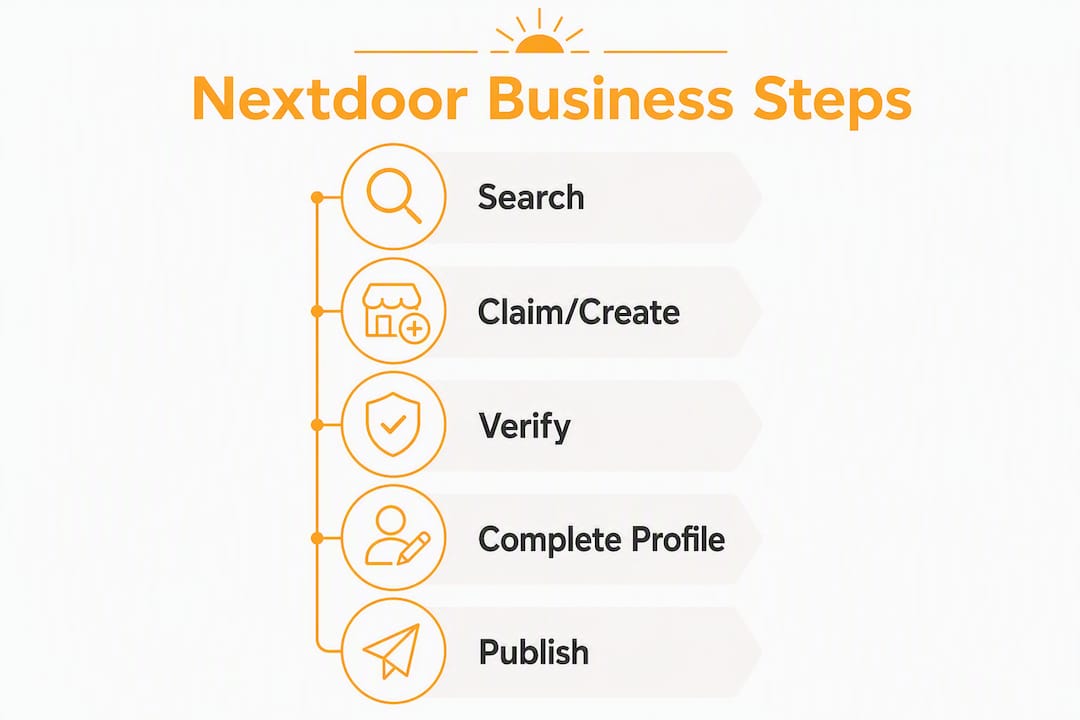
Setup takes under 30 minutes if you have your business documents ready. Here’s the practical sequence.

Step 1: Search before you create. Go to business.nextdoor.com and search by business name and location. Nextdoor often generates pages from third-party data or neighbor-submitted recommendations, so your page may already exist. If it does, claim it rather than create a duplicate.
Step 2: Claim or create. Select “Claim Your Free Business Page” or “Sign up for Free.” You’ll create a dedicated business account or log in with an existing one. If you plan to share access with employees, do not link your personal Nextdoor account to the business account.
Step 3: Verify your business. Most established businesses verify through standard contact confirmation. Casual service providers (dog walking, babysitting, lawn care) must supply official business documents before they can post to the neighborhood newsfeed. Without those documents, you can still promote services through the “Neighbor Made” or “Neighbor Services” member options.
Step 4: Complete your profile. Fill in every field: address, phone, website, hours, and at least three to five photos. A complete profile ranks better in Nextdoor search and gives neighbors the information they need to contact you immediately.
Step 5: Publish your first Business Post. Head to the Content tab, select “Create Post,” write a brief introduction, and set your neighborhood radius. Start with your immediate neighborhood, then expand once you have engagement data.
Pro Tip: Ask your three to five most loyal customers to leave a recommendation within the first week of claiming your page. Time the ask right after a positive service interaction, and keep the request simple: “We just set up our Nextdoor page — if you’ve been happy with our work, a quick recommendation there would mean a lot.” Avoid incentivizing reviews, which violates Nextdoor’s guidelines.
Use a dedicated business email address for your Nextdoor account. Shared logins are a common operational pitfall that leads to accidental personal posts appearing under the business name.
What paid ad options does Nextdoor offer, and how does targeting work?
There are three practical paid pathways for small, single-location businesses and one higher-floor option for regional or national advertisers.

Ad Type | Where It Appears | Best Fit | Cost Shape | Small-Business Pros/Cons |
Local Deals | Deals tab, feed, Business Page, search | Single-location, entry-level | Fixed deal pricing; avg. ~$75/campaign | Low risk, fast validation; limited creative flexibility |
Promoted Posts | Neighborhood newsfeed | Single-location, content-first | Auction-based CPC | Extends organic reach; requires strong post creative |
Ads Manager (CPC/CPM) | Feed, display placements | Multi-location, growth stage | Auction; ~$2 min. CPC, ~$10 min. CPM | Full targeting controls; steeper learning curve |
Neighborhood Sponsorship | Category pages, feed | Regional/national brands | Fixed, higher floor | Strong brand positioning; budget may not suit small operators |
Targeting strategy: Nextdoor lets you define your audience by selecting specific neighborhoods manually or by setting a radius around your address. The more effective approach for local services is concentration over spread. Picking three to five neighborhoods that closely match your ideal customer profile almost always outperforms spreading the same budget across fifteen neighborhoods. Auctioned inventory gets more expensive and less efficient when diluted across too many zones.
Nextdoor’s audience skews toward homeowners and older age cohorts. If your business serves homeowners directly (HVAC, landscaping, home cleaning, local retail), that demographic alignment is a genuine advantage. If your primary customer is a college student or renter, test carefully before committing significant budget.
What should you post on Nextdoor to engage neighbors?
Nextdoor rewards content that feels local, helpful, and genuinely neighbor-focused. Think of your Business Page as a community outreach channel, not a broadcast feed.
Post types and templates:
Business Update Post: “We just extended our hours to 7 PM on weekdays — stop by [Business Name] on [Street] for [service/product]. Questions? Reply here or call us directly.”
Event Post: “Join us Saturday, [date], for a free [workshop/demo/tasting] at our [neighborhood] location. Space is limited — RSVP in the comments.”
Poll: “Which would you find more useful: a Tuesday evening appointment slot or a Saturday morning one? Vote below and we’ll adjust our schedule.”
Video Post: A 60-second behind-the-scenes clip of your team at work, a quick how-to, or a neighborhood shoutout. Video posts tend to generate higher Fave counts and comments.
Dos and don’ts:
Do respond to every comment within 24 hours. Neighbor interactions that go unanswered signal disengagement and reduce future organic reach.
Do reference your specific neighborhood by name. “We’re right here in [Neighborhood Name]” outperforms generic copy every time.
Don’t post purely promotional content more than once per week. Neighbors flag over-promotional accounts, which can suppress your visibility.
Don’t ignore negative comments publicly. Acknowledge them, offer to resolve the issue offline, and follow up.
Pro Tip: Post two to three times per week organically. When a post gets strong early engagement (comments, Faves within the first few hours), that’s your signal to boost it as a Promoted Post rather than running a separate Local Deal. Save Local Deals for specific, time-sensitive offers where redemption tracking matters.
For broader small business social media tips that complement your Nextdoor cadence, the content principles carry over directly.
How do you measure performance and optimize Nextdoor campaigns?
Impressions alone won’t tell you whether Nextdoor is working. Track the metrics that connect to actual revenue.
Metric | Where to Find It | What to Act On |
Views/Impressions | Business Page Dashboard | Low impressions = expand neighborhood radius or boost post |
Saves/Faves | Business Page Dashboard | High Faves = strong content signal; consider Promoted Post |
Message leads | Business Page inbox | Track weekly; log against offline bookings |
Local Deal redemptions | Dashboard (available after 24 hrs) | Below target = test new offer or lower redemption barrier |
Clicks to website/phone | Ads Manager reporting | Low CTR = revise creative headline or CTA |
Recommendation volume | Business Page recommendations tab | Flat growth = activate recommendation outreach campaign |
Set UTM parameters on any link in your Business Posts or Local Deals before you publish. That way, Google Analytics (or whatever analytics platform you use) attributes website sessions and conversions back to Nextdoor specifically, not just “social” traffic.
The optimization loop is straightforward: run a Local Deal or Promoted Post in three to five target neighborhoods for two to three weeks, measure cost-per-lead or cost-per-redemption, then reallocate budget to the top one or two neighborhoods. Repeat. Most small businesses find their best-performing neighborhoods within the first two test cycles.
How should you handle negative reviews or feedback on Nextdoor?
Negative feedback on Nextdoor is visible to your entire neighborhood, which makes your response more important than the complaint itself. Respond promptly, stay professional, and keep it brief. Acknowledge the issue publicly (“We’re sorry to hear this wasn’t the experience you expected”), then move the resolution offline (“Please message us directly so we can make this right”). Never argue in the comments.
If a recommendation or comment contains false information, you can report it to Nextdoor through the platform’s flagging system. For a deeper playbook on managing social media reviews, the same principles apply across platforms. One well-handled complaint, visible to hundreds of neighbors, often builds more trust than five positive recommendations.
What compliance and privacy rules apply to businesses on Nextdoor?
Nextdoor’s Business Terms of Service prohibit incentivizing recommendations, posting misleading content, or using the platform for spam. Businesses must be the legitimate owner, employee, or authorized representative of the page they manage. Casual service providers must supply verification documents before accessing neighborhood posting features.
On the privacy side, Nextdoor’s verified-address model means the platform holds location data on its members. As a business, you interact with that data only through Nextdoor’s own tools. You cannot export neighbor contact information from the platform. If you run Ads Manager campaigns with the Nextdoor Pixel, standard cookie consent and privacy policy disclosures apply to your own website, consistent with applicable U.S. state privacy laws.
How does Nextdoor fit into a broader local marketing strategy?
Nextdoor works best as one channel in a coordinated local stack, not as a standalone solution. Pair your Business Page activity with Google Business Profile (for search visibility), local SEO on your website, and your most active social platform, whether that’s Instagram, Facebook, or another channel suited to your audience.
The content you create for Nextdoor, neighborhood updates, local events, behind-the-scenes posts, repurposes well across other channels with minor adjustments in tone. A local business social media strategy that treats Nextdoor as the community-trust layer and other platforms as the reach layer tends to produce the most consistent results. Recommendations earned on Nextdoor also provide quotable social proof you can use in email campaigns and on your website.
Key Takeaways
Nextdoor is a practical, low-cost channel for neighborhood-focused businesses that combines a free Business Page, verified neighbor recommendations, and targeted paid ad options starting at approximately $75 for a Local Deal campaign.
Point | Details |
Free page, real trust | A free Business Page collects verified-neighbor recommendations that carry more credibility than anonymous reviews. |
Local Deals as your first paid test | Local Deal campaigns typically cost around $75, making them the lowest-risk way to validate paid Nextdoor activity before scaling. |
Concentrate, don’t spread | Focus ad budget on three to five best-fit neighborhoods rather than spreading thin across many zones. |
Measure beyond impressions | Track message leads, deal redemptions, and recommendation growth alongside views to connect activity to revenue. |
SOL Social Media as your operator | SOL Social Media handles Business Page setup, Local Deal creation, content cadence, and reporting so you can focus on running your business. |
Nextdoor works best when someone runs it with intention
The businesses that get the most out of Nextdoor are not the ones who post the most. They’re the ones who post with clear neighborhood relevance, respond to every comment, and treat recommendations as an active campaign rather than a passive byproduct.
The platform’s verified-address model is genuinely different from every other major social channel. That difference only pays off if you use it deliberately: targeting the right three neighborhoods, posting content that sounds like it came from a neighbor rather than a marketing department, and following up on every lead the platform generates.
Where most small businesses underestimate Nextdoor is in the recommendation engine. A single recommendation from a verified neighbor carries the weight of a personal referral to everyone in that neighborhood who sees it. That’s not a feature to set up once and forget. It’s a reputation asset worth actively managing, week over week.
SOL Social Media helps you get results from Nextdoor faster
Running a Nextdoor Business Page well takes consistent effort: regular posts, timely responses, Local Deal testing, and weekly reporting. SOL Social Media handles all of it, so you get the neighborhood visibility without adding another task to your plate.

SOL Social Media’s Nextdoor services include Business Page setup and verification, Local Deal creation and offer testing, Promoted Post creative and neighborhood targeting, recommendation outreach campaigns, and performance reporting tied to real business outcomes. Whether you need a full managed program or a focused community involvement campaign, the work is grounded in what actually drives neighbor trust and local conversions. For businesses that want hands-on social engagement support without the overhead of managing it internally, reach out to SOL Social Media to discuss a setup that fits your neighborhood and your goals.
Useful sources and further reading
Create a Free Business Page on Nextdoor — official setup and verification guide
Business Posts: Promote Your Small Business on Nextdoor — posting mechanics and eligibility rules
Nextdoor Small Business Advertising — overview of free and paid tools for small businesses
Nextdoor Ads Manager — campaign creation, targeting, and reporting
Getting Started with Local Advertising on Nextdoor — step-by-step Ads Manager onboarding
Nextdoor Local Business Playbook — platform strategy and ad product overview
Nextdoor Ads: Costs, Reach, and Targeting Analysis — third-party breakdown of CPC/CPM benchmarks and audience fit
Best Social Media Platforms for Business — SOL Social Media’s platform comparison for local businesses
FAQ
Can a business use Nextdoor?
Yes. Local business owners, home service providers, and casual service providers can all create or claim a free Business Page on Nextdoor to post updates, collect neighbor recommendations, and run paid ads.
Does Nextdoor have a business page?
Nextdoor offers a free Business Page that displays your contact information, hours, photos, and verified neighbor recommendations, and lets you post directly to the neighborhood newsfeed.
Is Nextdoor free for businesses?
The Business Page and all organic posting tools, including Business Posts, Events, Polls, and Video, are free. Paid options like Local Deals, Promoted Posts, and Ads Manager campaigns carry separate costs, with Local Deal campaigns typically costing about $75 each.
Is Nextdoor worth it for small businesses?
For neighborhood-focused businesses serving homeowners or local residents, Nextdoor tends to deliver higher-intent interactions than broader social platforms because every account is tied to a verified address. The free tools alone justify claiming a page; paid ads are worth testing once the page has active recommendations.
Recommended
Comments