


Event Social Media Plan for Organizers: Ready-to-Run Templates
Updated: Sep 7
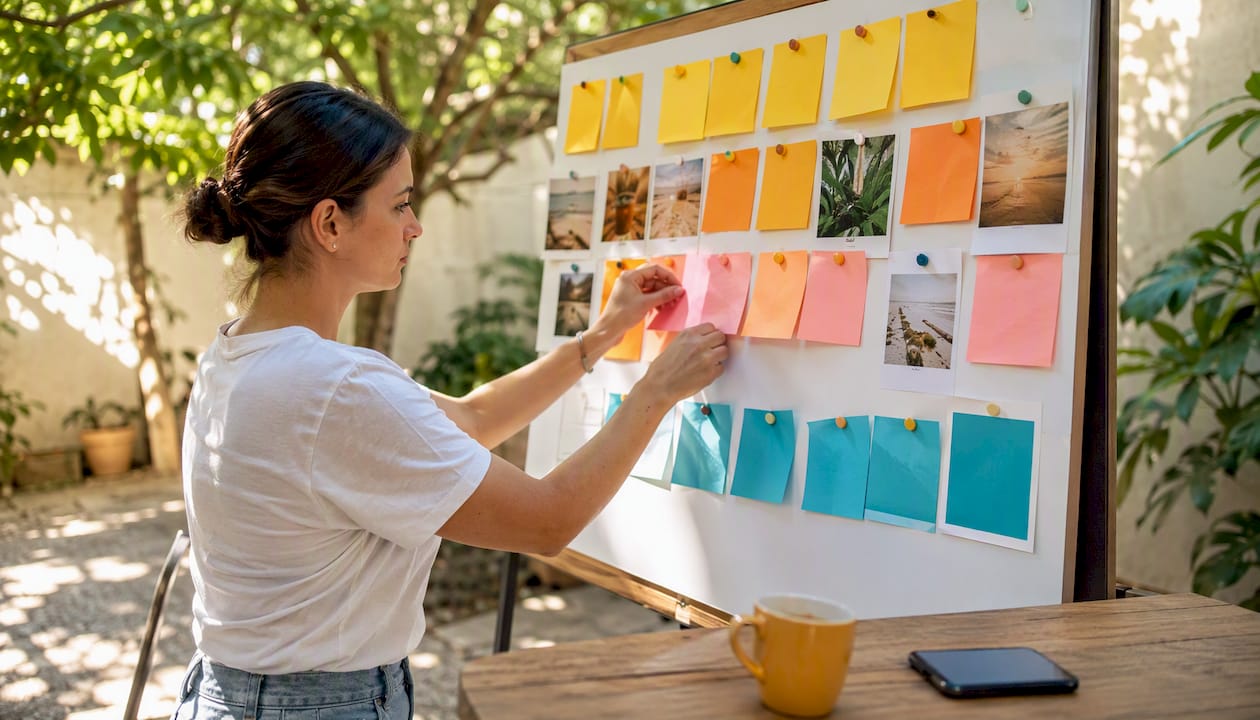
Use a three-phase event social media plan — pre, during, and after — with a 90-day runway, platform-specific playbooks, and ready-to-use templates to drive registrations and extend your event’s impact well beyond the final session. The phase-based approach is the industry standard because it matches content cadence to audience readiness: awareness first, then urgency, then community. Your plan needs five components to work: a defined audience and channel stack, a content calendar, a live-coverage role assignment, a measurement setup tied to registrations, and a post-event repurposing schedule.
Start here:
Pick two primary platforms based on your audience (see the platform table below).
Open the content calendar template (linked in the Templates section) and block your 90/60/30-day milestones.
Assign one person as your live-social lead before the event date.
Set up UTM parameters on every ticket and registration link now, not the week of the event.
Download the pre/during/post checklists from the Adobe sample social media plan and adapt them to your event size.
Key Takeaways
A three-phase event social media plan — pre, during, and after — with a 90-day runway, clear role assignments, and UTM-tracked registration links is the most reliable structure for driving measurable results from event promotion.
Point | Details |
Start 90 days out | Launch your event page, hashtag, and speaker kits at least 90 days before the event. |
Assign live-day roles | Designate a live poster, UGC capturer, and approver before event day to prevent execution gaps. |
Track registrations first | Cost per registration and share-to-registration ratio are your primary KPIs; reach is secondary. |
Repurpose for 30 days | Convert session recordings and photos into at least 30 days of post-event social assets. |
SOL Social Media | Provides end-to-end event social strategy, live coverage, and content repurposing for small businesses. |
Which social networks and tools should you use for your event?
Not every platform deserves your time, and spreading thin across six networks is one of the fastest ways to produce mediocre content everywhere. Match your event type and audience to two or three platforms, then go deep.
Platform-audience matching
Platform | Best event type | Audience fit | Format strengths |
B2B conferences, professional summits | Decision-makers, speakers, sponsors | Thought-leadership posts, event pages, speaker spotlights | |
Consumer festivals, brand activations, lifestyle events | General consumers | Reels, Stories, carousels, UGC reposts | |
Local community events, fundraisers, family-friendly | broad demographic range | Event pages, Groups, live video, paid ads | |
TikTok | Youth-focused events, music, entertainment, pop culture | Gen Z and younger millennials | Short-form video, trending audio, behind-the-scenes |
X (Twitter) | Industry conferences, news-driven events, sports | Journalists, industry insiders, live commentators | Real-time updates, hashtag conversations, threads |
YouTube | Multi-session conferences, educational events | All ages seeking depth | Full session recordings, highlight reels, post-event recaps |
Your minimum viable stack: one primary platform where your audience already lives, one secondary platform for a different format (video vs. text, for example), and a deliberate decision to ignore the rest. Trying to maintain a presence on all six before a single-day local event wastes budget and attention.
Tools that make execution manageable
Hootsuite lets you schedule content across platforms, monitor your event hashtag in real time, and assign posts to team members — useful when you have two or three people splitting social duties on event day. Sprout Social adds a unified inbox and deeper analytics, which matters when you need to pull a sponsor report within 48 hours of the event. For a practical social media strategy that integrates these tools from day one, build your scheduling workflow before you write a single post.
Pro Tip: On LinkedIn specifically, personal profiles from speakers and organizers consistently outperform company page posts in reach and engagement. Activate your speakers as advocates early — their networks are often more relevant than your brand page’s followers.
How do you build the pre-event plan: calendar, outreach, and budget?
The runway matters as much as the content. Starting audience activation 90 days out gives you time to build awareness before you ask for a registration commitment. Here is how to structure the timeline.
90/60/30-day priority framework
90 days out: Publish your event page and optimize it as a conversion page — who it’s for, what attendees will gain, date/time, and one clear CTA above the fold. Launch your event hashtag. Begin organic teaser content on your primary platform.
60 days out: Activate speaker and sponsor social kits (branded graphics plus prewritten captions they can post in one tap). Start a paid awareness campaign targeting your lookalike or retargeting audience. Send the first email to your existing list with a social share prompt.
30 days out: Shift to urgency content — countdown posts, last-chance early-bird messaging, and a five-touch sequence across email and social. Publish registrant-specific shareables so confirmed attendees can spread the word in their own networks.
Pre-event checklist
Register and test your event hashtag across all target platforms.
Build a registration page that treats the visitor as a buyer, not a browser.
Create speaker and sponsor social kits with one-tap graphics and prewritten captions.
Send personalized confirmation emails with a shareable graphic and a prewritten caption for registrants.
Schedule all pre-event posts in Hootsuite or Sprout Social before the 30-day mark.
Set up Facebook and LinkedIn event pages with complete details and a direct ticket link.
Brief your paid media team on retargeting parameters and conversion pixel placement.
Budget allocation guidance
For smaller local events, collapse the influencer line and redirect it to paid reach on your primary platform.
Influencer outreach template (adapt as needed):
Pro Tip: Treat your registration page as a conversion page, not a brochure. Prioritize who the event is for and what attendees will leave with — those two points, above the fold, drive more sign-ups than any countdown timer.
What content formats and sample posts drive registrations and sharing?
Short-form video is the primary discovery engine for event promotion right now. Algorithms on Instagram, TikTok, and even LinkedIn prioritize it over static images, and mobile-first, captioned clips perform well even when watched on silent autoplay. Build your content calendar around video first, then fill in with supporting formats.
High-impact formats by phase
Pre-event: Speaker teaser Reels (15–30 seconds), countdown Stories, carousel “what to expect” posts, quote cards from past attendees, behind-the-scenes setup clips.
During: Live streams of keynotes, real-time photo dumps, UGC reposts with credit, short interview clips, hashtag highlight Stories.
Post-event: Highlight reel (60–90 seconds), quote graphic series, blog synopsis carousel, attendee testimonial clips, next-event teaser.
For more creative post formats that work across event phases, mix static and video in a 40/60 ratio — 40% static for consistency, 60% video for reach.
Ten ready-to-adapt sample posts
(Pre / Instagram Reel) “Something big is coming. [Speaker Name] is joining us at [Event] — here’s a 20-second preview of what they’ll cover. Link in bio to register.”
(Pre / LinkedIn) “We’re 30 days out from [Event Name]. Here’s what you’ll walk away with: [3 bullet outcomes]. Seats are limited — grab yours at [link].”
(Pre / Facebook Event) “Early-bird pricing ends Friday. [Event Name] brings together [audience type] to [core benefit]. Join us: [link].”
(Pre / TikTok) Behind-the-scenes venue walk-through with trending audio and text overlay: “POV: you’re setting up for [Event Name].”
(Pre / X) “Excited to announce [Speaker Name] is joining #[EventHashtag]. Follow along for live updates on [Date].”
(During / Instagram Stories) Live poll: “Which session are you most excited about? A or B?” with a sticker poll.
(During / X) Real-time quote tweet from the keynote: “‘[Quote]’ — [Speaker Name] at #[EventHashtag]. Thread below.”
(During / TikTok) 30-second crowd reaction clip with text overlay: “The energy at [Event Name] right now.”
(Post / Instagram Reel) 60-second highlight reel with upbeat audio: “That’s a wrap on [Event Name]. See you next year.”
(Post / LinkedIn) “Three things we learned at [Event Name] this week — and what they mean for [industry]. Full recap: [link].”
The candid footage often outperforms the polished version because it feels real.
How do you run real-time social media coverage on event day?
Execution on event day falls apart when roles are unclear. Assign three distinct functions before you arrive on site.
Roles matrix
Live poster: Writes and publishes real-time posts, monitors comments, and responds to the event hashtag feed. Needs platform access and pre-approved copy templates.
UGC capturer: Photographs and films sessions, crowd moments, and sponsor placements. Sends assets to the live poster within 10 minutes of capture.
Approver: Reviews any post that tags a sponsor, features a speaker quote, or responds to a negative comment before it goes live. One person, reachable by text.
Live-stream checklist
Test your internet connection and have a mobile hotspot as backup.
Confirm platform permissions (Facebook Live, YouTube Live, Instagram Live) are active on the event account.
Add captions — auto-captions on YouTube or a third-party tool — before going live.
Brief speakers on any embargo: nothing goes live until the session officially starts.
Use interactive features like polls and Q&A during live streams to increase viewer participation and create FOMO for those watching remotely.
Save the recording immediately after the session ends.
UGC capture and permissions
When you want to repost an attendee’s photo or video, use this quick script: “Love this shot — can we share it on our channels with credit to you?” A public reply of “yes” is your documented permission. For a more formal approach, include a UGC consent clause in your event registration terms and display a notice at the venue entrance. The American Library Association’s live-event social media guidelines recommend clear, visible permission notices as a baseline practice.
Crisis escalation procedure
Tech failure (stream drops): Post a text update within 3 minutes. Restart and notify followers when you’re back live.
Speaker cancellation: Draft a holding post (“We have an update on today’s schedule — stay tuned”) before announcing the change. Never go silent.
Negative post or complaint: Acknowledge within 15 minutes, move the conversation to DM, and loop in the approver before any public response.
Safety incident: Pause all promotional posting immediately. Follow your event’s emergency communication protocol first; social media is secondary.
For broader social media engagement ideas that keep your audience active between sessions, prepare a bank of 10 pre-written interactive posts you can deploy on a slow moment.
What should you do on social media after the event ends?
The 48 hours after your event are the highest-leverage window for content repurposing and audience retention. Most organizers go quiet — which is exactly when your audience is most receptive.
Content repurposing ideas
Clip keynote sessions into 60–90-second Reels and TikToks.
Pull speaker quotes and turn them into branded quote graphics for Instagram and LinkedIn.
Write a blog recap and promote it as a carousel post.
Compile attendee photos into a “moments from [Event Name]” gallery post.
Create a YouTube playlist of full session recordings for long-tail discovery.
Repurposing captured content into at least 30 days of post-event assets is a realistic target for a mid-size event with two or three recorded sessions. Tools like ClipForge can turn long-form recordings into short clips automatically, cutting editing time significantly.
Feedback and survey timeline
Send a thank-you message with a survey link within 24–48 hours of the event closing. Keep the survey to five questions or fewer. Sample questions:
What was the most valuable part of today’s event?
What would you change or add?
Would you attend again or recommend this event to a colleague?
Any speakers or topics you’d like to see next time?
Responses collected within the first 72 hours tend to be more detailed and emotionally engaged than those collected a week later.
Remarketing and next-event seeding
Run a retargeting ad to your event attendee list within two weeks, promoting an early-bird offer or a save-the-date for your next event. Attendees who just had a positive experience are your warmest possible audience — the cost per registration for this segment is typically far lower than cold acquisition.

What KPIs and tracking setup should your event social media plan include?
Registration conversions are the north-star metric for any event social media campaign. Everything else — reach, engagement, hashtag volume — is a leading indicator, not the outcome.
KPI framework
Metric | Type | Why it matters |
Registrations from social | Primary | Direct revenue signal; ties social spend to ticket sales |
Cost per registration | Primary | Measures paid efficiency; benchmark against your ticket price |
Share-to-registration ratio | Secondary | Tracks attendee advocacy; high ratio means organic amplification is working |
Hashtag reach and impressions | Secondary | Measures brand visibility and conversation volume |
Engagement rate by platform | Secondary | Signals content relevance; compare across platforms to allocate budget |
Live stream peak viewers | Secondary | Indicates real-time interest and content quality |
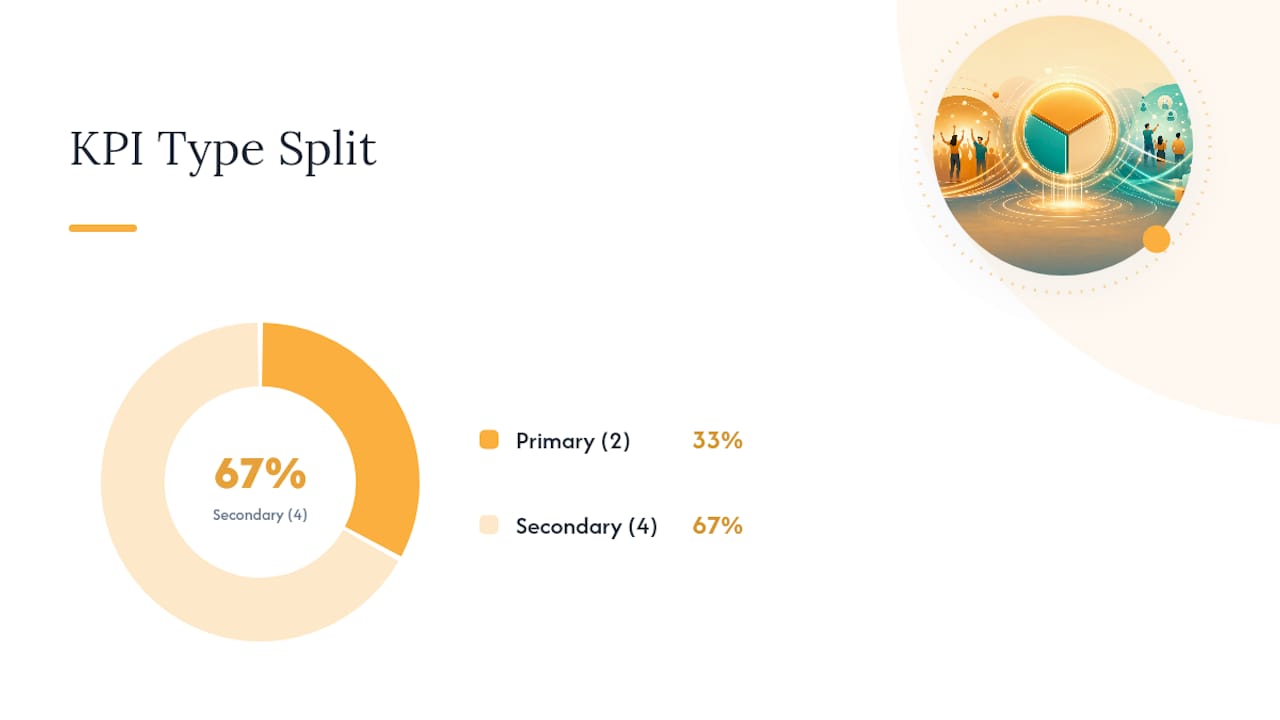
The share-to-registration advocacy metric is worth tracking separately because it tells you whether your shareable assets and speaker kits are generating organic reach beyond your paid spend.
Tracking setup steps
Create UTM parameters for every link: source (facebook, instagram, linkedin), medium (social), campaign (event-name-2026), and content (post-type).
Install the Meta Pixel and LinkedIn Insight Tag on your registration page before any paid campaign launches.
Set up a conversion event for “registration complete” in both Meta Events Manager and LinkedIn Campaign Manager.
Use a URL shortener (Bitly or a custom domain) for all in-bio and story links so you can track clicks independently of platform analytics.
Pull platform analytics weekly during the pre-event phase and daily in the final 10 days.
Combine platform data with your registration platform’s source report to get a complete attribution picture.
For social media marketing strategies that align your tracking setup with broader campaign goals, build your UTM taxonomy before you schedule your first post.
Where can you find downloadable templates and checklists?
A structured worksheet prevents the most common event social media failures: inconsistent posting, missed hashtag setup, and no post-event follow-up plan. The Adobe sample social media plan for events is a strong starting point for standardizing your campaign elements.
Content calendar template
The calendar should include: platform, post date, post type (video/image/text), caption draft, hashtag set, link, and approval status. Adapt the column count to your event size — a single-day local event needs 4–6 weeks of pre-event content; a multi-day conference needs 12 weeks. Import the template into Google Sheets for team collaboration or into a project management board like Asana or Trello for task assignment.
Pre/during/post checklists
Pre-event checklist: Event page live, hashtag registered, speaker kits distributed, paid campaign active, UTMs in place, posts scheduled through event day.
During-event checklist: Roles assigned, live-stream tested, UGC permission script ready, crisis contacts confirmed, post bank loaded in Hootsuite.
Post-event checklist: Thank-you post published within 2 hours, survey sent within 48 hours, highlight reel posted within 72 hours, repurposing calendar built for the next 30 days.
Sample posts pack
The posts pack (10 templates from the Creative Formats section above) works best when you customize three elements: the event name and date, the specific outcome or benefit for attendees, and the CTA link. For a link-in-bio page that consolidates your ticket link, survey, and post-event resources in one place, set it up before your first pre-event post goes live.
Pro Tip: Build your post templates in a shared Google Doc with the caption, hashtags, and image file name in each row. When event day arrives, your live poster can copy-paste and publish without hunting for assets.
SOL Social Media’s live-coverage playbook: what actually works on the ground
Live coverage is where most event social media plans break down — not because the strategy is wrong, but because the execution is under-resourced. Here is the field-tested approach SOL Social Media uses for on-site coverage.
Equipment checklist
Smartphone with a stabilizing grip or gimbal (DJI OM series works well for mobile).
External microphone (Rode Wireless GO or similar) for speaker clips and interviews.
Portable battery pack — at least 20,000 mAh — because live streaming drains devices fast.
Mobile hotspot as a backup to venue Wi-Fi.
Editing app loaded and logged in: CapCut for quick Reels, InShot for multi-clip edits.
Shot list by share value
Speaker delivering a quotable line (highest share value — pull the exact quote for the caption).
Crowd reaction shot — wide angle showing energy and attendance.
Sponsor signage or activation in a natural context (not a staged product shot).
Behind-the-scenes moment: setup, green room, speaker prep.
Attendee interaction: networking, Q&A, hands-on activity.
Quick-edit workflow (30–60 minutes)
Capture the clip during the session.
Trim to 30–60 seconds in CapCut; add captions using the auto-caption feature.
Add a text overlay with the speaker’s name and the event hashtag.
Export at 1080p and post directly to Instagram Reels and TikTok simultaneously.
Cross-post the same clip to LinkedIn as a native video (not a link share) for maximum reach.
Pro Tip: Get verbal permission from speakers before filming close-up clips for social. A quick “Can we share a clip of this on our channels?” takes 10 seconds and prevents a post-event dispute with a speaker’s PR team.
How do you handle a social media crisis during your event?
A crisis on social media during a live event is not a matter of if — it’s a matter of when. The difference between a recoverable situation and a reputational problem is almost always response time and preparation.
Build a one-page crisis communication document before event day. It should list three things: the escalation chain (who approves what), pre-drafted holding statements for the most likely scenarios, and a clear rule about when to pause all promotional posting.
The most common crises at events fall into four categories. A technical failure (AV drops, stream cuts out) needs a factual update posted within 3 minutes — no apology language yet, just information. A speaker or schedule change needs a holding post first, then a clear announcement once the alternative is confirmed. A negative viral post or complaint needs acknowledgment within 15 minutes and a move to private messaging; never argue publicly. A safety or security incident requires an immediate pause on all non-emergency posting and coordination with your event’s official communication team before anything goes on social.
Pre-write three holding statements and save them in your live poster’s phone notes: one for tech issues, one for schedule changes, and one for general delays. Speed matters more than polish in the first 10 minutes of a crisis.
How do you segment your audience for more targeted event social media messaging?
Generic event promotion treats every potential attendee the same. Segmented messaging converts better because it speaks to a specific person’s reason for attending.
Start by identifying three to four distinct audience segments for your event. A B2B conference might have: first-time attendees, returning attendees, speakers and VIPs, and sponsors. A consumer festival might segment by age group, geographic proximity, or past purchase behavior. Each segment has a different primary motivation and a different objection to overcome.
Map your content to each segment’s motivation. First-time attendees need social proof and a clear picture of what to expect. Returning attendees respond to “what’s new this year” messaging. Speakers and VIPs want visibility and co-promotion. Sponsors need audience data and ROI framing.
On Facebook and Instagram, use Custom Audiences to serve different ad creative to each segment. Upload your past attendee list as a Custom Audience for returning-attendee messaging, and use Lookalike Audiences built from that list for new acquisition. On LinkedIn, layer job title and company size targeting to reach the right professional profile. Personalized shareables — branded graphics with the attendee’s name or company — increase the likelihood of organic sharing from registrants, which extends your reach into networks you cannot buy.
What legal and compliance issues apply to event social media?
UGC permissions, platform rules, and FTC disclosure requirements are the three areas where event organizers most often create unintentional liability.
UGC permissions: Reposting an attendee’s photo or video without explicit permission is a copyright infringement risk, even when the post is public. The safest approach is a two-step system: include a UGC consent clause in your event registration terms (covering content captured at the event), and get a direct reply or DM confirmation before reposting any specific piece of content. Display a visible notice at the venue — “By attending, you consent to being photographed and filmed for social media” — as a secondary layer.
FTC disclosure: If you are compensating speakers, influencers, or attendees with free tickets, gifts, or payment in exchange for social posts, those posts must include a clear disclosure (#ad, #sponsored, or equivalent). This applies to your own posts and to any posts made by compensated third parties. The FTC’s endorsement guidelines cover this directly and apply regardless of platform.
Platform rules: Each platform has specific rules about contest mechanics, ticket sales, and event promotion. Facebook prohibits using personal timelines to administer contests. Instagram requires that contests state they are not affiliated with Instagram. YouTube’s live-streaming policies restrict certain content categories. Review the platform’s current terms before running any giveaway, contest, or paid promotion tied to your event.
Accessibility: Adding captions to video content is both a best practice and, in some contexts, a legal consideration under the Americans with Disabilities Act for organizations covered by that statute. Auto-captions on YouTube and TikTok are a low-effort starting point; review them for accuracy before publishing.
What most event organizers get wrong about social media
The most common mistake is treating social media as a broadcast channel rather than a participation engine. Organizers spend weeks crafting polished pre-event content and then go nearly silent during the event itself — which is exactly when the audience is most engaged and most likely to share.
The events that generate the most organic reach are not the ones with the biggest budgets. They are the ones where attendees feel like participants in something worth talking about, and where the organizer makes it frictionless to share. One-tap shareables, a visible hashtag, a live stream that acknowledges remote viewers — these mechanics cost almost nothing and consistently outperform an extra $500 in paid reach.
The second mistake is measuring the wrong things. Follower counts and likes feel like progress, but they do not pay for the next event. Registration conversions and cost per registration are the metrics that tell you whether your social media strategy is actually working. Build your reporting around those two numbers from day one, and let everything else be a diagnostic tool.
SOL Social Media handles the plan so you can run the event
SOL Social Media builds and executes event social media strategies for small businesses and organizations that need a professional result without hiring an in-house team. The work covers every phase: pre-event content calendars and paid distribution setup, live-event coverage with on-site capture and real-time posting, post-event repurposing into 30 days of assets, and sponsor reporting.

The practical difference: you get a team that has done this before, with a shot list, a crisis script, and a repurposing workflow already built. No learning curve on event day. SOL also offers social media training for organizers who want to build the capability in-house — a one-time investment that pays off across every future event. If you want a strategy session or a quote for live-event coverage, reach out through the social strategy page and describe your event.
Sources
FAQ
What is a good event social media plan timeline?
Start 90 days out with awareness content and your event page, shift to urgency messaging in the final 30 days with a five-touch sequence, and plan post-event repurposing for at least 30 days after the event closes.
Which platforms work best for event promotion on social media?
LinkedIn works best for B2B conferences, Instagram and TikTok for consumer and youth-focused events, Facebook for local community events, and X for real-time conference commentary. Choose two platforms based on where your audience already spends time.
How do you get permission to repost attendee content?
Include a UGC consent clause in your registration terms, display a visible notice at the venue, and get a direct reply or DM confirmation before reposting any specific attendee photo or video.
What KPIs should you track for event social media?
Track registrations from social and cost per registration as primary metrics. Use hashtag reach, engagement rate, and share-to-registration ratio as secondary indicators of content performance and organic amplification.
Can SOL Social Media handle live event coverage?
Yes. SOL Social Media provides on-site live-event coverage including real-time posting, UGC capture, and post-event content repurposing for small businesses and organizations across the United States.
Recommended
Comments