


Plan a Month of Social Media in 2 to 4 Hours for Small Businesses

You can plan and schedule a full month of social posts in one focused session by using three or four content pillars, batching your work in blocks, and tracking just three KPIs. The whole system takes 2 to 4 hours once you know it (longer the first time), and it ends with a scheduled month sitting in your queue instead of a blank calendar staring back at you.
TL;DR:
Small businesses can plan a full month of social posts in 2 to 4 hours by batching content creation around three to four core pillars and tracking only three key performance indicators.
The content planning process must follow a specific sequence: setting monthly goals, adding fixed dates, assigning content pillars, then batching caption writing, design, and scheduling to save time and maintain consistency.
Limiting KPIs to reach, engagement, and conversion helps avoid analysis paralysis, with baseline numbers recorded on day one to measure progress accurately over 30 days.
Content pillars should include educational content, behind-the-scenes glimpses, social proof, and offers, with posting cadences tailored to each platform’s capacity to prevent burnout.
Regular monthly audits, every 30 to 90 days, focus on actionable insights to refine content strategy, while building an evergreen idea pipeline prevents running out of creative topics.
What Should a Monthly Social Media Content Plan Include?
A working monthly social media content plan follows the same order every time, whether you run it solo or hand it to a contractor. Skipping steps is what turns “batch day” into a three-day scramble.
Here is the sequence that gets you from blank page to scheduled month:
Decide the month’s primary goal or campaign. Pick one thing this month is building toward: a product launch, a seasonal push, a community event, or simply steady visibility. Every other decision flows from this.
Add fixed dates and deadlines first. Holidays, sale windows, in-person events, and client obligations go on the calendar before anything else, because they cannot move.
Assign pillars to posting days. Once your content pillars are set (more on that below), slot each pillar into a repeating weekly pattern so you are not reinventing the mix every week.
Batch-create captions and visuals, then schedule. Write in one pass, design in another, and load everything into your scheduler last.
This order matters more than it looks. Small businesses that treat batching as one focused session with three or four content buckets consistently get through a month of posts faster than those who write post-by-post, because a single planning session covering 3 to 4 buckets removes the daily “what do I post today” decision entirely. You are not more creative in a batching session. You are just not restarting your brain from zero every time.
How Do You Set Monthly Goals Without Overanalyzing the Data?
Most small business accounts drown in metrics that do not change any decision. The fix is picking exactly three KPIs, one from each stage of the customer relationship, and ignoring the rest for 30 days.
Awareness: reach or impressions, to see if new people are finding you
Engagement or retention: engagement rate or saves, to see if your existing audience actually cares
Conversion: link clicks or leads generated, to see if any of this moves the business
Pro Tip: Write your baseline number for each KPI on day one of the month. Without a starting point, “engagement went up” is just a feeling, not a finding.
This is not arbitrary. Choosing one awareness metric, one engagement metric, and one conversion metric to track over a defined 30-day window is a documented way to avoid analysis paralysis that comes from staring at a dashboard with 40 data points and no clear read on any of them. Set the target, run the month, check the three numbers. That is the entire measurement discipline.
What Content Pillars Work Best for Small Businesses?
Four pillars cover nearly every small business without over-complicating the calendar: educational content, behind-the-scenes moments, social proof, and offers or community posts. A workable starting ratio is roughly 40% educational, 20% behind-the-scenes, 20% social proof, and 20% offers, adjusted based on what your KPIs tell you after a month or two.
Educational: tips, how-tos, myth-busting, anything that answers a question your customers actually ask
Behind-the-scenes: your process, your team, the mess before the polished result
Social proof: reviews, client results, before-and-afters, tagged customer posts
Offers or community: promotions, events, local partnerships, direct calls to action
Posting cadence should flex by platform rather than follow one blanket rule. Realistic starting ranges are Instagram feed at 3 to 5 posts a week, Facebook at 3 to 4, LinkedIn at 2 to 4, and TikTok at 3 to 7 videos a week, scaled down if your team cannot sustain the top of that range without burning out. A consistent 3 posts a week beats an inconsistent attempt at 7.
Pro Tip: If you only have capacity for one platform this month, pick the one where your existing customers already spend time, not the one that feels trendiest.
Monthly Batching Workflow: The Hour-by-Hour Runbook
This is the actual session, broken into blocks you can run on a single afternoon or split across two mornings.
Prep (15 minutes): Gather this month’s offers, fixed dates, and 5 to 10 quick answers from whoever runs the business (What’s new? What are customers asking? Any photos from this month?). Pull any existing photos or video clips into one folder.
Skeleton (30 minutes): Map each pillar onto specific calendar days for the full month before writing a single caption.
Write (60 to 90 minutes): Batch captions by pillar, not by date. Write all your educational captions in one pass, then all your behind-the-scenes captions, then social proof, then offers. This reduces the mental switching that slows down solo writers.
Design (30 to 60 minutes): Build visuals using saved templates rather than starting from a blank canvas each time.
Schedule (30 minutes): Load everything into your scheduling tool and do a quick quality check for typos, broken links, and correct dates.
That structure lines up with what a 4-part batching workflow of plan, write, design, and schedule looks like when small businesses actually run it in a single sitting. Add one more habit: a 30-minute weekly check-in to swap in anything timely and confirm next week’s posts are still accurate.
Prep, skeleton, write, design, schedule: five blocks, one session
Weekly 30-minute review to catch anything that needs updating before it goes live
Build the Calendar: Fields, Structure, and Tool Choices
Your calendar only needs a handful of fields to function: date, platform, pillar, caption, visual notes, call to action, link, owner, and status. Anything beyond that is decoration that slows down the update process.
Color-code by pillar so you can see your mix at a glance, keep one tab per month, and maintain a running backlog tab for ideas that do not fit this month but should not disappear either.
Tool type | Best for | Watch out for |
Spreadsheet (Google Sheets, Excel) | Planning, drafting, backlog tracking | No native scheduling, manual updates |
Native platform scheduler (Meta Business Suite, LinkedIn scheduler) | Direct publishing on one platform | Doesn’t unify multi-platform view |
Dedicated scheduling app (Later, Buffer, Hootsuite) | Publishing across several platforms at once | Monthly cost, learning curve for a first-time user |
Start with a spreadsheet for planning and a simple weekly grid layout, since assigning each month its own tab with a weekly grid is enough structure for most small teams. Upgrade to a dedicated scheduler once you are consistently posting on three or more platforms and manual publishing eats too much of your week. A content calendar built around growth, not just organization, is the difference between a calendar that looks tidy and one that actually moves your numbers.
How Often Should You Audit Your Social Media Content?
Audit every 30 days if you post weekly, and stretch to 60 or 90 days if your posting pace is lighter. Skipping the audit is how the same weak content mix survives three months in a row unnoticed.
The audit itself takes about an hour: pull your three KPIs, note which pillar and format performed best and worst, and list three concrete changes for next month. Splitting your audit into action-item tabs rather than a wall of raw numbers is what turns an audit from a report nobody reads into a plan somebody actually follows.
Week 1 to 2 after the audit: fix the quick wins (posting time, caption length, weak CTA)
Week 3 to 4: test one repeatable change (new pillar ratio, new format) and carry it into next month’s plan
Run the same audit process through SOL Social Media’s audit framework if you want a second set of eyes before you commit to next month’s priorities.
Where Do You Find Content Ideas Every Single Month?
Running out of ideas by month three is the single most common way small businesses abandon their content calendar. The fix is building an idea pipeline that refills itself instead of starting from a blank page every 30 days.
Mine your own customer questions first. Every email, DM, and in-person question a customer asks this month is a caption waiting to happen, and it costs nothing to collect. Keep a running note or a Slack channel labeled “content ideas” and drop questions in as they come up, so batch day starts with a stocked list rather than a stare-at-the-wall moment. Tools built around answering customer questions directly, like Konvuno, can even surface the exact questions your audience is typing before they become a comment or DM, which doubles as free content research.
Look at last year’s calendar next. Whatever performed well 12 months ago in the same season is worth refreshing, not reinventing. Seasonal patterns repeat, and your best-performing post from last spring is a head start, not old news.
Finally, borrow structure from formats rather than starting with a blank topic. A rotating list of proven post formats (polls, myth versus fact, client spotlights, quick tips) gives you a container to pour any topic into, which is faster than generating both the topic and the format from scratch every time.
How Do You Repurpose Content Instead of Starting Over Each Month?
One idea, told in three formats, is worth more than three separate ideas told once. A single customer FAQ can become a carousel post, a short caption, and a 30-second video without any new research.
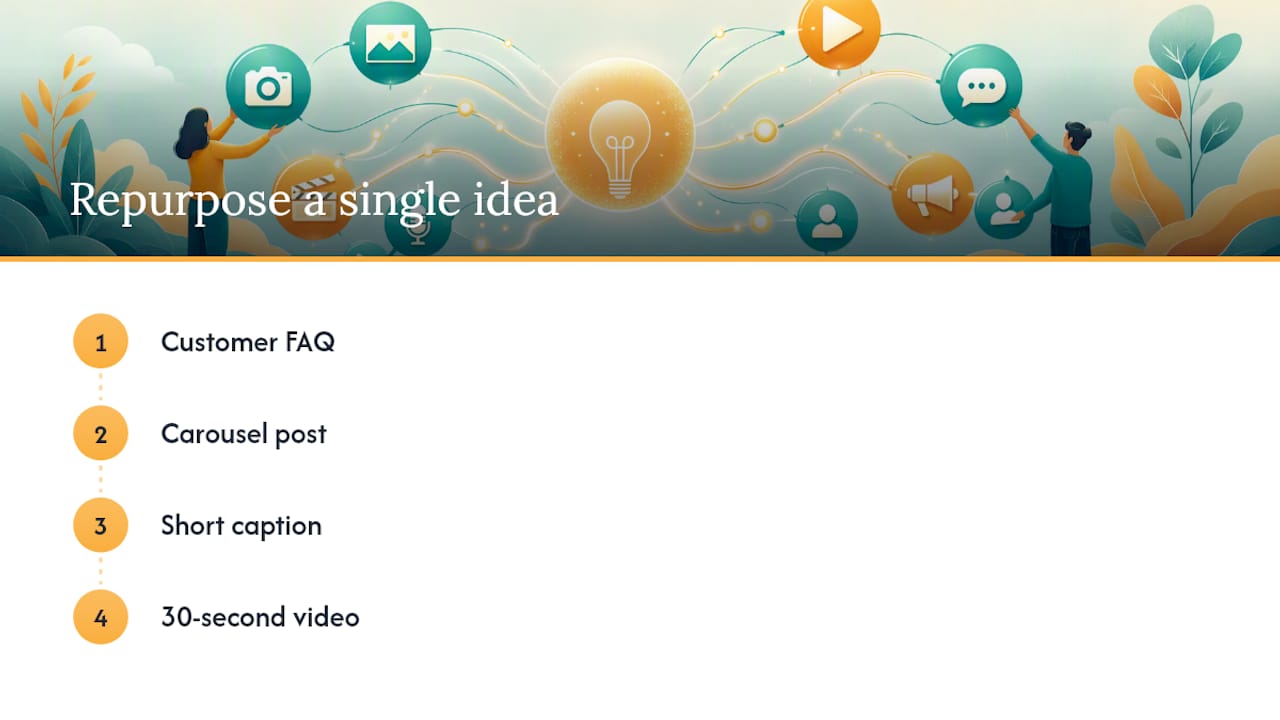
That kind of format-shifting is exactly how one idea produces content across multiple platforms: take a core message and adapt its shape to whatever each platform rewards, rather than treating every platform as needing its own original concept.
Build a habit of pulling from three sources every month: your best-performing post from the prior 90 days, a client testimonial that has not been shared yet, and a behind-the-scenes clip sitting unused on someone’s phone. Keep an evergreen bank of 20 to 30 posts that never expire (core tips, FAQs, mission statements) so a slow week has a fallback that still feels relevant. Maintaining that kind of evergreen content bank is what keeps a calendar full during a busy season without any new writing required.
Old blog posts, past email newsletters, and even internal training slides are usually full of material nobody has turned into a caption yet. A content creation process built around reuse, not constant new production, is far more sustainable for a two-person marketing team than a fresh-idea-every-day standard nobody can hold.
Who Are You Actually Planning Content For This Month?
A pillar mix built for the wrong audience will underperform no matter how well it is scheduled. Before locking in next month’s calendar, revisit who is actually engaging with your account, not who you assumed would be.
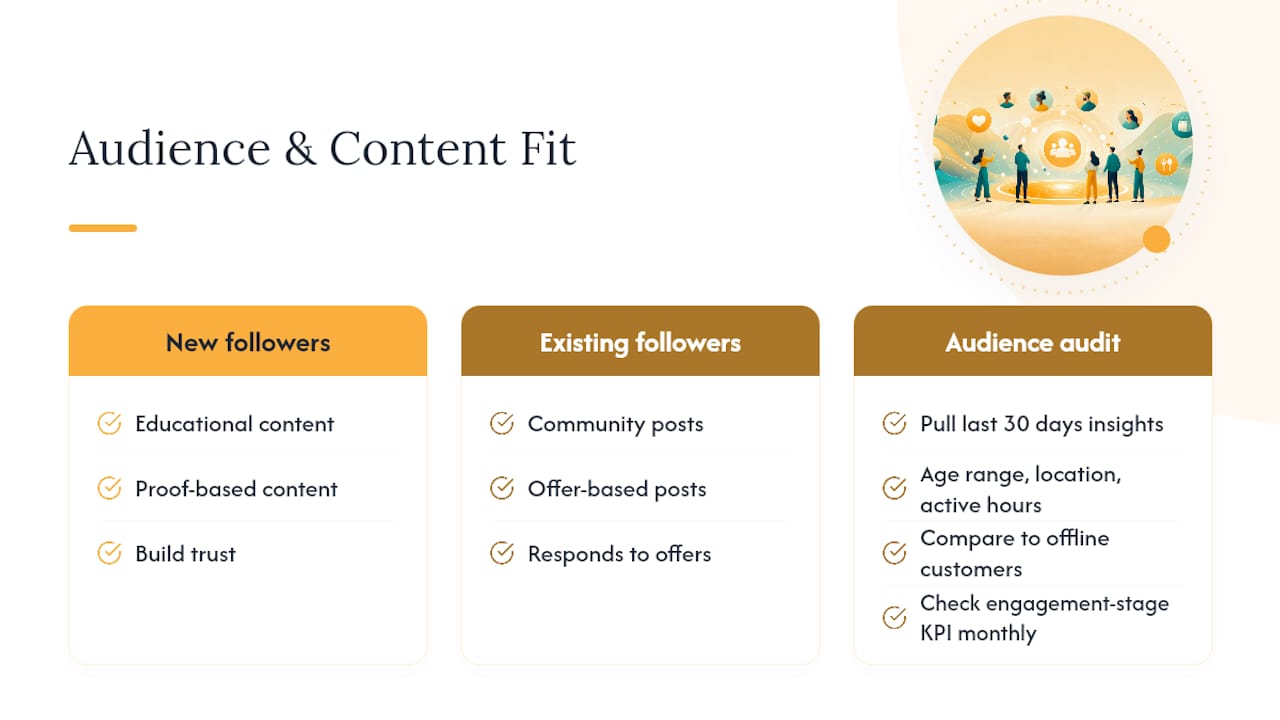
Pull your last 30 days of audience data (age range, location, active hours) directly from your platform’s native insights and compare it against your customer base offline. A mismatch here usually explains a pillar that “should” work but keeps flopping. If your best in-person customers are local parents in their 30s but your top-performing posts skew toward a younger, broader audience, your content is attracting the wrong crowd even while the engagement numbers look fine.
Segment your content ideas by where a follower sits in the relationship: new followers need educational and proof-based content to build trust, while existing followers respond better to community and offer-based posts because they already trust you. This is part of why a rigid one-size-fits-all pillar ratio breaks down for accounts with a mixed audience, and why checking your engagement-stage KPI monthly matters more than chasing follower count.
For regulated or trust-sensitive industries like healthcare, audience targeting carries extra weight, since the wrong tone or an overpromised claim does more damage than a low-performing post ever would. A clinical content strategy approach built around careful, accurate messaging is worth studying even outside healthcare, because the discipline of matching tone to audience expectation applies everywhere.
Should Trending Topics Have a Place in Your Monthly Plan?
Yes, but only if you leave room for them. A calendar filled to 100% capacity has no space to react to anything happening in real time, and reactive content is often what performs best.
Leaving 20 to 30% of your monthly slots open for timely or reactive content is a deliberate buffer, not a gap in your planning. That kind of intentional flexibility is what lets you capitalize on a trend or a local news moment without scrapping the entire calendar you spent hours building.
Practically, this means building your skeleton around fixed pillars and dates first, then deliberately leaving a few unassigned days each week rather than filling every single slot during your batching session. When something relevant breaks (a local event, a seasonal weather shift, a widely discussed industry story) you already have room to slot in a fast response instead of bumping a planned post.
Not every trend deserves a post. The filter is simple: does this connect naturally to your business, or are you forcing a stretch just to look current? A stretch usually reads as exactly that to your audience.
What We’ve Learned Running Monthly Plans for Real Clients
The businesses that stick with a monthly plan longest are not the ones with the fanciest calendar. They are the ones who write in their own voice from day one, because a caption that sounds like a template gets scrolled past no matter how well it is scheduled. Authentic, human copywriting outperforms generic filler consistently, which is why effective plans are built around a client’s actual voice rather than a reusable script.
Small teams that succeed also share one habit: someone owns the calendar. Not “the team,” one named person, even if that person is the business owner squeezing in an hour on a Sunday. Ownership plus a buffer week for the inevitable busy month is what keeps a plan alive past month three.
— SOL Social Media
Ready to Hand Off Your Monthly Planning?
Running this system yourself works, but it takes real hours every single month, and those are hours pulled from running the business itself. One alternative to building and maintaining this calendar alone is to have a dedicated team handle the batching, writing, and scheduling, so your monthly plan gets done on time even during your busiest weeks.

This can include full content creation in your brand’s voice, not templated captions, plus KPI tracking to monitor the plan’s effectiveness. Training sessions are also available for business owners and teams who want to keep planning in-house but need the system taught properly the first time. For businesses that want their content to reflect real community connection, the case studies on community-focused campaigns show what that looks like in practice.
The next step is simple: visit SOL Social Media’s engagement services page and book a conversation about your monthly content needs. You will walk away with a clear sense of what a managed plan would look like for your business, whether that means full management or a training session, before you commit to anything.
Sources
FAQ
What Is the 30/30/30 Rule for Social Media?
Definitions vary across sources, but the version most small businesses use splits content into thirds: one-third industry or educational insight, one-third personal or behind-the-scenes storytelling, and one-third direct promotion. It functions as a simpler variant of the four-pillar mix covered above, useful if you want fewer categories to manage.
What Should a Monthly Social Media Content Plan Include?
A working plan includes a stated goal for the month, three or four content pillars, fixed dates and deadlines, a posting cadence per platform, three KPIs to track, and a populated calendar with caption, visual, and scheduling details for every post.
How Long Does It Take to Plan a Month of Content?
Most small businesses complete a full month’s batching session in 2 to 4 hours once they have a repeatable system, though the first month typically takes longer while templates and pillars get established.
How Many Times a Month Should I Audit My Content?
Audit every 30 days if you post weekly, or every 60 to 90 days if your posting pace is lighter, and convert every audit into specific action items rather than a general impressions review.
Can SOL Social Media Take Over My Monthly Planning Entirely?
Yes. SOL Social Media offers full monthly content planning and creation as a managed service, along with training sessions for teams who prefer to run the process themselves with expert guidance.
Recommended
Comments