


5 Fields for a Social Media Content Brief plus Templates and Examples

Every effective social media content brief needs five fields: a clear business objective, an audience described by behavior rather than demographics, exact platform specs, one core message with a single call to action, and a defined KPI. Skip any one of these and you invite revision cycles that cost you time and budget. The templates and filled examples below are ready to copy into your next brief.
TL;DR:
Clear platform and format specifications ensure content meets technical requirements and reduces revisions, especially on reels, TikTok, and YouTube Shorts.
Focusing the audience description on behavior and moment rather than demographics helps creators design more targeted and authentic content.
Writing one clear objective, measurable KPI, and a single core message with a call to action streamlines approval and aligns content with goals.
Including specific assets, references, approval owners, and deadlines in briefs prevents scope creep, revision delays, and quality issues.
Using a standardized workflow and tool system for building, managing, and tracking briefs increases efficiency and provides valuable history for team onboarding.
What Is a Social Media Content Brief?
A social media content brief is a working document that tells a creator, designer, or freelancer exactly what to make, for whom, on which platform, and how you’ll know it worked. It’s action-focused by design. A broadcast creative brief for a TV spot or a print campaign can run several pages and cover brand history, competitive landscape, and tone essays. A social media brief does not have that luxury. Feeds move fast, and a brief that takes ten minutes to read will get skimmed, not followed.
You need a one-post brief when you’re producing a single piece of content, like a Reel responding to a trend or a product photo for Instagram. You need a full social media content plan or campaign brief when multiple posts, platforms, or creators are working toward one launch or event.
The principle that separates good social briefs from bad ones: start with the platform and format first, then build the message around what that platform’s audience actually does. A brief written for the format performs differently than one written for the brand, according to Fresheather’s guide to briefing social-first creative work.
One-post brief: single deliverable, tight turnaround, minimal context needed beyond the immediate goal.
Campaign brief: multiple deliverables across platforms, longer timeline, shared objective and KPI across all assets.
Platform-first brief: format and specs come before message, because a script written for LinkedIn rarely survives a TikTok edit intact.
The Component Checklist Every Brief Needs
A brief missing any of these fields tends to bounce back for revisions at least once. Building from a fixed checklist, rather than starting from a blank document each time, is the single fastest way to cut that back and forth.
Business objective and primary KPI. Name the outcome you’re chasing (awareness, leads, event registrations) and the one metric that proves it happened, whether that’s saves, click-through rate, or sign-ups. According to Siteimprove’s research on content brief best practices, a robust brief always pairs a defined objective with a measurable KPI, not a vague hope for engagement.
Audience described by behavior and moment, not just age and location. “Working parents scrolling during a lunch break” gives a creator far more to work with than “women 25 to 45.”
Core message and a single call to action. One sentence. If you can’t compress the message to one sentence, the brief probably has too many objectives baked in.
Deliverables, platform destinations, and specs. List exactly where the content is going and what format that destination requires.
Assets, references, approvals, and timeline. Attach brand assets, at least one visual reference, name the approver, and set a delivery date.
Pro Tip: Keep the audience field behavioral, not demographic. “People who stop scrolling for something oddly satisfying at night” gives a creator a hook to design around; “18 to 34 year olds” gives them nothing to react to.
Reference the KPI field against your existing measurement setup before you send the brief out. If you haven’t nailed down which metrics actually matter for your goals, a quick pass through SOL Social Media’s guide to social media KPIs will save you from picking a vanity number that looks good in a report but tells you nothing.
Copy-Ready Brief Templates and Two Filled Examples
A campaign brief template, according to Postoria’s social media campaign brief format, should include the campaign name, owner, dates, primary goal, target audience, main message, deliverables, required assets, approval owner, publishing workflow, and success metric. That’s eleven fields, but most fit on a single page once you fill them in.
A single-post template for a creator needs less: platform, format, objective, audience behavior, one reference link or image, message, CTA, and due date. Anything beyond that starts to feel like a script instead of a brief.
Here’s how those look filled in:
UGC ad brief: Platform: TikTok in-feed ad. Objective: drive app installs. Audience: people who’ve abandoned a shopping cart in the last 14 days. Message: “You left something behind, and it’s still on sale.” CTA: swipe up to finish checkout. Reference: attached competitor ad with similar pacing.
Organic reel brief: Platform: Instagram Reels. Objective: grow saves as a proxy for purchase intent. Audience: home cooks scrolling in the evening, deciding what’s for dinner. Message: a five-ingredient dinner idea, no voiceover needed. CTA: save this for later.
Scaling either template across a team means locking the field order and never letting a brief skip the objective or the platform line, no matter how small the request feels.
The UGC Brief Mistakes Killing Your Approval Rate
Most creator content underperforms not because the creator lacked talent, but because the brief set them up to fail. According to Influencer Marketing Hub’s research on UGC brief mistakes, most UGC briefs fail for the same handful of reasons: they over-script the creator, they mix multiple funnel stages into one ask, they skip platform context entirely, and they never describe how the audience actually behaves in the moment.
Over-scripting instead of briefing outcomes. Handing a creator a word-for-word script instead of a desired outcome strips the authenticity that makes creator content work in the first place.
Missing platform context. A brief that never states the platform or the intended placement leaves the creator guessing at pacing, length, and hook style.
Message overload. Trying to hit awareness, consideration, and conversion in one 15-second clip means the video accomplishes none of them well.
No audience behavior description. “18 to 34” tells a creator nothing about what that person is doing when they see the video.
No revision rules or named owner. Without a stated limit on rounds of feedback and a single approver, revisions can spiral indefinitely.
Pro Tip: Replace scripted lines with a scripted outcome. Instead of writing the exact words a creator should say, write the reaction you want the viewer to have, then let the creator find their own way there.
Structured, single-page briefs with one clear objective consistently produce more authentic, on-platform content, and setting format guardrails in your intake process helps catch a missing spec before it reaches a creator, according to Billo’s 2025 review of common UGC brief mistakes.
Platform Specs Every Brief Should List
Technical revisions (wrong aspect ratio, caption cut off, file rejected on upload) are some of the easiest fixes to prevent, and some of the most common reasons a brief bounces back. Every brief should list four spec fields regardless of platform: aspect ratio, maximum length, file type, and how the CTA should be treated (on-screen text, caption link, or sticker).
Reels and TikTok: 9:16 vertical, 15 to 60 seconds, MP4 or MOV, CTA usually spoken or on-screen text in the first three seconds.
Instagram feed and carousel: 1:1 or 4:5 ratio, caption front-loaded because previews cut off around 125 characters (see SOL Social Media’s breakdown of Instagram caption length for exactly how that preview window works).
YouTube Shorts: 9:16, up to 60 seconds, MP4, CTA in the caption plus an on-screen end card.
LinkedIn: 1:1 or 16:9, native video preferred over links, caption can run longer since the audience reads more before scrolling past.
Attach these specs directly inside your intake form or project management tool as required fields, not optional notes, so a brief can’t move to production without them filled in.
How to Write and Approve a Brief Without the Endless Revisions
A repeatable workflow is what turns a good template into consistently good output, especially when supported by the Best ASO Tool for SMBs and Startups that helps refine app marketing efforts effectively. Six steps cover most teams’ needs from request to publish.
Intake. The requester fills out objective, audience, and deadline. Owner: requester. SLA: same day.
Brief drafting. The social manager or strategist builds the full brief from the checklist above. Owner: social lead. SLA: 24 hours.
C.A.P. validation. Before the brief moves to design, confirm it has Context, Asset references, and Platform specs attached. MyDropAI’s framework for building briefs that get approved calls this the C.A.P. model, and skipping it is the single most common reason briefs bounce back after creative work has already started.
Creative production. Designer or creator builds the asset against the validated brief. Owner: creative. SLA: varies by deliverable.
Review. One named approver checks the asset against the brief, not against personal preference. Owner: brand or account lead. SLA: 24 to 48 hours.
Revise and schedule. Cap revisions at two rounds tied to the brief’s original fields, then schedule.
Pro Tip: Version your briefs the same way you’d version code. Label test variants “v1, A/B” so a small creative test doesn’t get confused with a full campaign brief further down the line.
Measuring Whether Your Briefs Are Actually Working
Three numbers tell you whether your brief process is healthy: revision cycles per post, brief-to-approval time, and platform compliance rate (the percentage of assets that pass spec on the first submission). MyDropAI’s data on approval health recommends tracking revision cycles and approval time as core KPIs, then reviewing the trend monthly rather than judging any single post in isolation.
Metric | What it tells you | Target direction |
Revision cycles per post | How often the brief failed to set clear expectations | Trending down |
Brief-to-approval time | How fast a request moves from idea to published asset | Trending down |
Platform compliance rate | How often specs were followed on the first submission | Trending up |
Add these three rows to your monthly post-campaign review. Fewer revision cycles free up hours that would otherwise go to redoing work, and that time shows up as budget you can redirect toward producing more content instead of fixing existing content.
Aligning the Brief With Your Brand Voice
A brief can nail every technical field and still produce content that sounds nothing like your brand. The fix is treating tone as its own required field, not an assumption the creator will pick up from a logo file.
State the voice in concrete terms inside the brief itself: three adjectives that describe how the brand sounds (playful but not silly, direct but not cold), a short “say this, not that” example pulled from a past post that worked, and a link to any formal brand voice document you already have. If you don’t have a formal document yet, pull two or three of your best-performing captions and attach them as reference tone, since a real example teaches a creator faster than an abstract adjective list.
Pin visual tone the same way you pin verbal tone. Reference images or past posts that hit the right look tell a designer more in five seconds than a paragraph of description, a point Fresheather’s social-first briefing guide makes when it recommends pinning tone and visual references directly inside the brief rather than pointing to a separate brand book nobody opens.
Keep one voice reference doc that every brief links back to, and update it quarterly as your brand’s actual output evolves. A brand voice guide from two years ago rarely matches how your best content sounds today.
Fitting the Brief Into Your Bigger Campaign Plan
A single brief should never exist in isolation from your broader social media strategy. Every brief you write should trace back to a content pillar or campaign goal already defined at the strategy level, or you risk producing polished content that doesn’t move any needle you actually care about.
Start campaign planning by mapping out your content pillars and the calendar of moments you’re building toward (product launches, seasonal pushes, recurring series), then generate individual briefs from that map rather than starting each brief from a blank page. This is also where the eight components of a marketing campaign become useful reference points. Objective, audience, and message should already exist at the campaign level before you write a single post-level brief.
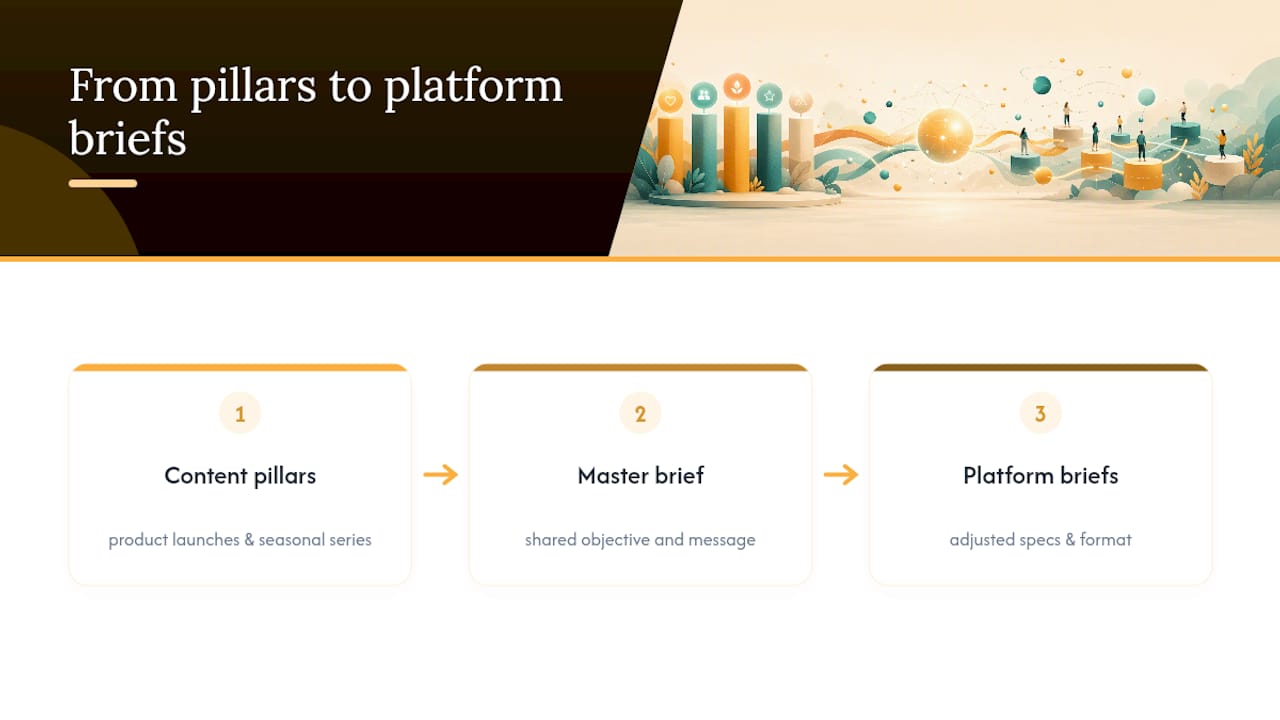
When a campaign spans multiple platforms, write one master brief with the shared objective and message, then spin off platform-specific briefs that inherit those fields but adjust specs and format. This keeps your message consistent while still respecting the fact that a LinkedIn audience and a TikTok audience expect completely different pacing.
Tools for Building and Managing Your Brief Library
Most teams outgrow a shared document within a few months. Once you’re running more than a handful of briefs a week, a dedicated system pays for itself in time saved chasing down the latest version.
Project management tools like Asana, Trello, or Monday.com work well for teams that want brief fields built as custom form fields, so nothing gets skipped at intake. Notion and Airtable suit teams that want a searchable content bank for social media, since both let you tag briefs by platform, campaign, and status, and pull up past examples fast when a new creator needs reference material. Google Docs or Google Sheets remain a fine starting point for smaller teams, provided you lock the template structure so people stop reinventing the field order every time.
Whatever tool you land on, the goal is the same: a living content library for social media where past briefs, their outcomes, and their approval times are all searchable in one place. That history becomes your best training material for onboarding new team members or freelancers, since they can see exactly what a brief that hit its KPI actually looked like.
Building SEO and Keywords Into Your Social Brief
Search visibility inside platforms like TikTok, Instagram, YouTube, and Pinterest now works a lot like traditional SEO, which means your brief needs a field for it. Add a line for the primary keyword or search phrase the post should target in its caption and on-screen text, plus any hashtags tied to that search term.
For a Reel or TikTok, that means naming the specific phrase you expect people to search (e.g., “easy weeknight dinner ideas”) and instructing the creator to say or caption that phrase naturally within the first few seconds, since platform search increasingly indexes spoken audio and on-screen text alongside the caption itself. For YouTube Shorts, the same principle applies to the title field, which behaves much like a traditional YouTube video title for search purposes.
Don’t overload a single post with more than one or two target phrases. A brief chasing five keywords at once usually produces a caption that reads like a list of tags instead of a real sentence, and that hurts engagement more than it helps discovery.
Getting the Best Work Out of Creative Teams and Freelancers
The brief is the entire relationship for a freelancer you’ve never worked with before. They don’t have your brand history in their head, so every assumption you don’t write down becomes a guess they’ll have to make on their own.
Give freelancers more reference material than you’d give an in-house designer, since they lack the context an internal team member picks up just by being in the building. Attach two or three examples of past work you loved, and be specific about what worked in each one, not just “we liked this.”
Set revision limits before work starts, not after the first round comes back short. Two rounds tied directly to the original brief fields is a reasonable standard, and it protects both sides from the scope creep that happens when “just one more tweak” turns into a fifth revision.
Pay attention to turnaround expectations in the brief itself. A freelancer juggling multiple clients needs a real deadline with buffer built in, not a same-day ask disguised as a routine request. Teams that build these expectations into a repeatable social media strategy brief format find that freelancers deliver faster and need fewer rounds of clarification over time, simply because the pattern becomes familiar.
SOL Social Media’s Perspective on Briefing for Real Engagement
We build briefs platform-first, then write the message to match, not the other way around. That order matters more than most teams realize, because a message built before the format is chosen almost always needs rework once someone realizes it doesn’t fit the platform’s pacing or audience behavior.
Our brief templates stay modular on purpose. A campaign-level brief and a single-post brief share the same core fields (objective, audience behavior, message, KPI) so a team member can move between the two without relearning a new system. Real human copywriting still starts with a brief that describes how an audience actually behaves in the moment they see the post, not just who they are on paper. That’s the difference between content that gets scrolled past and content that gets a save.
— SOL Social Media
Let SOL Social Media Build and Run Your Briefs
If writing, distributing, and tracking briefs across platforms is eating more of your week than the actual content strategy behind it, that’s exactly the gap SOL Social Media closes. Instead of you building templates from scratch and chasing approvals by hand, our team handles the brief, the creative, and the revision cycle as one connected process.

Social Media Content Creation covers the briefing and production work directly, so your objective, audience behavior, and KPI get built into every asset before a single frame is shot. If your gap is higher up the funnel, Social Media Strategy builds the campaign-level plan your individual briefs should trace back to. Teams that want to keep briefing in-house but need their people trained on the process can book Customized Social Media Training, where we teach your team the exact checklist and workflow covered here.
For ongoing support, compare the Monthly Unlimited and Weekly Consulting plans and pick the engagement level that matches how much of this work you want to hand off. Reach out through the pricing page to get a plan recommendation based on your current posting volume.
Sources
FAQ
What Is a Social Media Brief?
A social media brief is a short working document that tells a creator or designer exactly what to make, for which platform, and how success will be measured. It includes the objective, audience behavior, platform specs, core message, and KPI, according to Siteimprove’s guide to content brief best practices.
What Is the 5-3-1 Rule for Social Media?
Definitions of the 5-3-1 rule vary across marketing resources, and this article’s research doesn’t confirm one canonical version. Rather than guess, focus on the five components covered here: objective, audience, message, deliverables, and KPI, since those are the fields directly tied to approval speed and campaign results.
What Are the Core Parts of a Design Brief for Social Content?
For social media specifically, the core parts are objective, audience behavior, platform specs, core message with a single CTA, and required assets with a timeline. A campaign brief template also adds campaign name, owner, dates, and approval owner for larger, multi-post projects.
What Does an Effective Creative Brief Example Look Like?
A strong example names the exact platform and format, describes the audience by behavior rather than age range, states one message and one CTA, and lists the KPI upfront. The filled UGC ad and organic reel examples in this article show both structures in practice.
Recommended
Comments