


Start With One Channel: Community Management for Small Businesses

Community management for small business means building direct, ongoing relationships with your customers in a space you help shape, whether that’s a private group, a comment thread, or a reply-friendly newsletter, rather than just broadcasting content and hoping for likes. The first move: pick one channel your team can sustain weekly, then set three KPIs (active members, response rate, and one impact metric like referrals) before you post a single thing. Everything below shows you how to build on that foundation.
TL;DR:
Small business community management is most effective once a loyal customer base exists, usually after three years or when recurring inquiries become repetitive.
Choose one to three measurable objectives tied to specific business metrics, and prioritize community channels your team can realistically moderate without burnout.
Build your community gradually by inviting a small pilot group, monitoring their interactions, and adjusting rules, prompts, and engagement tactics before expanding.
Track health metrics like activation and contribution rates separately from impact metrics such as referrals and support ticket reductions to gauge both community vitality and business growth.
Use simple, familiar platforms matched to your team’s capacity, and consider outsourcing reply-writing or moderation to maintain authentic engagement without overloading staff.
What Is Community Management for Small Business, and How Is It Different From Social Media Management?
Community management and social media management get lumped together constantly, and that mix-up costs small businesses real time. Social media management is one-to-many: you plan content, publish it, track reach, and grow followers. Community management is many-to-many: you’re facilitating conversations between customers, not just delivering messages to them. A breakdown from HubSpot puts it plainly. The two functions have different goals, different daily responsibilities, and different ways of measuring success.
Social media management asks, “Did people see this?” Community management asks, “Did people talk to each other because of this?” That distinction shapes everything from your posting cadence to who you hire.
The business case for investing in community work comes down to four outcomes:
Retention. Customers who feel connected to a brand’s community stick around longer than those who only see occasional ads.
Feedback. A group of engaged customers will tell you what’s broken before it shows up in a review.
Advocacy. Members who feel ownership over a community refer friends without being asked.
Support deflection. Active peer-to-peer groups answer each other’s questions, cutting down on repetitive support tickets.
Community-led approaches, where customers vote on ideas, join events, or help shape products, tend to strengthen retention and marketing alignment at the same time, according to Shopify’s research on community-led growth. That’s a different payoff than social media delivers. A viral post might spike traffic for a week. A functioning community compounds value month over month because the relationships don’t reset every time the algorithm changes.
So when is community work the right investment for a small business? Not always immediately. If you’re pre-revenue or still finding product-market fit, spend your limited hours on sales and social content instead. Community management pays off once you have a repeat customer base, whether that’s 50 loyal clients or 5,000, because a community needs existing relationships to activate. A local bakery with three years of regulars is ready. A brand-new e-commerce store with its first ten orders isn’t, yet.
The other signal: if your team is already fielding the same questions over and over in DMs or emails, that’s a sign a shared space could redirect that energy into something more useful than a bottleneck.
How Do You Build a Community Management Strategy for a Small Business?
A community strategy for a small business needs six moving parts in sequence: objectives, audience, channel, cadence, governance, and a launch plan. Skip a step and you’ll end up with a Facebook Group nobody posts in or a Discord server that turns into a ghost town within a month. HubSpot’s framework for community strategy recommends defining objectives and audience before touching a platform, and that order matters more than most small business owners assume.
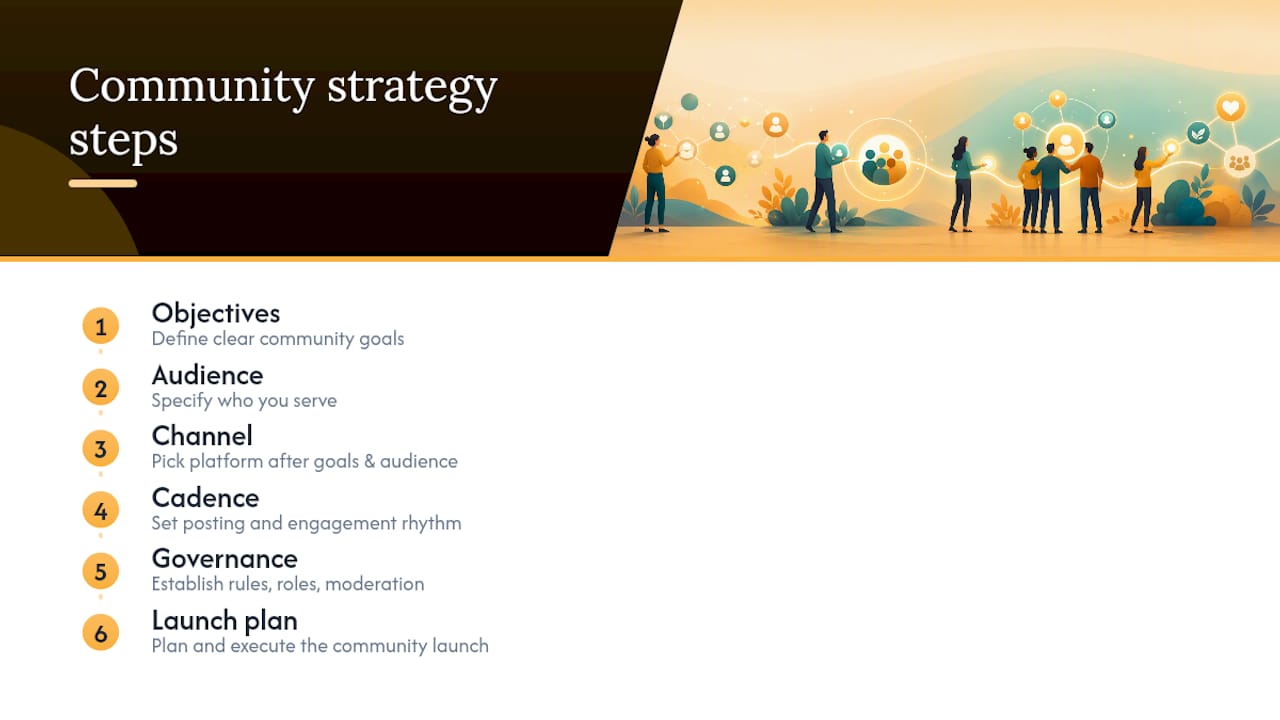
1. Choose one to three objectives tied to a business metric
Vague goals like “build engagement” don’t survive contact with a busy week. Tie each objective to something you already track: reduce support tickets by 15%, generate five qualified referrals a month, or lift repeat purchase rate among community members compared to non-members. Pick objectives you can measure with tools you already have, like your point-of-sale system or email platform, so tracking doesn’t become its own project.
2. Identify and segment your initial audience
Your first community members should be your best existing customers, not strangers you’re trying to attract. Pull a list of the 20 to 50 people who buy most often, refer others, or leave the most thoughtful reviews. Segment by what they’d actually want: some care about early access to products, others want to swap advice with peers, others just want a direct line to you. This early group sets the tone for everyone who joins later.
3. Match the channel to your audience’s habits and your team’s capacity
Choose a channel your team can actually staff, not the one that looks most impressive on a pitch deck. A private Facebook Group, a WhatsApp broadcast, or a reply-enabled newsletter each work fine for small teams because they don’t demand daily moderation to stay useful, a point About in its guidance for budget-conscious businesses. Ask three questions before committing: Where does your audience already spend time? How much moderation will this platform realistically require? Can one person run this alongside their existing job?
4. Set a cadence you can sustain for a full year, not just a launch month
A weekly cadence might mean one discussion prompt on Monday and one reply-check on Thursday. A monthly cadence might add a live Q&A or a member spotlight. Write the cadence down and treat it like a recurring calendar event, because community work dies from neglect far more often than from a bad first post.
5. Set governance before your first member joins
Decide your posting rules, your tone for handling complaints, and who has authority to remove a disruptive member, before you need any of it. A simple three-line guideline post pinned at the top of your space (be respectful, no spam, keep it on-topic) prevents most problems. Assign one person as the escalation point for anything that crosses a line, even if that person is you.
6. Launch with a small pilot cohort before opening the doors
Invite 10 to 20 people first. Watch what they post, what questions they ask, and where the format feels awkward. Adjust your prompts and rules based on that pilot, then do a soft launch to your broader list. This staged approach catches problems while the stakes are still low.
Pro Tip: Send your pilot cohort a direct, personal message asking them to join, not a generic announcement. A dozen people who feel personally invited will post far more in week one than a hundred who found a public link buried in a newsletter.
Which Channels and Tools Work Best for Small Teams?
The channel that works isn’t the one with the most features. It’s the one your team can run without burning out by month three. Owned channels (your website, your email list) give you full control and no algorithm risk, but they take longer to build momentum. Third-party platforms (Facebook Groups, Discord, Slack) come with built-in discoverability and familiar interfaces, but you’re renting space on someone else’s rules. Email-first approaches sit in between: you own the list, but replies create the community feeling without needing a dedicated app.
For most small businesses starting out, a combination works better than picking just one:
Solopreneurs: a reply-enabled newsletter plus a single private group (Facebook or WhatsApp) covers most needs without requiring daily check-ins.
Two-person teams: add a lightweight scheduling tool for posts and a shared inbox so both people can respond to comments without duplicating effort.
Small marketing teams: layer in a simple analytics dashboard to track engagement trends across channels, plus a shared moderation calendar so coverage doesn’t lapse on weekends.
Retail and healthcare businesses tend to do well starting with private groups because customers often want a lower-visibility space to ask questions, compared to industries where public visibility drives more value, like local restaurants or event venues.
Know your upgrade triggers before you need them. When moderation demands or group size exceed your current tools and resources, consider upgrading to platforms with built-in automation and analytics to maintain community satisfaction and operational efficiency.
Simple integrations help more than complicated ones. Connecting your community platform to your email tool so new customers get invited automatically saves more time than any advanced analytics dashboard. For basic moderation, a keyword filter and a clear reporting button cover most of what a small business actually needs. If your team is spread thin, AI-assisted workflows can help handle routine replies or flag posts that need a human’s attention, freeing up your time for the conversations that actually require your voice. For platforms like YouTube, features like the Community tab offer a built-in way to post polls and updates without needing a separate app at all.
Our guide on engagement strategies for small businesses covers more specific tactics for converting passive followers into active community members once your channel is chosen.
How Do You Measure Community Management Success?
Health metrics and impact metrics answer two different questions, and mixing them up is one of the most common reporting mistakes small businesses make. Health metrics tell you whether the community itself is functioning. Impact metrics tell you whether it’s moving your business forward. Both matter, but they need to be tracked and reported separately, according to guidance from Gradual Community on defining success metrics.
Health metrics measure the pulse of the space itself:
Activation rate (percentage of new members who post or comment within their first two weeks)
Repeat participation (members who engage more than once per month)
Contribution rate (percentage of members who post versus only lurk)
Impact metrics measure whether the community is worth the time investment:
Leads or referrals attributed to community activity
Support tickets deflected because members answered each other’s questions
Retention lift among community members compared to non-members
By the Numbers: Trackable KPIs for small business communities should include active members, content engagement rate, inbound inquiries attributed to the community, and reduction in support tickets, according to US Chamber guidance on community moderation. Small businesses should pick 3 to 5 of these at launch rather than trying to track everything at once.
Early on, weight your reporting toward activation. A brand-new community won’t have meaningful retention data yet, so tracking whether new members post something in their first two weeks tells you more about whether your onboarding works than any long-term number can. As the community matures, shift the emphasis toward repeat participation and contribution, since those reflect whether people are staying engaged rather than just showing up once.
Pick a few key KPIs at launch and report them regularly along with qualitative examples to illustrate what the numbers mean. Contextual storytelling alongside metrics makes reports more meaningful for stakeholders.
The most common reporting mistake is presenting a single blended number, like “engagement” as one figure, without separating what’s healthy for the community from what’s actually driving revenue. The second most common mistake is changing your KPIs every month because early numbers look unimpressive. Community metrics take time to trend in a direction worth reporting; give a launch at least 90 days before deciding a metric isn’t working.
Who Should Run Community Management at a Small Business?
The role itself blends relationship-building, moderation, and facilitation skills that differ from what a content creator or social media poster does day to day. Someone running community work spends their time responding to comments, welcoming new members, resolving small disputes, and noticing which conversations need a nudge to keep going, according to HubSpot’s comparison of the two roles. A social media manager spends their time planning content calendars and tracking reach.
Realistic time budgets vary by team size. Solopreneurs should expect to spend several hours per week managing community activities. Small teams need to allocate more time proportionally as their community and channel count grow.
If you’re deciding whether to outsource, ask any agency or consultant these questions before signing anything: How do they measure health versus impact metrics? What’s their process for handling a negative comment or a member dispute? Do they provide a monthly report with qualitative examples, not just raw numbers? How much input will your team have on tone and voice?
Watch for burnout signals in whoever owns this role. If your community manager is checking notifications outside work hours regularly, if response times are slipping past 24 hours, or if the same person is also running paid ads, email, and content on top of community, capacity has been stretched past what’s sustainable. A burned-out community manager produces flat, generic responses, and members notice that shift faster than any metric will catch it.
What Engagement Tactics Actually Work for Small Businesses?
The tactics that work share one trait: they’re repeatable without requiring new creative energy every single week. Building a library of formats you can rotate through saves you from staring at a blank page every Monday morning.
Here are formats worth building into your first 90 days:
Weekly question prompts. Ask something specific and easy to answer in one sentence, like “What’s one thing you wish you’d known before your first visit?” Specific prompts get far more replies than open-ended ones like “How’s everyone doing?”
Monthly member spotlights. Feature one community member’s story, project, or question of the month. This costs nothing but attention and makes members feel seen, which drives loyalty faster than a discount code does.
Office hours. Block 30 minutes once a month for a live Q&A, whether that’s a video call, an Instagram Live, or a scheduled thread where you answer questions in real time.
Mini workshops. A 15 minute walkthrough of a product feature, a skill, or a common customer question, recorded once and reused as onboarding material for every new member after.
Member-only promos. A small discount or early access window reserved for community members only. This rewards participation without requiring a big marketing budget.
Recognition without spending money. A shoutout, a badge, or a “member of the month” post costs nothing and works because people respond to visibility more than most businesses assume.
Pro Tip: Run one experiment per month instead of five. If you launch a poll, a challenge, and a spotlight all in the same week, you won’t be able to tell which one actually drove engagement. Isolate the variable, then scale what works.
Sample experiments worth trying in your first quarter: post the same type of prompt at two different times of day for a month and compare reply rates, or test whether a personal invite message versus a public announcement drives higher pilot cohort participation. Interpret early signals carefully. A single quiet week doesn’t mean a tactic failed; a consistent three-week decline usually does.
Community-led tactics, like letting members vote on your next product feature or menu item, tend to produce stronger buy-in than top-down announcements, based on Shopify’s community-led growth research. Even something as small as “should our next flavor be X or Y?” turns passive followers into people with a stake in the outcome. Our roundup of engagement ideas with proven tactics has more specific formats you can adapt to your own audience’s tone. And if you’re planning cadence across a full month, the 30-day engagement framework built around focus, batch, and reply gives a structure that keeps content creation from eating your entire week.

Setting Community Guidelines, Handling Conflict, and Onboarding New Members
Every functioning community needs three things most small businesses underestimate until they’re missing: clear rules, a plan for conflict, and a real onboarding process.
Guidelines and moderation. Write three to five rules in plain language: be respectful, no spam or self-promotion without permission, keep discussions on-topic, and report concerns directly to a named moderator. Pin these where every new member sees them on day one. Enforcement matters more than the wording. A rule nobody enforces isn’t a rule, it’s a suggestion, and members notice quickly when bad behavior goes unaddressed.
Handling conflict and negative feedback. Disputes and criticism inside a community need a different approach than a one-star review on a public page. Respond quickly, acknowledge the concern without getting defensive, and move detailed complaints to a private message when possible so the public thread doesn’t turn into a pile-on. If a member consistently violates guidelines, a private warning first, followed by removal if it continues, protects the group without making a public example of anyone. Setting this escalation path before you need it, as covered in the governance step above, prevents a single bad moment from spiraling.
Onboarding new members. A warm welcome message, a pinned post explaining what the space is for, and an easy first action (answer this week’s prompt, introduce yourself) turn a passive new member into an active one within the first two weeks. That early activation window is exactly what your health metrics should be tracking, since members who post early tend to stay engaged longer than those who join and go quiet.
Legal and privacy considerations. If you’re collecting emails, phone numbers, or any personal data through your community platform, make sure your privacy practices match what you tell members, and store data only as long as you need it. Be transparent about who can see posts, whether a group is truly private or visible to a broader network, and disclose clearly if you’re using member testimonials or photos in your marketing. These aren’t optional details for a business handling healthcare or financial customer data. Check your platform’s own data handling terms and, where your business touches regulated information, consult a professional about what applies to your specific situation.
What SOL Social Media Has Learned From Running Community Programs
Most small businesses treat community management as a nice-to-have they’ll get to once social posting is under control. That’s backwards. SOL Social Media builds community engagement as a core piece of every client’s social media strategy, not an afterthought layered on top, because the businesses that struggle most with inconsistent engagement are almost always the ones treating their audience as a broadcast list instead of a relationship to manage.
Our approach moves through three phases with every client: discovery, where we map who a business’s most engaged customers already are and what platforms fit their real capacity; a pilot phase, where we test one or two channels and cadences with a small group before scaling; and a scale phase, where we expand what’s working and cut what isn’t, based on the health and impact metrics outlined earlier in this guide.
[Case studies demonstrating client results across retail and healthcare accounts to be added here.]
[Testimonials from small business clients on community growth outcomes to be added here.]
[Proprietary engagement and growth data from SOL Social Media client accounts to be added here.]
The businesses that see the strongest results share one trait: they commit to a cadence they can actually sustain, rather than chasing every new platform feature. That’s the same principle behind the step-by-step social media playbook we build with clients from day one.
— SOL Social Media
Get Hands-On Help Building Your Community
An alternative to hiring a full-time community manager or piecing together freelance help for small businesses that want consistent, human-written engagement without adding headcount is available. The service provides real, human copywriting tailored to a brand’s voice, so that replies, prompts, and member spotlights sound authentic rather than like a generic template.

If you already have a content plan but need someone actively managing conversations, replies, and moderation, our Social Media Engagement service picks up exactly where this guide leaves off. If you’re still working out objectives, audience, and channel choice from the strategy section above, our Social Media Strategy service builds that foundation with you. And if your team wants to run community work in-house but needs the skills to do it well, Customized Social Media Training sessions cover exactly the frameworks outlined in this article, tailored to your specific platforms and audience.
Most engagements start with a discovery conversation about where your community efforts stand today. From there, you can review current packages, including Monthly Unlimited and Weekly Consulting options, and pick the format that matches your team’s capacity. Reach out to schedule that first conversation and see which package fits your business.
Where to Learn More
The strategy and tactics in this guide draw on frameworks from a handful of sources worth bookmarking if you’re building this out further. HubSpot’s community management strategy guide covers the objective-to-measurement framework in more depth. The US Chamber’s moderation best practices go further into KPI selection and handling difficult members. Gradual Community’s guide to defining success metrics is the clearest resource available on separating health from impact metrics. For budget-conscious tactics, About.us’s guide to small business community building and Shopify’s research on community-led growth both offer concrete, low-cost starting points.
Sources
FAQ
What is included in community management?
Community management includes moderating conversations, responding to comments and messages, setting and enforcing guidelines, welcoming new members, running engagement activities like prompts or events, and reporting on health and impact metrics. It’s distinct from content creation or ad management, though small teams often handle both.
What are the three C’s of community engagement?
Definitions vary across sources, but a common version centers on content (what gives members a reason to show up), conversation (the back-and-forth that makes it feel alive), and consistency (a cadence members can rely on). Consistency tends to matter more for small businesses than either of the other two, since an inconsistent presence undoes trust faster than mediocre content does.
How can a small business help the community it serves?
Beyond online engagement, small businesses build real community goodwill through local sponsorships, in-person events, and visible support for causes their customers care about. SOL Social Media helps clients document and share this kind of community involvement as part of a broader engagement strategy.
What is the best software for community management?
There’s no single best platform. It depends on your audience’s habits and your team’s capacity. Small businesses often start with a private Facebook Group, a reply-enabled newsletter tool, or WhatsApp before graduating to a dedicated community platform once volume and moderation needs outgrow free tools.
How much does community management cost for a small business?
Costs vary depending on whether you handle it in-house or outsource. SOL Social Media offers packages including Monthly Unlimited and Weekly Consulting, with current pricing available on the pricing page.
Recommended
Comments