


30/60/90 Agency Social Media Account Cleanup for Small Business Owners

A social media account cleanup is an audit-driven process that inventories every profile, closes security gaps, standardizes branding, and fixes or removes off-brand content according to a prioritized plan. Done right, it leaves you with secure, consistent profiles and a clear 30/60/90-day fix list. Run a full audit regularly with periodic lighter check-ins to keep things from sliding back.
TL;DR:
Regularly review and update account security by removing outdated admin access, revoking unused third-party apps, and enabling two-factor authentication.
Prioritize fixing access and security issues within the first 30 days before standardizing branding and addressing content performance in later phases.
Always back up all account data, including posts, comments, and analytics, before deleting or archiving content to prevent permanent loss.
Ensure compliance by checking data privacy regulations like GDPR or CCPA before deleting any customer information or personal data during cleanup.
Use organized tracking tools and avoid bulk automation for deletions to prevent account locks, while focusing on human-driven, impactful fixes.
What Does a Social Media Account Cleanup Include?
Before you brief an agency or sign a contract, know what a legitimate cleanup scope covers. Vendors who skip any of these steps are cutting corners you’ll pay for later.
A complete cleanup touches five areas:
Inventory of every active, dormant, and forgotten account tied to your brand, including who owns login access.
Profile audit covering bios, profile images, cover photos, link destinations, and calls to action.
Security review of admin users, connected apps, and two-factor authentication status.
Content review identifying which posts to keep, edit, archive, or delete.
Analytics pull benchmarking engagement rate, reach, and click-through so you can measure progress after the fixes go live.
When you compare agency bids, ask each one to name their deliverables outright. You want a master spreadsheet listing every account and its status, a prioritized fix list ranked by risk and impact, and a timeline with named owners. After the work wraps, spot-check three things yourself: log into each profile to confirm access actually changed hands, click every link in every bio, and pull up the “keep, improve, test, stop” recommendations to see if they match what got fixed.
How Does an Agency Run a Social Media Audit and Cleanup?
A competent agency works in a fixed sequence, because skipping steps creates rework. Here’s what that sequence looks like, and what each stage should produce.
Inventory every account. For each platform, capture the handle, profile URL, current owner, login or access method, and status (active, dormant, or abandoned). This step exists specifically to catch unofficial or impostor accounts that were spun up years ago and never closed.
Audit each profile against a checklist. Review the bio copy, profile and cover images, link accuracy, call-to-action placement, and verification badge status on every platform.
Review the content history. Pull the top-performing and worst-performing posts by engagement, then sort them into delete, archive, or edit. This is where tone and brand-voice drift usually surfaces.
Export analytics. Benchmark engagement rate, link clicks, reach, and impressions before you touch anything, so post-cleanup numbers actually mean something.
Deliver outputs. A master spreadsheet with tabs for access, profile, audience, and performance data keeps findings organized, paired with a prioritized 30/60/90-day plan.
An audit by itself isn’t a strategy. It’s the diagnostic baseline that tells you and your agency what needs fixing before anyone writes a single new caption.
Pro Tip: Ask your agency to hand over the raw spreadsheet, not just a summary deck. If the relationship ends, you still own the inventory and can brief a replacement vendor in an afternoon instead of starting from zero.
Why Does Account Security Matter During Cleanup?
Security gaps are the single most expensive thing a cleanup can miss, because they’re invisible until something goes wrong. A locked account or a rogue former employee can undo months of content work in one afternoon.
Audits routinely turn up former employees or outside vendors who still hold admin access or OAuth permissions months or years after the relationship ended. That’s not a minor oversight. It’s an open door.
Before your agency touches a single caption, they should be running through this list:
Pull the full admin roster on every platform and remove anyone who no longer works with you.
Revoke third-party app connections and OAuth grants you don’t recognize or no longer use.
Enable two-factor authentication on every account and document recovery contacts and credentials in one secure, centralized location.
Avoid mass unfollows or mass deletions done manually. Platforms flag rapid bulk activity and can lock the account, so stage changes in small batches using native tools or approved partners.
Skipping this step to save time is how a “cleanup” turns into an account recovery emergency.
What Are the Rules for Cleaning Up Old Content?
Content decisions need a clear rule, or your agency ends up making judgment calls one post at a time with no consistency. The rule is simple: delete only when a post is illegal, dangerously misleading, or actively damaging to your reputation. Everything else gets archived or edited.
That distinction matters because deleted posts lose their engagement history and searchability, while archiving preserves the record without keeping stale content visible. Beyond content, standardization is where most brands lose consistency across platforms:
Align bios, usernames (where the platform allows it), CTAs, and profile images across every channel, and designate one profile as the canonical source of truth for future updates.
Audit every link in every bio for dead URLs, and standardize UTM parameters so future analytics actually roll up correctly.
Document your branded hashtags and a short voice guideline sheet so anyone posting later stays on-brand.
If you’re removing content in a regulated industry, like healthcare, keep an archived record rather than a hard delete, since compliance reviews sometimes require it.
Pro Tip: Keep a single “brand bible” doc with your approved bio copy, hex colors, and tone notes. When a new hire or a new agency takes over your accounts, that one document replaces three weeks of guesswork.
How Do You Prioritize Fixes and Track Results?
Not every fix carries the same urgency, and treating them equally wastes your first 30 days on low-value work. Prioritize in this order: security and access first, profile accuracy second, high-value content updates last.
Days 1 to 30: Lock down access. Revoke stale admins, remove unused apps, enable two-factor authentication, and fix broken profile links. Owner: agency and your IT contact jointly.
Days 31 to 60: Standardize branding. Rewrite bios, fix visual inconsistencies, consolidate or archive duplicate accounts. Owner: agency, with your sign-off on copy.
Days 61 to 90: Address content and performance. Archive or edit underperforming posts, relaunch a content calendar aligned with KPIs tied to business goals, and report first-round results.
Milestone | Primary owner | KPI to report |
Access audit complete | Agency + IT | Number of stale admins removed |
Profile standardization | Agency | Broken links resolved |
Content remediation | Agency | Engagement rate, link clicks |
Full re-audit | Agency + client | Reach, impressions vs. baseline |
Re-audit fully every quarter, and run a 30-minute monthly check-in in between to catch drift before it compounds.
Data Privacy and Compliance in a Social Media Cleanup
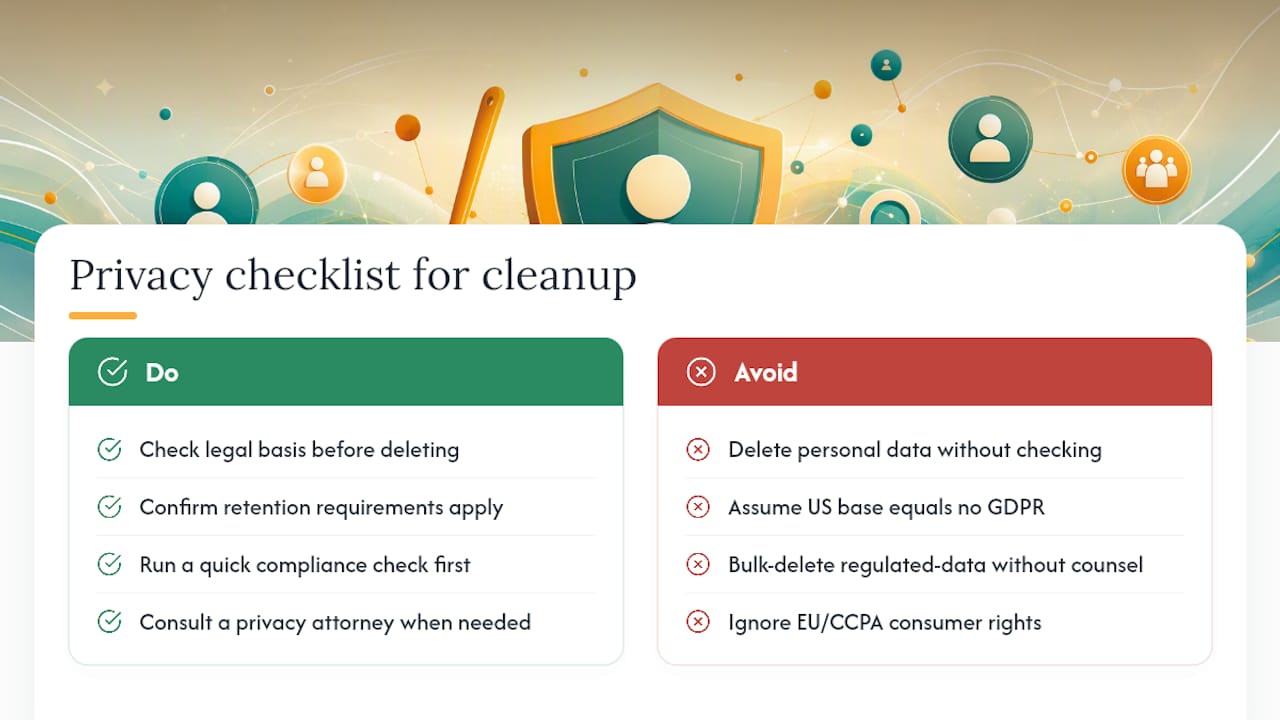
Cleanup work isn’t just cosmetic once customer data enters the picture. If your business collects comments, direct messages, or lead-generation form submissions through social platforms, privacy rules apply the moment you start archiving or deleting that data.
Under the EU’s GDPR, any business with European followers, customers, or ad targeting has obligations around consent and data retention, even if the company itself is based in the United States. The California Consumer Privacy Act (CCPA) creates similar obligations for businesses that meet its thresholds and hold data on California residents, giving those consumers rights to know what’s collected and to request deletion.
For a small business, the practical takeaway during cleanup is this: before deleting a post, a comment thread, or a customer interaction that contains personal information, check whether you have a legal basis or retention requirement to keep it. Healthcare-adjacent businesses in particular should treat any post referencing patient interactions with extra caution, since privacy exposure there compounds quickly.
This isn’t a substitute for legal advice specific to your business and its data footprint. If your company handles regulated health information, financial data, or significant EU or California traffic, loop in a privacy-savvy attorney before your agency executes bulk deletions. A five-minute compliance check up front is cheaper than a retroactive data request you can’t fulfill.
Should You Back Up Data Before Deleting or Archiving?
Yes, and skipping this step is the most common regret owners report after a rushed cleanup. Once a post, comment thread, or entire account is deleted, most platforms give you a narrow window, if any, to recover it.
Before your agency deletes or archives anything, they should export a full backup of the account: post history, images and video files, comment data, follower lists where available, and any analytics history tied to the account. Most major platforms offer a native data-export tool buried in account settings, which is the safest route since it comes directly from the platform rather than a third-party scraper.
Store that export somewhere outside the platform itself, ideally a shared drive your business controls, not just the agency’s internal system. If the agency relationship ever ends, you want that archive to travel with you, not stay locked in a vendor’s account.
This matters even more for accounts you’re consolidating rather than deleting. If you’re merging three regional Facebook pages into one, the two you’re retiring should be fully backed up before you request removal, since some of that historical content and audience data may be useful later for retargeting or reporting.
How Do You Handle Connected Apps and Integrations?
Every business account accumulates connections over time: scheduling tools, chatbot plugins, contest apps, review widgets, CRM integrations. A cleanup has to inventory all of them, because each one represents both a security exposure and a potential point of failure if you change account ownership or credentials.
Start by pulling the full list of authorized apps from each platform’s settings menu, not from memory. You’ll typically find integrations nobody on the current team remembers approving. For each one, decide: still in active use, safe to keep; not sure who set it up or why, investigate before deciding; clearly abandoned, revoke access immediately.
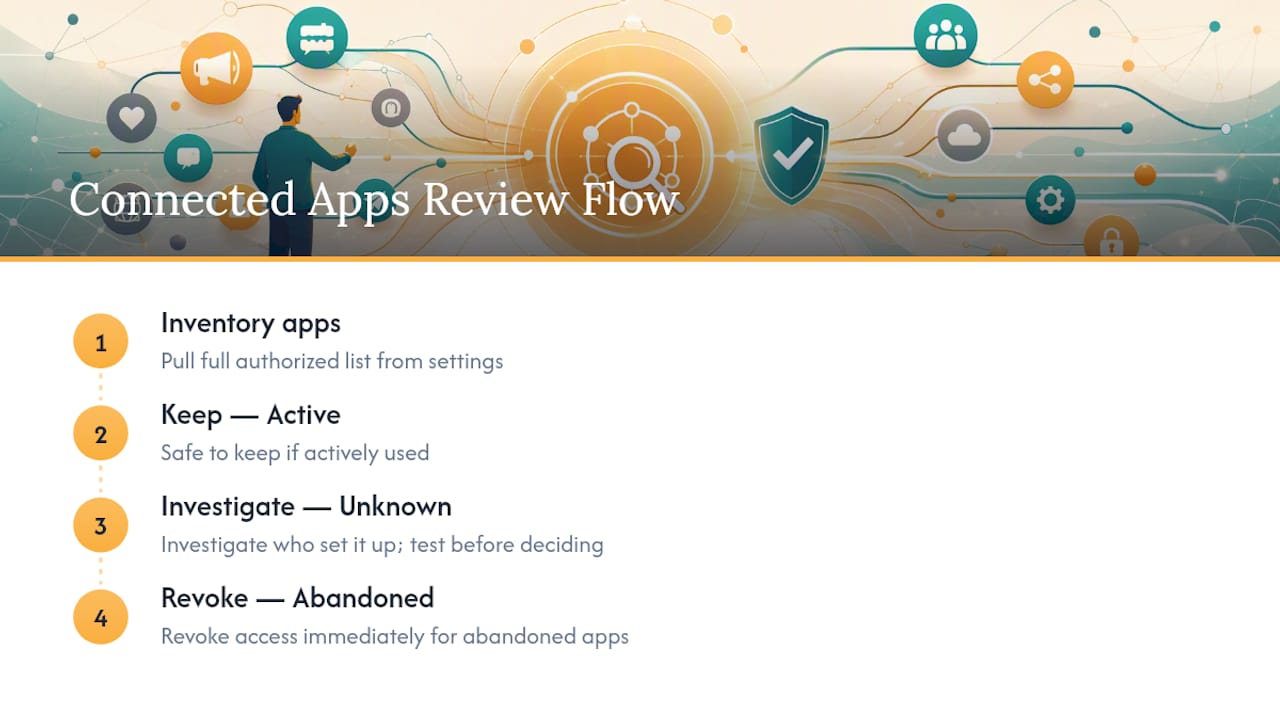
Pay particular attention to apps tied to lead capture, appointment booking, or e-commerce checkout, since revoking access carelessly can break a customer-facing function without warning. Test each integration in a staging environment or during low-traffic hours if you’re not certain what depends on it.
If your cleanup reveals broken links between print materials and social profiles, such as a QR code on a flyer pointing to a dead landing page, that’s worth fixing in the same pass. A QR code platform built for agencies can help you audit and redirect those print-to-digital connections without reprinting materials.
Should You Tell Followers About the Cleanup?
For most routine fixes, no announcement is needed. Nobody notices a corrected bio link or a removed 2019 post. But two situations call for a short, direct heads-up to your audience.
The first is consolidation. If you’re merging two Facebook pages or retiring an old Twitter/X handle in favor of a new one, post a clear note on the outgoing account pointing followers to the new one, and pin it. Do this before you request the account’s removal, not after, since followers can’t be redirected once the profile disappears.
The second is any visible change to tone, posting frequency, or content type that regular followers will notice within a week or two. A short post explaining that you’re “freshening things up” costs you nothing and heads off the assumption that the account got hacked or handed to someone careless.
Internally, loop in any staff who interact with customers on social media, sales, front desk, support, so they’re not caught off guard by a changed bio or a new response template mid-conversation with a customer.
Does Cleanup Affect SEO and Social Reach?
Cleanup helps discoverability more often than it hurts it, but the mechanism matters. Search engines and social platform algorithms both reward consistency and penalize confusion.
Consolidating scattered or duplicate profiles into one canonical account improves discoverability because search engines and platform search bars stop splitting your brand’s authority across multiple weak profiles. A single, active, well-optimized profile tends to outrank several half-abandoned ones for branded searches.
Removing large volumes of old posts can cause a short-term dip in raw engagement metrics simply because there’s less content indexed, but this typically recovers within a few weeks as fresh, on-brand content starts performing better without dead weight dragging down your average engagement rate. Broken links fixed during cleanup also stop losing you referral traffic that was previously going nowhere.
The bigger reach risk isn’t the cleanup itself, it’s an unprofessional bio or a dead link driving potential customers away before engagement even starts. That’s lost reach no algorithm change ever shows up in a report.
What Tools Help Automate Cleanup Tasks?
Manual cleanup across five or six platforms is slow, but full automation is risky given how platforms flag bulk activity. The right approach uses tools to organize and analyze, while keeping actual deletions and access changes deliberate and staged.
For the inventory and tracking phase, a shared spreadsheet with separate tabs for access, profile data, content review, and analytics keeps a multi-person cleanup project from turning into a mess of conflicting notes. For the analytics-pull phase, dedicated analytics platforms can export engagement rate, reach, and click data faster than pulling it platform by platform.
For content review, scheduling and management tools that show your full post history in one dashboard make it much faster to sort posts into keep, archive, or delete than scrolling each platform’s native feed manually. What you should avoid is any tool promising fully automated bulk deletion across accounts. Native platform tools remain the safer route for actual removals, since third-party bulk actions are a common trigger for temporary account locks.
How SOL Social Media Approaches a Cleanup Project
We build every cleanup around real human copywriting, not templated fixes, because a bio rewrite that sounds like everyone else’s bio rewrite doesn’t move the needle. Retail and healthcare clients typically come to us with scattered access and inconsistent tone across platforms; our audits prioritize fixes by actual business risk, not by what’s easiest to change first. Every project ends with a documented handoff: access records, an editorial calendar, and automation recommendations your team can run with.
— SOL Social Media
Ready to Fix Your Social Profiles the Right Way?
Handling a cleanup in-house means someone on your team learns platform security settings, OAuth permissions, and brand-voice editing on the fly, usually on top of their regular job. SOL Social Media exists so you don’t have to become a part-time social media administrator to keep your profiles secure and on-brand.

A scoped audit from SOL Social Media includes the full inventory, a security sweep, profile standardization, a prioritized 30/60/90 plan, and monthly check-ins to keep things from drifting again. We also offer training sessions if you’d rather build the skill in-house once the accounts are stable. Our approach starts with understanding your specific brand voice and goals, not a one-size-fits-all checklist, which is what separates a lasting fix from a temporary patch. Visit our social media strategy services page to request a scoped audit and get a clear timeline before you commit to anything.
Sources
For a deeper look at audit fundamentals, see our guide on what a social media audit actually involves and our content audit checklist for standardizing tone and visuals across platforms.
FAQ
How Often Should a Business Do a Social Media Account Cleanup?
Run a full cleanup and audit quarterly, with a lighter 30-minute check-in each month to catch broken links, stale access, or tone drift before it builds up.
What’s the Difference Between Archiving and Deleting a Post?
Archiving hides a post from public view while preserving its history and data; deleting removes it permanently, so most agencies reserve deletion for illegal, misleading, or reputationally damaging content only.
Who Should Own Account Access After a Cleanup?
The business owner or a designated internal admin should hold primary access, with the agency granted documented, revocable permissions rather than permanent ownership of logins.
Does a Cleanup Require Legal Review for Privacy Compliance?
If your accounts collect personal data from EU or California followers, a quick compliance check under GDPR or CCPA before bulk deletions is worth the time; this isn’t a substitute for advice from a qualified attorney.
Can SOL Social Media Handle the Whole Cleanup Process?
Yes, SOL Social Media runs the full inventory, security sweep, content review, and prioritized action plan as one scoped engagement, with optional training for teams who want to manage day-to-day posting themselves afterward.
Recommended
Comments