


Small Businesses: LinkedIn Content Ideas That Drive Dwell Time and Saves

Five formats carry LinkedIn in 2026: short native video, carousel or document posts, long-form insight posts, proof-of-work case posts, and polls that invite real opinions. The platform now rewards substance and niche relevance overreach for their own sake, and personal profiles outperform company pages by a wide margin. Pick two content pillars and one reproducible format, then publish it this week. Everything else is refinement.
TL;DR:
Focusing on one or two content pillars and repurposing formats like proof-of-work posts and carousels can maximize engagement without overloading your team.
Short native videos, long-form posts over 1,300 characters, and detailed case studies are proven to hold attention and generate saves, boosting reach according to recent metrics.
Engaging small businesses should reply to comments within the first hour and actively involve employees in authentic thought leadership to increase visibility.
Consistent publishing, such as one proof-of-work, one carousel, and one question each week, helps maintain momentum and build audience trust over time.
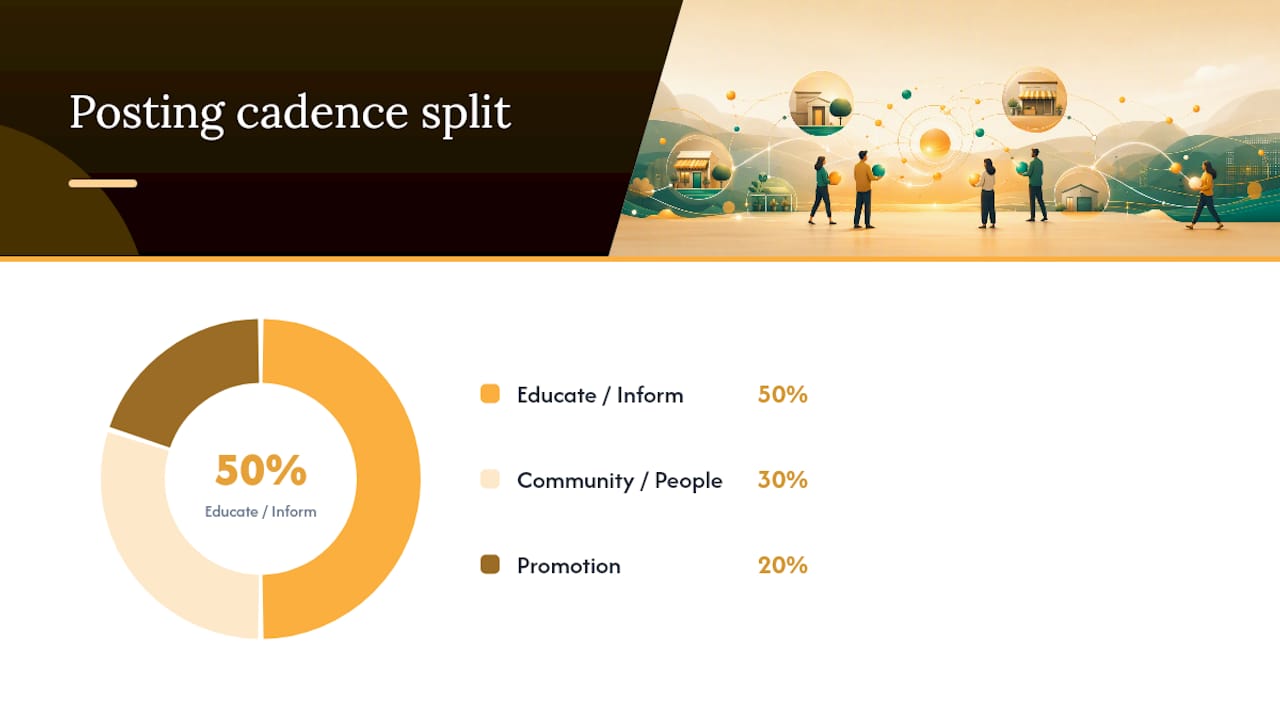
Using a clear content mix following the 5-3-2 rule ensures balanced authority-building, community engagement, and genuine promotion without overwhelming your audience.
Linkedin Content Ideas Organized By What They’re Built To Do
Not every post should chase the same goal. Some ideas exist to spark conversation, some build your authority over months, and some quietly move a reader toward booking a call. Sorting your linkedin content ideas by purpose, rather than by format alone, keeps your posting plan from turning into a random grab bag of “things that seemed interesting at the time.”
Engagement-first ideas
These posts exist to get comments, not applause. A like costs nothing; a comment signals real interest, and LinkedIn’s algorithm treats that signal accordingly.
The contrarian take. State a belief your industry holds and explain why you no longer buy it. Micro-template: “Everyone in [industry] tells you to [common advice]. I stopped doing that in 2024. Here’s what changed.”
The either/or poll. Frame a real decision your audience faces and let them vote. Micro-template: “Would you rather [option A] or [option B]? I’ll share what I’d pick in the comments.”
The unpopular lesson. Share something that went wrong and what it taught you. Vulnerability reads as credibility, not weakness, when it ends in a specific takeaway.
The fill-in-the-blank. Post a half-finished sentence tied to your field and ask people to complete it. Low effort to write, surprisingly high comment volume.
Authority-building ideas
These are the posts that make a reader think, “this person knows what they’re doing,” even before they’ve spoken with you.
The data storytelling post. Take one number from your business or your industry and explain what it actually means for the reader. Micro-template: “We looked at [metric] across [timeframe]. Here’s the one pattern that surprised us: [insight].”
The process breakdown carousel. Walk through how you solve a specific problem, one slide per step. Document posts like this consistently generate strong engagement because readers save them for later, which is exactly the signal LinkedIn’s current algorithm rewards.
The long-form insight post. Write past the 1,300-character mark and actually teach something. Posts of this length tend to outperform shorter takes because they hold attention longer, and dwell time is now one of the platform’s stronger ranking signals.
The myth-busting explainer. Name a widespread misconception in your field and correct it with evidence, not just opinion.
Pipeline-building ideas
These posts do the quiet work of moving a stranger toward a client relationship, without ever sounding like a pitch.
The proof-of-work post. Show the actual work behind a result. Not “we grew engagement 40%,” but the screenshot, the before-and-after, the specific tactic that moved the needle. Chief Content Marketer’s research on what drives pipeline on LinkedIn points to exactly this kind of proof-of-work content as one of the few formats still reliably converting attention into leads.
The client-question post. Answer a question a prospect actually asked you last week, in public, without naming them. Micro-template: “A client asked me [question] this week. Here’s the honest answer.”
The behind-the-curtain post. Show a piece of your process that competitors usually hide: your pricing logic, your onboarding sequence, your review checklist.
The comparison post. Lay out two approaches to the same problem and explain the tradeoffs plainly, without pretending one is universally right.
Repurposing one idea into three formats
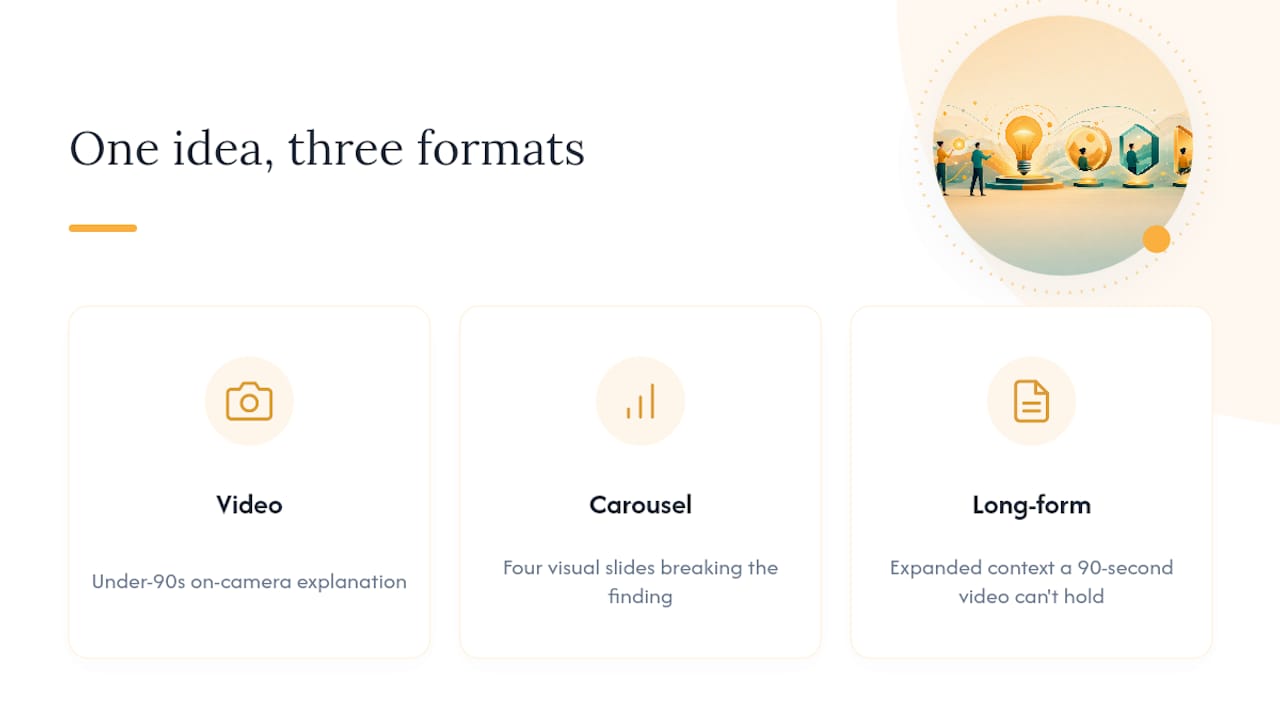
A single insight rarely needs to live in only one place. Take the data storytelling idea above and turn the number into a short video where you explain it on camera in under 90 seconds. Turn the same number into a carousel that breaks the finding into four visual slides. Then expand it into a long-form post that adds the context a 90-second video can’t hold. Same idea, three different dwell-time opportunities, three chances to show up in someone’s feed this month.
Why These Formats Win Under LinkedIn’s 2026 Algorithm
LinkedIn’s ranking system has shifted its priorities. Relevance and substance now outweigh raw engagement volume, and the platform openly favors posts that keep people reading, watching, or scrolling back through a carousel. Content Marketing Institute’s analysis found that organic company content shows up in only about 2% of feeds, compared to 31% for top personal creators. That gap alone explains why so many small businesses feel invisible on their own company page.
Several format-level patterns back this up:
Carousel and document posts consistently earn stronger engagement because readers linger on each slide, and multi-image posts tend to drive higher impressions overall.
Long-form text posts that pass 1,300 characters generate more engagement than short takes, based on Socialinsider’s benchmark data.
Posts that get saved receive additional distribution, since saves now signal real value in a way a quick like never could.
Metricool’s 2026 data shows impressions dropping around 10% while engagement rose nearly 14%, with smaller accounts posting less often but seeing double-digit engagement gains. The operational lesson: stop optimizing for how often you post and start optimizing for whether anyone finishes reading what you posted.
How to Choose Your Content Pillars and Posting Cadence
Pick three to five pillars, not fifteen. A pillar is a topic you can credibly speak on every week without repeating yourself, and it should map to something your audience actually searches for, not just what you find interesting.
Test the 5-3-2 framework. Five posts that educate or inform, three that build community or spotlight people, two that promote your work directly. It keeps promotion from overwhelming substance.
Build an authority matrix. Cross your pillars against formats. If “pricing transparency” is a pillar, decide now whether it lives best as a carousel, a long-form post, or a proof-of-work case. Assign each pillar its strongest format instead of forcing every topic into the same shape.
Sketch a 30-day sample calendar. Four weeks, one dominant format per week, so you’re not reinventing your production process daily.
Choose pillars based on three filters: does your audience actually ask about this, do you have evidence to back it up, and can you realistically produce this format on a repeating basis without burning out your team. Smaller accounts that lean into niche authority rather than posting volume are the ones seeing real engagement growth right now.
Batch your production. Write four long-form posts in one sitting, film three short videos in one afternoon, and build a simple template file for carousels so you’re not starting from a blank slide every time.
Pro Tip: Keep one template document with your five best-performing hooks and CTA phrasings. Reuse the structure, swap the substance, and you’ll cut your writing time in half within a month.
Hooks, CTAs, and First-Hour Tactics That Drive Dwell Time
Your first line decides whether anyone reads line two. Three hook formulas hold up across almost every industry:
Contrarian hook: “Most advice about [topic] is outdated. Here’s what actually works now.”
How-to hook: “Here’s exactly how we [specific result], step by step.”
Data hook: “We tracked [metric] for [timeframe]. The result surprised even us.”
Your call to action matters just as much as your opening line. Skip the generic “thoughts?” and ask something specific enough to earn a real answer: “What would you add to this list?” or “Which of these have you tried?” Since saves now factor into distribution, it’s worth directly inviting readers to save a carousel or checklist post for later rather than assuming they will.
The first hour after publishing sets the tone for how far a post travels. Notify two or three colleagues or co-creators directly rather than mass-tagging people. Reply to every comment within the first 60 minutes, and reply with a real answer, not a thumbs-up emoji. If a comment raises a good counterpoint, ask a follow-up question back. That exchange itself becomes a second wave of engagement signal.
Pro Tip: Draft your reply strategy before you post. If you already know the two most likely objections to your take, have your response ready so you can answer within minutes, not hours.
Building a Small-Company Employee Advocacy Bench
Company pages reach a fraction of the audience personal profiles do, which makes your team’s individual voices one of your biggest untapped channels. Treat employees as co-creators, not people who reshare your company’s posts once a quarter.
Start with mid-level contributors, not the C-suite. People closer to the day-to-day work usually write more authentically and post more consistently than executives asked to perform thought leadership on command.
Select for topic consistency, not job title. Look for employees who already talk shop naturally, have some engagement history, and align with your target audience’s interests.
Brief lightly instead of ghostwriting. Give co-creators a topic, a relevant stat, and a deadline. Let them write it in their own voice; a polished but hollow post from a ghostwriter rarely performs as well as an honest one from the actual employee.
Amplify without micromanaging. Comment on their posts from your own account, share the strongest ones to the company page, and track which employees consistently drive real conversation.
A structured employee advocacy playbook can help formalize this without turning it into a compliance exercise.
Sample Posts You Can Adapt This Week
Video script: Open with “I used to believe X. Here’s why I changed my mind,” speak for 60 to 90 seconds, close with one specific takeaway.
Carousel plan: Slide 1 states the problem, slides 2 to 5 walk through your process, slide 6 ends with a single question for comments.
Long-form insight: Open with a real number, explain what caused it, end with what the reader should do differently.
Proof-of-work post: Show a screenshot or before-and-after, name the specific tactic, skip the vague “results speak for themselves” line.
Poll: Ask a genuine either/or question tied to a decision your audience faces this quarter.
How-to checklist: List the exact steps for a task your audience struggles with, kept to five items or fewer.
A healthcare practice might turn the proof-of-work idea into a patient-education carousel; a retail shop might turn the data post into a “what our customers bought most this month” breakdown. For more format variations, SOL Social Media’s guide to engaging post formats is worth keeping bookmarked.
What Actually Moves the Needle for Small Businesses on LinkedIn
Most small businesses we talk to are not short on ideas. They’re short on a repeatable system for turning ideas into finished posts before the week gets away from them. The format mix that consistently performs is boring in the best way: one proof-of-work post, one carousel, one genuine question, published on a rhythm the team can actually sustain without burnout.
Three things to try this week: pick one real client win and turn it into a proof-of-work post, ask your two most vocal employees to publish one honest take each, and reply to every comment on your next post within the hour instead of the next day.
— SOL Social Media
Getting Consistent LinkedIn Content Off Your Plate
Building a linkedin posting plan is one thing. Sticking to it for six straight months while running a business is another. SOL Social Media exists for the small-business owner who has the ideas in this article sitting in a notes app but never quite finds the hour to turn them into finished posts.

SOL Social Media’s social media strategy services build content pillars, a realistic posting cadence, and real human copywriting around your actual business, not a generic template pulled from a swipe file. That includes training for teams that want co-creators publishing in their own voice, plus ongoing content creation so the proof-of-work posts, carousels, and long-form insights above actually go out on schedule. The result small businesses tend to notice first is simple: a publishing rhythm that doesn’t fall apart the moment the owner gets busy, paired with engagement metrics that reflect actual interest instead of vanity likes. If your team wants help executing this plan instead of just reading about it, reach out to plan a strategy session and get a content calendar built around your business this month.
Sources
For deeper reading on the shifts covered here, consult Content Marketing Institute’s LinkedIn algorithm breakdown, Chief Content Marketer’s 2026 LinkedIn strategy guide, Socialinsider’s LinkedIn benchmark report, and Metricool’s 2026 LinkedIn statistics roundup. SOL Social Media’s own social media engagement tactics guide covers related ground for small businesses building their first real posting plan.
FAQ
What content works best on LinkedIn right now?
Short native video, carousel and document posts, long-form insight posts over 1,300 characters, and proof-of-work case posts currently perform best because they hold attention and earn saves, both of which LinkedIn’s algorithm rewards.
What is the 5-3-2 rule on LinkedIn?
It’s a simple posting ratio: five posts that educate or inform, three that build community or highlight people, and two that promote your work directly, keeping self-promotion from crowding out substance.
What is the 95-5 rule on LinkedIn?
The idea behind it is that only about 5% of your audience is actively ready to buy at any given time, so your content should aim to build authority with the rest while still speaking clearly enough that the ready 5% recognize you as the answer.
What are the best topics to post about on LinkedIn?
The strongest topics are ones tied to a real result, a real number, or a real lesson from your own work. Generic advice performs far worse than a specific case, a specific data point, or a specific mistake you corrected.
How often should a small business post on LinkedIn?
There’s no universal number, but Metricool’s 2026 data shows smaller accounts posting less frequently while still gaining engagement, suggesting quality and consistency matter more than raw frequency.
Recommended
The advice to pick two content pillars and one repeatable format feels especially practical for small businesses—less guesswork, more consistency. I’ve been using https://audio-to-text.pro
The “two content pillars + one reproducible format” advice is refreshingly practical, especially with document posts and proof-of-work cases driving saves. I’ve been using https://base44.art/base44-website-builder
The advice to pick two content pillars and one repeatable format makes LinkedIn strategy feel much more sustainable, especially with document posts driving saves. I’ve been using https://atlascloud.site
The “two content pillars + one reproducible format” advice is practical, especially for small teams testing carousels or proof-of-work posts. I’ve been using https://voiceisolator.online
The “two content pillars, one reproducible format” advice is refreshingly practical, especially for small teams chasing saves over vanity reach. I’ve been using this workflow with a LinkedIn content planner like https://hidream.pro/ai-image-generator-home-design