


30+ Instagram Stories Ideas to Post, Schedule, and Convert

Post these six today: a poll on a product feature, a “this or that” sticker on two services, a countdown to a sale, a customer question you actually answer, a 15 second behind the scenes clip, and a repost of a customer’s tag with a thank you sticker. Space them across the day rather than dumping all six at once. Post 5 to 7 Stories daily in short sequences of 3 to 7 slides, since that range holds the highest completion rates on the platform.
Poll on a product feature or opinion
“This or that” sticker comparing two offers
Countdown sticker to a sale or launch
Answer a real customer question on camera
15 second behind the scenes clip of your workspace
Repost a customer tag with a thank you sticker
Quiz sticker testing followers on a fun fact about your business
Quick tutorial showing one step of your process
Pro Tip: Batch these six in one sitting on a Sunday night. You will post faster all week and never stare at a blank Story screen again.
Key Takeaways
Consistent posting in short sequences, organized by the 50-30-20 pillar mix, converts Story viewers more reliably than sporadic high-volume posting.
Point | Details |
Post 5 to 7 Stories daily | Batch them into short sequences of 3 to 7 frames rather than scattering single slides. |
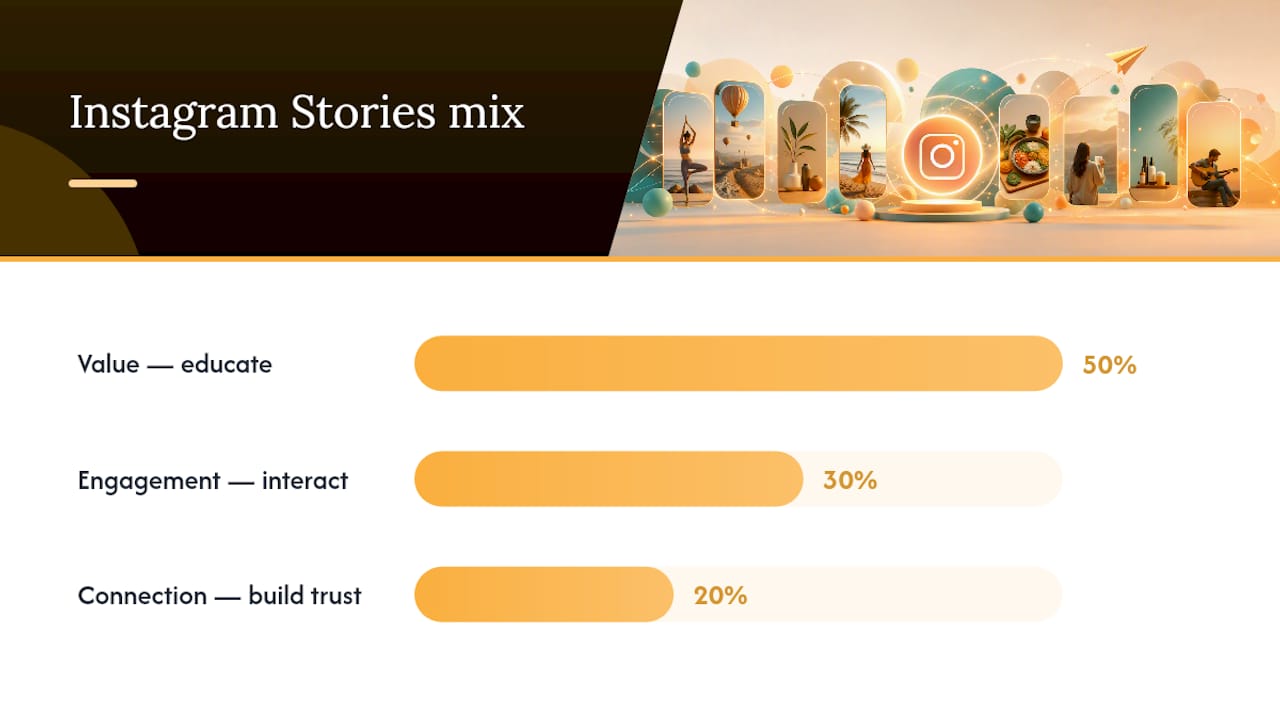
Balance your content mix | Use the 50-30-20 framework: 50% value, 30% engagement, 20% connection. |
Use the 3-slide conversion sequence | Hook, then solution, then a single low-friction CTA drives more replies and clicks. |
Save evergreen Stories to Highlights | Organized Highlights convert profile visitors who check them before your grid. |
Get a calendar built for you | SOL Social Media’s strategy and engagement services handle Story planning, captions, and sticker replies. |
Instagram Stories Ideas Organized by Goal
Every Story you post should do one of three jobs: teach something, spark interaction, or make your audience feel closer to you. Sorting your instagram stories ideas by goal keeps your content balanced instead of randomly cycling between memes and product shots.
Value: teach, inform, and demonstrate
Quick tip carousel. Break one useful tip into 3 slides with bold text overlay. Variant: turn it into a “myth vs. fact” format for the same topic.
Behind the process. Film 20 seconds of how a product gets made or a service gets delivered. Variant: speed it up 2x for a punchier cut.
FAQ answer. Screenshot a real DM question (with permission) and answer it on video. Variant: use the question sticker to collect new ones live.
Price or package breakdown. Show what’s included using text-on-screen bullets. Variant: compare your package to a generic industry example.
Tool or ingredient spotlight. Highlight one thing you use and why it matters. Best for building trust before a launch.
Engagement: interactive sticker ideas that pull replies
Polls remain one of the strongest response drivers on the platform, and effective use of them can lift engagement by 15 to 25 percent.
Poll sticker: “Which color should we restock: A or B?”
Quiz sticker: “Guess how many years we’ve been in business.”
Emoji slider: “How excited are you for [new product]?”
Question box: “What’s the one thing you wish we sold?”
Add Yours sticker: “Show us your setup using our product.”
Countdown sticker: tied to a launch, restock, or event, with a reminder tap built in.
Use polls and quizzes for awareness and product launches; question boxes and Add Yours work better for repeat engagement with existing customers.
Connection: humanize the brand behind the account
Owner intro or re-intro. A 15 second “why I started this” clip, refreshed quarterly.
Team shoutout. Feature one team member’s role and a fun fact.
Day in the life. Loose, unscripted footage of a normal workday.
Milestone share. A anniversary, a review, or a small win worth celebrating.
Gratitude post. Thank a specific customer by name (with permission) for their support.
Ready-to-Use Story Templates and Caption Copy
Copy these directly and swap in your details.
Image plus headline template. Photo of the product, bold headline text at the top (“New This Week”), one line of body text below, sticker at the bottom (poll or link).
Short tutorial template. Slide 1: “Here’s how to [do the thing] in 20 seconds.” Slide 2: the demo, captioned. Slide 3: “Try it and tag us.”
Product demo frame. Slide 1: the problem (“Tired of [pain point]?”). Slide 2: the product solving it, filmed handheld. Slide 3: price or link sticker.
Testimonial frame. Screenshot of a review, text overlay reading “We didn’t pay for this review. We just did the work.”
Caption and sticker copy to plug in directly:
Poll question: “Team coffee or team tea? ☕🍵”
Question box prompt: “Ask us anything about [service]. We’ll answer on Stories tomorrow.”
Casual CTA: “Slide up if you want the recipe 👇”
Professional CTA: “Book your consultation through the link below.”
Keep the casual tone for lifestyle and retail accounts; healthcare and professional service accounts should lean on the formal CTA style throughout their sequence, not just the final slide.
How to Convert Story Viewers Into Customers
A 3 slide sequence turns casual viewers into leads more reliably than a single hard sell. Here is the formula:
Slide 1: Hook or value. State a problem or a fact that stops the scroll. Example: “Most people don’t know their AC filter should be changed monthly.”
Slide 2: Solution or demonstration. Show the product or service solving that exact problem. Example: a 10 second clip of the filter swap with a price sticker overlay.
Slide 3: Low friction CTA. One clear action. Example, product: “Tap to shop the filter bundle.” Example, service booking: “DM us ‘BOOK’ and we’ll send you three open time slots.”
Pro Tip: Use link stickers when a Story is getting steady taps and views already, since that engagement signals the algorithm to show it to more of your audience. Switch to a DM prompt when you want a real conversation, like booking a consultation, since replies and DMs carry more ranking weight than link taps alone.
Production Rules That Keep Viewers Watching
Completion rate lives and dies on a handful of production choices, not on how clever the idea is.
Keep video segments to 20 to 30 seconds each; longer clips lose viewers mid-frame.
Add captions to every video slide. Most people watch with sound off.
Use one bold headline per slide instead of paragraphs of text.
Post natively from the Instagram app to avoid watermarks and compression loss from third-party apps.
Cap sequences at 3 to 7 frames. Batch related slides together instead of scattering one idea across the whole day.
Use link stickers sparingly. One clear CTA per sequence beats three competing ones.
Sequences of 1 to 3 frames hold a 75 percent completion rate, and that number drops fast once a sequence stretches into double digits. Video also tends to outperform static images on reach, so lean toward motion when you have the choice.
A Weekly Stories Calendar You Can Copy
The 50-30-20 framework splits your week into 50% value, 30% engagement, and 20% connection content. That ratio keeps you from either lecturing your audience nonstop or turning your feed into a nonstop popularity contest.
Sunday: Q&A using the question box sticker.
Monday: Value post, a tip or tutorial.
Tuesday: Engagement post, a poll or quiz.
Wednesday: Product or service highlight (value).
Thursday: Behind the scenes or team shoutout (connection).
Friday: Engagement post, Add Yours or emoji slider.
Saturday: Customer feature or gratitude post (connection).
Aim for 5 to 7 Stories per day, batched into one or two sequences rather than spread thin.
Post during the hours your specific audience is most active. A first burst of views in the initial window gives your next Story a ranking boost.
Build your content pillars once, then reuse the same skeleton weekly and just swap the specifics.
Turning User-Generated Content Into Story Fuel
Customer photos and tags solve your two biggest Story problems at once: they fill your calendar and they read as more trustworthy than anything you’d create yourself.

Ask for permission before reposting, even when a customer publicly tags you. A quick DM (“Mind if we share this?”) takes ten seconds and avoids awkward follow ups. Once you have it, repost with a thank you sticker and their handle visible, not buried in tiny text.
Run a recurring prompt to keep submissions coming. An Add Yours sticker asking customers to show how they use your product turns into a running thread you can pull from for weeks. A hair salon might ask clients to post their new cut with a branded sticker; a bakery might ask for “plate shots” of the day’s order. Either way, you are not inventing new content, you are curating what already exists.
Rotate user-generated content into your value and connection slots rather than treating it as filler. A genuine customer testimonial slide does more for trust than a polished ad ever will, and it costs you nothing but a follow-up message.
Using Highlights as Evergreen Story Assets
Highlights are where a good Story goes to keep working long after it disappears from your grid. Instead of letting a strong tutorial or FAQ answer vanish after 24 hours, save it into a labeled Highlight so profile visitors can find it on day one or day 300.

Organize Highlights by what a new visitor actually needs: one for FAQs, one for reviews or testimonials, one for your process or “how it works,” and one for current promotions. Keep the covers visually consistent, using the same font or color treatment, so your profile looks intentional rather than thrown together.
Well-organized Highlights function as a high-conversion tool for profile visitors, since someone who lands on your profile from a tag or search often checks Highlights before they check your grid. Update them quarterly. A Highlight full of an old promotion or an outdated price is worse than no Highlight at all.
When to Post for Maximum Story Reach
Instagram ranks Stories in each follower’s tray based on relationship strength, past interactions, viewing history, and recency, not by strict chronological order. That means timing still matters, but less for beating an algorithm and more for catching your specific audience while they’re actually scrolling.
Test three windows for your account: early morning commute hours, the midday lunch lull, and evening wind down between 7 and 9 PM. Retail and lifestyle accounts often see stronger response in the evening; service businesses like healthcare practices tend to get more replies during business hours when clients are already thinking about appointments.
Whatever window performs best, post consistently in it. A Story posted at a time your audience is active gets an early wave of views and replies, and that early activity feeds the same ranking signals that decide whether your next Story shows up near the top of someone’s tray. Sporadic posting at random hours never lets you collect enough data to know your actual best window.
Pairing Stories With Reels and Feed Posts
Stories work best as the connective tissue between your bigger content pieces, not as a standalone channel. A Reel drives new reach, a feed post builds your permanent portfolio, and a Story turns both into a conversation.
Post a Reel, then use a Story a few hours later to ask “Did you catch our new Reel?” with a link sticker back to it. This gives the Reel a second wave of traffic from people who missed it in their main feed, and it gives you an easy, low-effort Story slide. The reverse works too: tease an upcoming feed post or Reel with a countdown sticker the day before it goes live.
For product launches specifically, sequence all three: a feed post announcing the launch, a Reel showing the product in action, and Stories filling the gaps with polls, countdowns, and behind the scenes footage in the days around it. Readers who check your posting frequency alongside a Story calendar tend to build the most consistent rhythm, since the two features are meant to reinforce each other rather than compete for the same content.
Why Stories Are a Relationship Channel, Not a Reach Play
Stories exist to deepen relationships with people who already follow you, and treating them as a pure reach tool misses the point. Every poll answer and DM reply is a small trust deposit, and those deposits compound into the repeat engagement that actually drives sales. That belief shapes how SOL Social Media builds Story strategy for clients: fewer slides chasing views, more slides inviting a reply.
Let SOL Social Media Build Your Stories Calendar
Reading this list is one thing. Posting six Stories a day, every day, while running a business is another. SOL Social Media handles that gap for small businesses that would rather spend their time serving customers than filming behind-the-scenes clips at 9 PM.

Our social media strategy services build your 50-30-20 calendar, write your captions in your actual voice, and plan your content pillars so you’re never guessing what to post next. If replies and DMs are where your Stories are falling flat, our social media engagement services handle the sticker responses and community replies that keep your account ranking well in followers’ trays. Reach out for a consultation and we’ll map out what your Stories calendar could look like within the first week.
Sources
FAQ
How do I make my Instagram Stories more interesting?
Mix video with captions, keep sequences under 7 frames, and add an interactive sticker like a poll or question box to every sequence to invite a reply.
What are some cool Instagram Story ideas?
Try a countdown to a launch, an Add Yours sticker for customer photos, a quick tutorial split across 3 slides, or a quiz testing followers on a fun fact about your business.
What should I post on my Instagram Story?
Rotate between value content like tips and demos, engagement content like polls and quizzes, and connection content like team shoutouts and gratitude posts, following roughly a 50-30-20 split.
How often should I post Instagram Stories?
Posting 5 to 7 Stories per day in short batched sequences keeps completion rates high and maintains visibility without overwhelming your audience.
Can SOL Social Media help plan my Stories content?
Yes. SOL Social Media builds custom Stories calendars, writes captions in your brand voice, and manages sticker replies through its strategy and engagement services.
Recommended
Comments