


Lead With One Detail: Instagram Caption Writing for Small Businesses

Write your hook first: one concrete, verifiable detail placed before the 125-character preview cutoff, then build out the rest using a four-part formula (Hook → Context → Insight → CTA). Instagram allows up to 2,200 characters per caption, but almost nobody reads past what shows before the “more” link, so the detail you lead with is the whole game. Skip the vague, feel-good opener and start with a fact your reader can picture right now.
TL;DR:
Using a specific, verifiable detail in the first 125 characters significantly increases the likelihood that your caption will be read and engaged with.
The caption’s crucial components are a concrete hook, brief context, a unique insight, and a single clear call to action,Edit the hook and CTA meticulously for maximum impact.
Focus on 5 to 10 niche-specific hashtags rather than the maximum 30, as targeted tags attract more relevant audiences and improve reach.
AI-generated captions serve as useful drafts but require manual editing of the hook and CTA to avoid generic tone and better reflect your brand voice.
Verifying character count inside the actual publishing tool is essential, especially for emojis and hidden characters that can inflate limits and cause publish failures.
The Instagram Caption Formula That Actually Converts
Most captions fail before the third sentence because they open with mood instead of substance. The fix is a four-part structure that works whether you’re writing for a boutique, a clinic, or a contractor: Hook, Context, Insight, CTA.
The Hook is the first line, and it has to survive Instagram’s roughly 125-character preview window before the feed truncates it with “more.” A hook that says “Feeling grateful today” gives the reader nothing to tap for. A hook that says “We sold out of the oat milk latte in four hours” gives them a reason to keep reading. That gap between vague sentiment and a specific claim is what separates captions people scroll past from captions people stop for.
Context follows the hook with the “why” or “what happened.” Insight is where you add the angle only your brand can offer, a lesson, a behind-the-scenes fact, or a small piece of advice. CTA closes with exactly one action.
That last rule matters more than most caption writers realize. A tested caption formula built around hook-first structure and post-type-specific length consistently outperforms captions with no clear order, and part of that comes down to discipline in the close.
Write the hook as a standalone sentence, then check if it works without the rest of the caption.
Use one line break after the hook so it visually separates from the body text.
Include exactly one CTA. Two competing asks (“comment below AND check the link AND tag a friend”) split attention and lower response rates.
Save your softest, most personal line for the Insight section, not the Hook.
Pro Tip: Read only your first line out loud, on its own. If it doesn’t make you want to know what happens next, it’s not a hook yet, it’s a caption fragment.
How Do You Actually Write a Caption, Step By Step?
Writing a caption well isn’t a creative burst, it’s a short, repeatable process. Here’s the sequence that keeps captions consistent even when five different people are posting for the same brand.
Pick one verifiable detail first. Before you write a single word, choose the fact the caption will be built around: a number sold, a specific ingredient, an hour of operation, a customer’s actual question. Testing across small-business accounts found captions anchored to a single concrete detail consistently beat generic personal or marketing tones, because specifics make a caption harder to skip and easier to reply to.
Draft the hook using that detail, and put it first. Not third. Not after a greeting. First.
Write Context and Insight next, in that order, keeping sentences short enough to read in one breath.
Write the CTA last, and make it match the goal of the post (comment, save, click, share).
Edit the hook and CTA by hand, even if a template or AI tool generated the draft. These two lines carry almost all the performance weight, so they deserve a second, human pass every time.
Batch and route for approval. If more than one person touches your content calendar, run captions through a shared doc or scheduler before publishing, and have one person check character counts and hashtag counts before anything goes live.
For teams scheduling in bulk, keep a short editing checklist taped to the workflow: hook confirmed above the fold, one CTA only, detail register used instead of generic language, and character count verified inside the actual publishing tool, not just a word processor. A guide to writing captions that convert within that 125-character preview window is worth bookmarking if your team publishes daily.
What Are Instagram’s Actual Caption and Hashtag Limits?
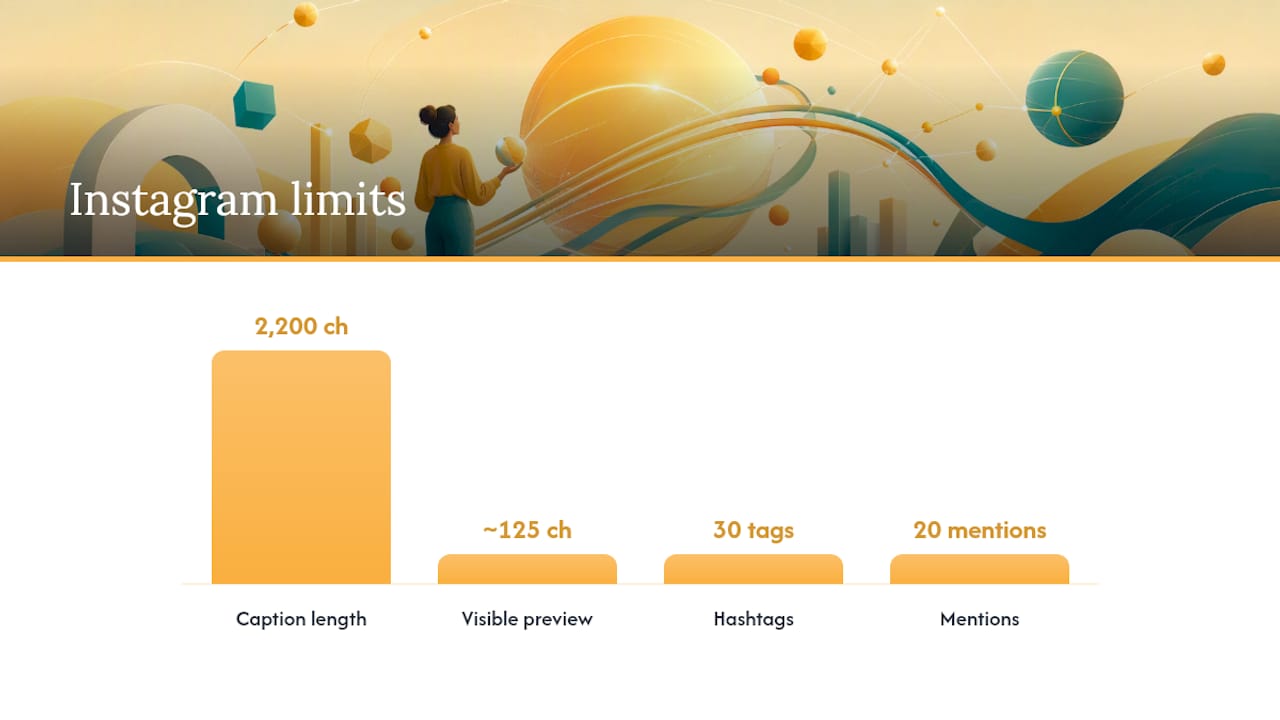
Instagram caps captions at 2,200 characters, but the feed only shows roughly the first 125 characters before the “more” link appears. That gap between the hard limit and the visible preview is the single most important technical fact in caption writing. Everything that matters has to happen inside that first line and a half.
Hashtags are capped at 30 per post, but capacity isn’t a target. Industry guidance for 2026 favors 5 to 10 hyper-specific tags over a wall of generic ones, since niche tags reach people actually searching that topic rather than scrolling a saturated hashtag feed. Instagram also limits mentions to 20 per caption.
Limit type | Cap | Practical guidance |
Caption length | 2,200 characters | Use full range for carousels or storytelling posts |
Visible preview | ~125 characters | Front-load the hook and detail here |
Scroll-stopping post sweet spot | 138–150 characters | Ideal for Reels and single-image posts meant to be fully visible |
Hashtags | 30 max | Use 5–10 specific tags, not the max |
Mentions | 20 max | Reserve for genuine collaborators or tagged customers |
A single fact worth memorizing: the 125-character preview, not the 2,200-character cap, is what determines whether your caption gets read at all.
One operational note before you publish: emoji encoding and hidden characters can inflate your character count inside a scheduler, sometimes triggering publish failures that don’t show up until you hit send. Always verify the count inside the actual publishing tool, not a separate document.
Can AI Write Instagram Captions Without Sounding Generic?
Yes, but only if you treat the AI output as a first draft, not a finished caption. AI caption generators are genuinely useful for producing structure and variation quickly, but the highest-leverage edit is always rewriting the hook and CTA by hand, since those two lines are where generic language does the most damage.
The fix starts before you even open the tool. Feed it your actual facts, not a vague topic.
Instead of “Write a caption about our new product,” try “Write three caption drafts using this exact detail: we hand-stitch every bag in a 200-square-foot studio in Denver, and each one takes six hours.”
Instead of “Make it sound exciting,” try “Use a confident, direct tone, no exclamation points, and end with one specific question for the reader to answer in comments.”
Instead of accepting the first draft, ask for five hook variations only, then pick or rewrite the strongest one yourself.
A tool like Sonance AI’s content workflow guidance makes a similar point about AI output: speed is real, but editorial oversight is what keeps content from sounding interchangeable with every other brand using the same prompt.
Pro Tip: Never publish an AI-generated caption without changing the first and last sentence. Those two lines are almost always where the “AI voice” shows up most, flat, safe, and missing your brand’s actual details.
Before publishing anything AI-assisted, run it against a short checklist: does the hook contain a specific, verifiable fact? Is there exactly one CTA? Would a customer recognize this brand’s voice if the logo were removed? If any answer is no, edit before you post.
Caption Templates You Can Adapt by Post Type
Different post formats call for different caption lengths and structures. A Reel caption needs to work even if nobody taps “more.” A carousel can carry a longer story because the swipe itself holds attention.
Single image post: “[Specific detail]. [One-line context]. [Question CTA].” Example: “We restocked the walnut cutting boards this morning. Each one comes from a single fallen tree in Sonoma County. Which finish do you want to see next?”
Reel: Keep the whole caption inside the 138–150 character sweet spot so it stays fully visible without truncation. Example: “Six hours, one espresso machine, zero shortcuts. Tap to watch the pull that almost went wrong.”
Carousel: Use the full length allowance for a short story arc across slides. Open with the hook, use Context and Insight across the middle, and land the CTA on the final line, matched to your final slide.
Product post: Lead with a number or material fact, not an adjective. Before: “This candle smells amazing and burns forever.” After: “This candle burns for 60 hours and uses a cotton wick with zero lead core.”
Announcement post: State the news in the first six words, then explain the “why” in Context. Example: “We’re open Sundays starting this week. Enough of you asked that we rearranged the whole schedule.”
Tone should shift by post type too. Product posts can run a little more matter-of-fact, while announcements and behind-the-scenes Reels have room for personality, as long as the hook still leads with something real.
What Should Your Team Check Before Every Caption Goes Live?
Publishing consistently across a small team requires more discipline than talent. A short, enforced checklist prevents the most common failure points before they cost you engagement or a rejected post.
Verify character count inside the scheduler, not a word processor, since emoji encoding can shift the real count.
Confirm the hashtag count is under 30 and ideally sits closer to 5 to 10 specific tags rather than broad, high-competition ones.
Assign one editor per batch if more than one person drafts captions, so voice and formatting stay consistent across a week’s worth of posts.
Run hook A/B tests on similar posts by swapping only the first line and comparing saves, comments, and reach after 48 hours.
Track qualitative signals, not just likes. Comments and saves tend to signal genuine interest more reliably than passive likes.
Batching works best when drafting and approval happen on separate days. Draft on Monday, edit hooks and CTAs on Tuesday, schedule Wednesday. That gap gives you enough distance to catch a flat hook before it goes live.
Where SOL Social Media’s Experience Changes the Advice
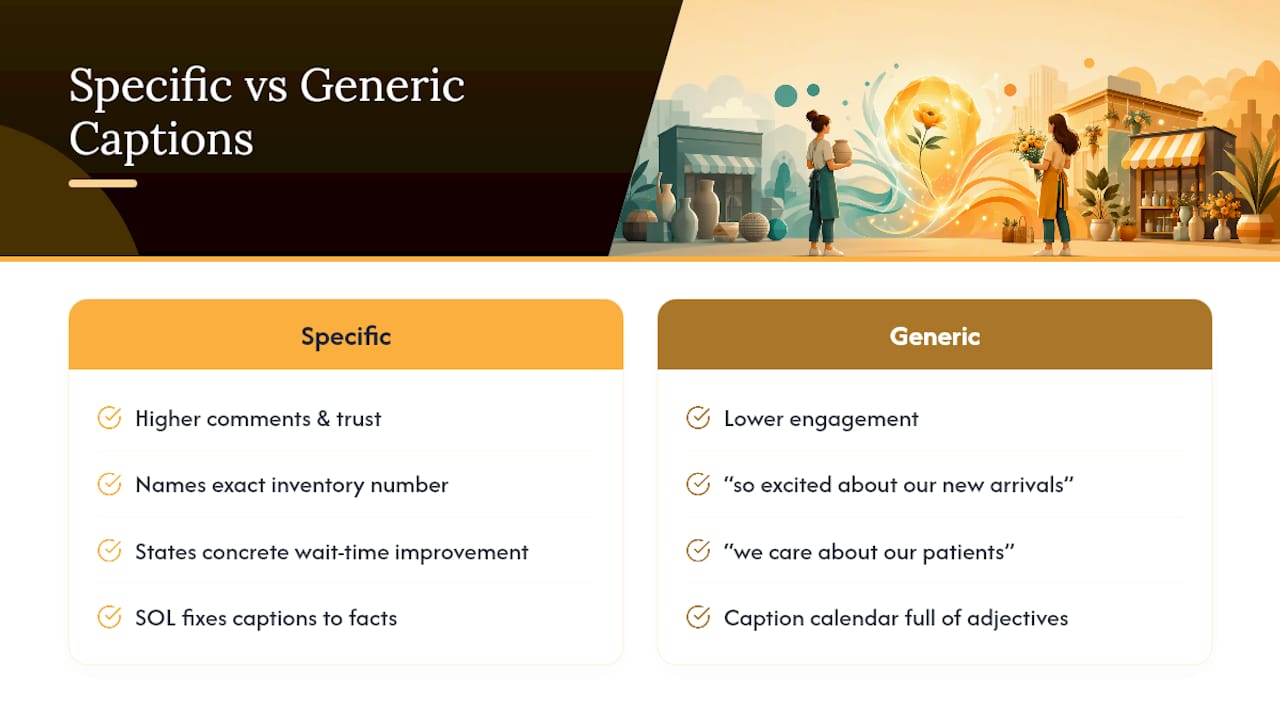
Small businesses across retail and healthcare show a pattern: the caption that performs is almost never the most polished one, it’s the most specific one. A retail client who names an exact inventory number gets more comments than one who writes “so excited about our new arrivals.” A healthcare practice that states an actual wait-time improvement builds more trust than one that says “we care about our patients.”
That’s the detail register in practice, not a theory. We’ve seen it move engagement in measurable, repeatable ways across client accounts, and it’s the first thing we correct when a business owner hands us a caption calendar full of adjectives instead of facts. For more on how visible caption length affects what customers actually read, see our breakdown of the 125-character preview window.
— SOL Social Media
How SOL Social Media Can Help You Write Better Captions
SOL Social Media is the alternative to guessing at your own caption strategy, or handing it to a template-based tool that strips out your brand’s actual voice. Every caption we write for a client runs through the same discipline covered above: one verifiable detail, a hook that survives the 125-character preview, and real human copywriting instead of AI-flattened language dressed up as personality.

If you’d rather not build this system yourself, Social Media Content Creation covers ongoing caption writing built around your actual brand facts, not generic prompts. For businesses that want the full framework behind their content calendar, Social Media Strategy builds caption formulas into a longer-term plan. Teams that want to keep writing captions in-house but need a faster start can book Customized Social Media Training to learn the hook-first workflow directly.
Pricing details for Monthly Unlimited and Weekly Consulting plans are listed on our site. The next step is simple: pick the plan that matches how much of this you want to hand off, and book a consultation to see how it fits your account.
Sources
FAQ
What Should You Write in an Instagram Caption?
Start with one specific, verifiable detail, a number, material, or fact, placed in the first line so it survives the roughly 125-character preview before Instagram truncates it. Follow with brief context, one insight or angle, and a single clear call to action.
How Do I Write My Own Caption Step By Step?
Pick the one detail you want the post to be about, write the hook around it first, add context and insight, then close with exactly one CTA. Edit the hook and CTA by hand even if you used a template or AI tool to generate the first draft.
What Are Some Examples of Good Caption Writing?
Strong captions lead with a fact instead of a feeling: “We sold out of the oat milk latte in four hours” beats “Feeling so grateful today.” The detail register consistently outperformed vaguer personal or marketing tones in testing across small-business accounts.
Can AI Actually Write Good Instagram Captions?
Yes, AI caption generators are useful for producing structure and multiple draft variations quickly, but the strongest results come from editing the hook and CTA by hand afterward. Supplying the AI with real brand details, not vague topics, prevents the flat, generic tone that untouched AI drafts tend to produce.
How Many Hashtags Should I Use on Instagram?
Instagram allows up to 30 hashtags per post, but 5 to 10 hyper-specific tags perform better than a large, generic set. Specific tags reach people actively searching that niche rather than getting buried in a saturated feed.
Recommended
Comments