


How to Curate Content on Social Media: A 2026 Guide

Content curation on social media is the practice of finding, selecting, and sharing high-quality third-party content with your audience, paired with your own commentary or context. It is not reposting for the sake of filling a feed. Done well, it positions you as a trusted filter in your industry.
Start here: pick 3 reliable sources in your niche, save one piece of content from each using a tool like Pocket or Feedly, and schedule a week of curated posts with a one-sentence takeaway added to each.
Your three immediate actions:
Save articles and posts with a browser extension (Pocket’s browser clipper or Feedly’s save button work well)
Draft a short caption for each saved piece that adds your perspective
Load those posts into a scheduler like Buffer or Later for the week ahead
Key Takeaways
Consistent content curation on social media requires a defined content mix, a weekly batching workflow, and platform-specific formatting to build real audience trust and engagement.
Point | Details |
Start with a content mix rule | The 5:3:2 rule (5 curated, 3 original, 2 personal/promotional per 10 posts) gives you a practical starting balance. |
Batch once a week | A single 30-minute discovery session plus one caption-writing block saves hours and keeps your voice consistent. |
Always add original context | Every curated post needs a caption that adds your perspective; bare link shares rarely perform well on any platform. |
Track saves and shares first | These metrics signal genuine audience value and drive organic reach more reliably than likes or impressions alone. |
SOL Social Media | Offers full-service curation strategy, content management, and training for small businesses that need consistent results without the guesswork. |
What content curation on social media actually means
Curation, creation, and aggregation are three different activities, and mixing them up leads to a weak content strategy.
Content curation is human-selected content from outside sources, shared with added commentary that makes it relevant to your specific audience. According to Buffer’s guide to content curation, the key distinction is that curation requires a human filter and original context, not just a repost.
Content creation is original material you produce yourself: blog posts, graphics, videos, or original insights. It takes more time but builds your own intellectual property.
Content aggregation is automated feed collection, like an RSS reader pulling everything from a topic. It requires no editorial judgment and delivers no added value on its own.
Here is how each looks in practice:
Solo creator: Curates a research article on Instagram with a caption explaining how it changed their approach, rather than just sharing the link
Small business: Shares an industry news piece on LinkedIn with two sentences on what it means for their customers
Community manager: Reposts a member’s success story on Facebook with a congratulatory note that reinforces the brand’s values
The line between curation and aggregation is editorial judgment. Aggregation is what an algorithm does. Curation is what a thoughtful person does.
Why curating content builds real authority
The benefits of content curation go beyond saving time, though that alone is significant for any small business owner managing social media alongside everything else.
Saves production time: You do not need to create every piece of content from scratch. Curating three to five posts per week frees up hours for higher-value original work.
Builds topical authority: Consistently sharing credible, relevant content signals to your audience that you know your industry deeply.
Diversifies your voice: Bringing in outside perspectives prevents your feed from feeling like a one-note broadcast.
Supports relationship building: Tagging and crediting creators opens doors to collaborations and cross-promotion.
Primes audiences for promotion: A deliberate content mix of curated and original posts builds the trust that makes your promotional content land better.
A well-curated feed tends to earn stronger saves and shares than purely promotional content, because it signals generosity rather than self-interest. Saves and shares are the metrics that tell platform algorithms your content is worth distributing further.
Pro Tip: Use curated posts to test which topics your audience responds to before investing in original content on the same theme. High engagement on a curated piece is a green light to go deeper with your own take.
Best practices for curating social content step by step
A repeatable process keeps curation from becoming a random activity. Here is a five-step workflow you can use every week.
Discover: Set up Feedly or Google Alerts with three to five keyword phrases relevant to your niche. Check your feeds once daily, not continuously. You are looking for content that is accurate, recent, and genuinely useful to your audience.
Evaluate: Before saving anything, run a quick three-question check: Is the source credible? Is the information current? Does this connect to a content pillar your audience cares about? If the answer to any of these is no, skip it. Defining your content pillars before you start curating makes this filter much faster.
Add value: Write a caption that does one of the following: summarizes the key point in one sentence, shares your honest reaction, or draws a direct connection to your audience’s situation. Platforms and audiences in 2026 expect original insight alongside shared content, not a bare link.
Tag and attribute: Always credit the original creator by name or handle. Link to the source. Never copy the full text of an article into your post. A brief quote with attribution is fine; reproducing the whole piece is not.
Follow up: Check back on curated posts 24–48 hours after publishing. Reply to comments, thank people who share, and note which topics generated the most conversation. That data shapes next week’s curation choices.
Pro Tip: Set a personal editorial standard: only share content you would genuinely recommend to a friend in your industry. If you would not stake your reputation on it, do not post it.
Content mix rules and a sample weekly posting plan
The 5:3:2 rule is the most practical starting framework for most small teams. For every 10 posts:
5 are curated content from trusted outside sources
3 are original content you created
2 are human, personal, or lightly promotional posts
Choose 5:3:2 if you are building a content habit from scratch. Shift toward 70/20/10 once you have a consistent original content engine running.
Sample weekly plan (5 posts/week):
Monday: Curated industry article with your commentary (LinkedIn or Facebook)
Tuesday: Original tip or insight post (Instagram or LinkedIn)
Wednesday: Curated visual or infographic with a short caption (Instagram or Pinterest)
Thursday: Original behind-the-scenes or educational post
Friday: Human/personal post or a light promotional piece
Platform posting frequency guidance:
Platform | Suggested cadence | Best content type for curation |
3–5 posts/week | Infographics, carousels, short video clips | |
2–5 posts/week | Articles, data-backed insights, industry news | |
X (Twitter) | 3–4 posts/day | News links, quick takes, threads |
3–5 posts/week | Articles, videos, community discussions | |
TikTok | 3–5 posts/week | Short reaction or commentary videos |
5–10 pins/week | Visual content, how-to graphics |
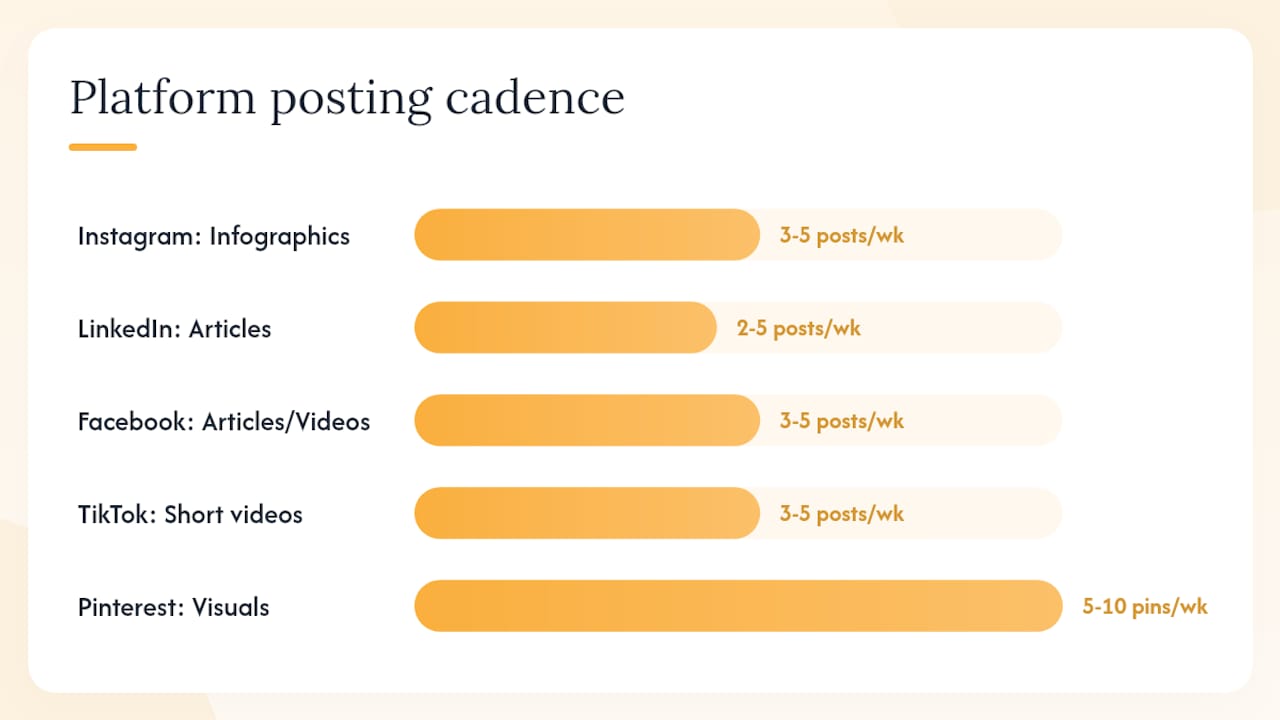
These cadences come from Hootsuite’s content planning guidance, which also recommends building a documented content calendar before committing to any posting schedule.
How to batch-curate and schedule posts efficiently
Batching is the single biggest time-saver in a curation workflow. Instead of hunting for content and writing captions daily, you block one focused session per week and handle everything at once.
Set a discovery timebox: Spend 30 minutes reviewing your Feedly feeds, Pocket saves, and Google Alerts. Do not write captions yet. Just flag the best five to seven pieces.
Collect and tag: Move flagged content into a simple spreadsheet or a tool like Notion. Tag each piece by platform, content pillar, and content type (curated, original, promotional).
Draft captions in bulk: Write all captions in one sitting. This keeps your voice consistent and speeds up the process because you are in “writing mode” rather than switching between research and writing.
Schedule: Load posts into Buffer, Hootsuite, or Later. Use their optimal-time suggestions as a starting point, then adjust based on your own audience’s historical engagement patterns. A content calendar workflow keeps everything organized across platforms.
Monitor and respond: Check scheduled posts after they go live. Engagement in the first hour matters on most platforms, so be available to reply.
Tools that support this workflow:
Pocket or Feedly: Save and organize discovered content before drafting
Google Alerts: Passive discovery for keyword-triggered news
Buffer, Hootsuite, or Later: Schedule across multiple platforms from one dashboard
Pro Tip: Keep a “break glass” folder of three to five evergreen curated posts that are always ready to publish. When a real-time event disrupts your schedule, you have a backup that still adds value.
Which tools should you use for discovery, organization, and scheduling?
The right curation stack depends on whether you are working solo or with a small team. Here is a breakdown of each tool and where it fits.
Discovery and collection tools:
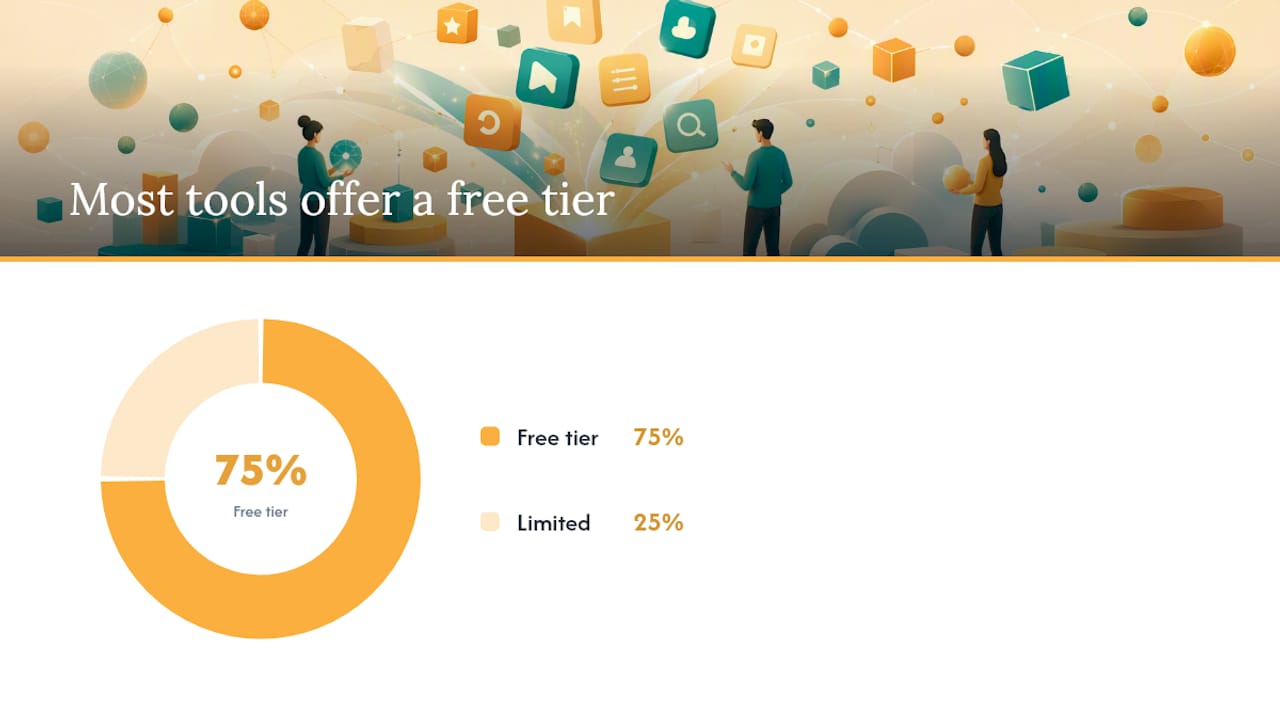
Feedly: An RSS-based feed reader that aggregates content from blogs, publications, and news sources you choose. Best for daily discovery across a defined set of trusted sources. The free tier covers up to 100 sources.
BuzzSumo: Identifies the most-shared content on any topic or domain. Best for finding proven, high-engagement pieces rather than just recent ones. Paid plans start at a higher price point, but the insight into what actually resonates is worth it for teams managing multiple accounts.
Flipboard: A visual magazine-style reader that surfaces content by topic. Good for discovering content you did not know to look for, especially in lifestyle and consumer categories.
Google Alerts: Free keyword-triggered email alerts for new web content. Best as a passive background layer, not a primary discovery tool. Set alerts for your brand name, key competitors, and two or three industry terms.
Pocket: A save-for-later tool with a browser extension and mobile app. Best for capturing content on the go and organizing it before your batching session.
Scheduling and publishing tools:
Buffer: Clean, simple interface for scheduling across Instagram, LinkedIn, Facebook, X, and Pinterest. Free tier covers three channels. Strong for solo operators and small teams who want a no-fuss scheduler.
Hootsuite: More feature-rich than Buffer, with team collaboration, approval workflows, and deeper analytics. Better suited to small teams where more than one person handles content. Paid plans required for most team features.
Later: Particularly strong for Instagram and Pinterest with a visual content calendar. The link-in-bio tool makes it easy to drive traffic from curated posts. Free tier available.
Two sample stacks:
Solo operator: Google Alerts (passive discovery) + Pocket (save on the go) + Feedly (daily review) + Buffer (schedule)
Small team: Feedly + BuzzSumo (discovery) + Pocket (collection) + Hootsuite (schedule, collaborate, approve)
Tool | Primary function | Best for | Free tier |
Feedly | Feed reader / discovery | Daily source monitoring | Yes (up to 100 sources) |
BuzzSumo | Content research / trending | Finding high-engagement pieces | Limited trial |
Visual topic discovery | Consumer/lifestyle niches | Yes | |
Google Alerts | Keyword monitoring | Passive brand/topic alerts | Yes (free) |
Save and organize | On-the-go content capture | Yes | |
Buffer | Social scheduling | Solo operators, 1–3 channels | Yes (3 channels) |
Hootsuite | Social scheduling + team tools | Small teams, multi-platform | Limited free plan |
Later | Visual scheduling | Instagram and Pinterest focus | Yes |
How to write captions that make curated posts worth reading
Sharing a link with no context is the fastest way to train your audience to scroll past your posts. Every curated piece needs a caption that earns the click.
Four caption frameworks that work:
TL;DR: “This article covers X. The one thing worth your time: [key insight].”
Why it matters: “Here is why this matters for [your audience’s specific situation].”
Contrarian take: “Most people read this and think X. We think the more interesting point is Y.”
Single actionable takeaway: “If you read nothing else this week, take away this: [one sentence].”
Dos and don’ts for curated captions:
Do credit the original creator by name or handle in every post
Do link to the original source, not a summary or aggregator
Do keep your caption focused on one point, not a summary of the whole piece
Do not copy-paste paragraphs from the article into your caption
Do not share content without reading it first, even if the headline looks great
Do not use the same caption template for every post; vary the angle
According to ethical curation best practices, always tag the source and link to the original. Avoid reproducing full content without explicit permission from the creator.
Pro Tip: Align curated posts to a specific stage of your funnel. A piece about “how to choose a social media agency” belongs at the awareness stage. A case study about results belongs closer to the decision stage. Intentional placement makes curation part of your strategy, not just content filler.
Metrics that tell you whether your curation is working
Tracking the right numbers keeps your curation strategy honest. Different goals call for different metrics.
By goal:
Awareness: Track reach and impressions. Are curated posts expanding your audience beyond your existing followers?
Engagement: Watch saves, shares, and comments. Saves signal that your audience found the content genuinely useful. Shares extend your reach organically.
Referral traffic: Use UTM parameters on links in your bio or link-in-bio tools to measure how many clicks curated posts drive to your website.
Downstream conversions: If you are using curation to warm up an audience before a promotion, track whether followers who engaged with curated content convert at a higher rate.
Running small experiments:
Test two caption styles on the same piece of content posted at different times (TL;DR vs. contrarian take) and compare engagement rates.
Vary your content mix ratio for two weeks (more curated vs. more original) and compare reach and saves.
Test posting times by scheduling the same content type at 8 AM versus 12 PM and tracking which slot performs better for your specific audience.
Run source-level tests: track whether content from one publication consistently outperforms another with your audience, then prioritize that source.
The goal is not to optimize for vanity metrics. Focus on saves and shares for organic growth, referral clicks for traffic, and comment quality for community health.
Platform-specific tips for adapting curated content
The same piece of content needs a different treatment on each platform. Format and context matter as much as the content itself.
LinkedIn: Share data-backed articles or industry reports. Add two to three sentences explaining the business implication for your audience. Tag the author or publication directly. Long-form commentary performs well here because LinkedIn’s algorithm rewards dwell time and comments.
X (Twitter): Use threads to break down a curated article into five to seven key points. Credit the source in the first tweet. Threads drive more engagement than a single link post because they give readers value without leaving the platform.
Instagram: Turn a curated insight into a carousel. Slide one states the hook, slides two through five break down the key points, and the final slide credits the source and adds your CTA. Instagram’s algorithm favors saves and shares, so educational carousels consistently outperform link posts.
Facebook: Share articles with a question in the caption to prompt discussion. Facebook groups are particularly strong for curated content because members expect to share and discuss outside resources.
TikTok: Record a short reaction or commentary video responding to a curated piece. Watch time and completion rate drive TikTok’s algorithm, so keep it under 60 seconds and get to the point in the first three seconds.
Pinterest: Pin infographics and visual summaries from curated articles. Write keyword-rich pin descriptions because Pinterest functions as a search engine. Curated visual content here supports discoverability long after the original post date.
YouTube: Create a short “roundup” video summarizing three to five curated pieces on a theme. Add your commentary on each. YouTube prioritizes watch time and click-through rate, so a clear title and thumbnail that promise a specific takeaway are non-negotiable.
Pro Tip: Pinterest and YouTube have longer content shelf lives than other platforms. Curated posts on these channels can drive traffic for months, making them worth extra effort on captions and descriptions.
Legal considerations and copyright compliance
Curation does not give you a free pass on copyright. Sharing a link to someone else’s article is generally fine. Reproducing their content without permission is not.
What is generally safe:
Sharing a link with a short excerpt (one to two sentences) and attribution
Embedding a public social post using the platform’s native share or embed feature
Quoting a brief passage with clear attribution and a link to the original
What creates legal risk:
Copying an entire article or substantial portion into your post or caption
Downloading and reposting images, graphics, or videos without permission or a license
Removing watermarks or credits from visual content
Using content under a Creative Commons license in ways that violate its specific terms (some CC licenses prohibit commercial use)
The fair use doctrine in U.S. copyright law allows limited use of copyrighted material for commentary, criticism, or education, but it is not a blanket permission. Fair use is evaluated case by case based on factors including the purpose of the use, the nature of the original work, and the amount used. When in doubt, ask for permission or link rather than reproduce.
Best practice: Always credit the creator, link to the original source, and use only what you need to make your point. If you want to use an image or video beyond a native platform share, check the license or contact the creator directly.
Building relationships with original content creators
Curation is one of the most underused relationship-building tools in social media. When you consistently share and credit someone’s work, they notice.
Practical strategies:
Tag creators when you share their work. A genuine tag (not a spam mention) puts you on their radar and often earns a reshare, which extends your reach to their audience.
Leave a substantive comment on their original post before or after sharing it. “Great article” is forgettable. A specific observation or question starts a real conversation.
Send a brief direct message when you share their content. One sentence explaining why you found it valuable and who you shared it with is enough. Keep it short and genuine.
Feature creators in roundup posts. A “five voices worth following in [your industry]” post credits multiple creators at once and almost always generates goodwill and reshares.
Engage consistently, not just when you want something. Commenting on, liking, and sharing a creator’s work over several weeks before making any ask builds a real relationship rather than a transactional one.
Over time, these relationships can lead to co-created content, guest posts, podcast appearances, and referrals. Curation, at its best, is a relationship engine that compounds in value the longer you practice it.
When to DIY curation versus hire a manager or trainer
Content curation looks simple until you are three weeks in and the feed has gone quiet because discovery, captioning, and scheduling all slipped. Here is an honest framework for deciding whether to manage it yourself or bring in support.
Signs you should keep it in-house:
You have a clear niche and already know your best sources
You can protect two to three hours per week for batching
You have someone on your team who genuinely enjoys the editorial side
Signs it is time to get help:
You are posting inconsistently because curation keeps getting deprioritized
Your content mix is almost entirely promotional because curated posts feel like extra work
You want to scale to multiple platforms but lack the bandwidth to manage platform-specific formats
You are not tracking any metrics and have no idea what is working
A social media audit is a practical first step before committing to either path. It shows you exactly where the gaps are, which makes the build-vs.-hire decision much clearer.
If the issue is knowledge rather than time, a structured training session can get you or your team up to speed on tools, workflows, and content mix strategy without a long-term commitment. If the issue is capacity, a managed service handles the entire workflow so you can focus on the business.
SOL Social Media handles the curation work for you
Managing a consistent curation workflow across multiple platforms takes real time, editorial judgment, and platform knowledge. Most small business owners have the intent but not the hours.

SOL Social Media builds and manages the entire content workflow for small businesses, from source selection and caption writing to scheduling, engagement monitoring, and monthly performance reporting. Every post reflects your brand’s voice because the work is done by real people, not automated templates. Whether you need a full social media content strategy built from the ground up or consistent social media engagement management that keeps your community active, SOL Social Media delivers results without requiring you to become a content expert. Reach out to discuss what a managed curation plan would look like for your business.
Sources
FAQ
What is content curation in social media?
Content curation on social media is the process of finding, selecting, and sharing relevant third-party content with your audience, paired with your own commentary or context. It differs from aggregation because it requires human editorial judgment and added value, not just automated reposting.
What is the 5:3:2 rule for social media?
The 5:3:2 rule recommends that for every 10 posts, 5 should be curated content from outside sources, 3 should be original content you created, and 2 should be personal or lightly promotional posts. It is a practical starting framework for maintaining a balanced content mix.
What is the 5:3:2 rule on Instagram specifically?
On Instagram, the 5:3:2 framework applies the same way: roughly half your posts can be curated content (infographics, carousels, or short clips from credible sources), three posts should be original, and two can be personal or promotional. Instagram’s algorithm favors saves and shares, so curated educational carousels tend to perform particularly well.
How do you curate your social media content effectively?
Set up discovery tools like Feedly or Google Alerts for your key topics, save strong pieces with Pocket, then batch-write captions once a week that add your original perspective before scheduling through Buffer, Hootsuite, or Later. Always credit the original creator and link to the source.
Which tools work best for content curation on social media?
For discovery, Feedly and Google Alerts cover most needs at no cost. BuzzSumo adds value for finding high-engagement content. For scheduling, Buffer suits solo operators, Hootsuite fits small teams, and Later is the strongest option for Instagram and Pinterest-focused workflows.
Recommended
Comments