


Content Approval Workflow: Fewer Revisions, Faster Sign-Off

A content approval workflow is a defined sequence of review and sign-off steps that a piece of content moves through before it publishes, with named reviewers, set turnaround windows, and a clear record of who approved what. Get this right and you cut revision cycles in half. Get it wrong and every social post, blog draft, or email campaign turns into an email thread nobody can find two weeks later.
Here is what to do this week, before you read another word of theory:
Name one approver and one alternate for each content type (social, blog, email). No committees.
Set one SLA today: give reviewers 24 to 48 hours per stage, and write it down where your team can see it.
Pick one place to log approvals — a shared doc, a project board, or your content management system’s status field. Stop relying on inbox threads.
If you’re a two-person team posting three times a week, you need a lightweight workflow: one reviewer, one channel, done. If you’re running client work, healthcare content, or anything with legal exposure, you need a gated workflow with multiple named roles and a documented audit trail. Most teams overbuild for their risk level or underbuild for it. Match the workflow to what’s actually at stake.
Key Takeaways
A content approval workflow works when it pairs one named final approver per content type with an enforced SLA and a single system of record for tracking status.
Point | Details |
Set one SLA this week | Give each review stage a 24 to 48 hour turnaround window and write it down where the team can see it. |
Name one approver and alternate | Assign a single final decision-maker per content type, plus a backup for when they’re unavailable. |
Pilot Loom on one asset | Record a short walkthrough video with timestamped comments on your next design or campaign review. |
Track revision counts | Watch for rising revisions per asset as an early signal the brief or feedback process needs fixing. |
Get help implementing it | SOL Social Media offers workflow audits and managed setup for small businesses building their first structured approval process. |
What Is a Content Approval Workflow, Really?
A working approval process is built from a small set of components, and skipping any one of them is usually why teams end up stuck in revision loops. Kontent identifies the core pieces every functioning system needs: intake, defined roles, service-level agreements, decision states, and an audit trail.
Here’s what each component does and what happens when it’s missing:
Intake or brief. A structured brief with goals, audience, and constraints prevents reviewers from rejecting work for reasons that should have been settled before drafting started.
Defined content types. Social captions, blog posts, and email campaigns carry different risk levels and need different review depth. Treating them identically wastes reviewer time on low-stakes posts and under-scrutinizes high-stakes ones.
Named reviewers and approvers. Without a specific person attached to each stage, work sits in limbo because nobody feels responsible for moving it forward.
Version control. Reviewers need to know which draft they’re looking at. Without it, feedback gets applied to the wrong version, and old comments resurface on content that’s already been fixed.
Decision states. “Approved,” “needs revision,” and “rejected” need to be distinct, visible statuses, not a verbal “looks good” buried in a chat thread.
SLAs. A stage with no deadline has no deadline, which means it takes exactly as long as your slowest reviewer’s inbox habits allow.
Escalation rules. Someone has final say when reviewers disagree or a stage stalls past its SLA.
Audit log. A record of who approved what and when, which matters enormously if a client or compliance officer asks later.
Low-risk content, like a routine social caption, might only need intake, one approver, and a decision state. High-risk content, like a healthcare claim or a paid legal ad, needs every component including escalation rules and a full audit trail. Map your content types to that risk spectrum before you build anything.
How Do You Build a Content Approval Workflow?
Building a workflow that survives contact with real deadlines takes a specific sequence. Skip steps here and you’ll end up redesigning the whole thing in month two.
Map your content types. List everything you publish: social posts, blog articles, email campaigns, paid ads. Note the volume and risk level of each.
Choose your approval model. Artikle outlines three workable models: single-approver (fast, low friction, best for low-risk content), multi-role gated (slower, higher scrutiny, best for client work or regulated content), and auto-approve-with-exceptions (content publishes automatically unless flagged, best for high-volume, low-risk channels).
Assign roles. Decide who drafts, who reviews, who approves, and who just needs visibility.
Set SLAs per stage. Give each review stage a turnaround window, not just an overall deadline.
Pick your tools. Choose where drafts live, where comments happen, and where approvals get recorded.
Pilot on a small batch. Run the workflow on five to ten real pieces before rolling it out team-wide.
Iterate based on friction points. Fix the stage that stalled, not the whole system.
Two sample flows show how differently this looks depending on stakes:
Compact flow for routine social content:
Draft written and dropped into shared folder
One reviewer approves or requests one revision round
Approved post scheduled for publishing
Six-stage flow for campaigns or regulated content:
Brief approved by strategist
Draft written and internally reviewed by editor
Subject-matter expert checks technical accuracy
Legal or compliance reviews claims
Client or final stakeholder approves
Published version logged with timestamp and approver name
When you pilot a new workflow, run it for two to four weeks and track three things: average time per stage, number of revision rounds per asset, and whether anyone missed an SLA. If a stage consistently blows past its deadline, that’s the one to fix first, not the whole process. Smartsheet’s guide to building approval workflows recommends starting with the stages that have the highest content volume, since that’s where friction shows up fastest.
Who Should Be in the Approval Chain?
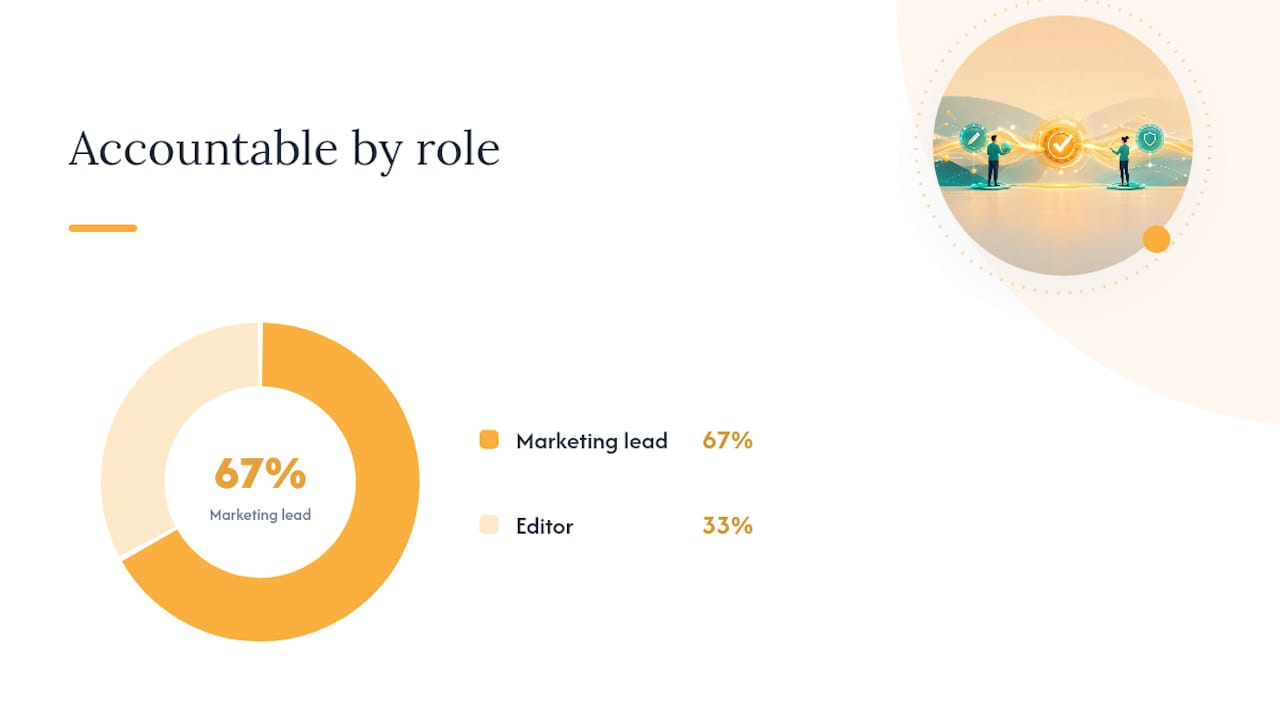
Every stalled approval process has the same root cause: too many people with vague authority and nobody with final say. A RACI structure (Responsible, Accountable, Consulted, Informed) fixes that by assigning exactly one person to “Accountable” for each content type.
Role | Social Posts | Blog Posts | Email Campaigns |
Responsible (creates) | Content creator | Writer | Marketing coordinator |
Accountable (final approver) | Marketing lead | Editor | Marketing lead |
Consulted (reviews) | None or brand lead | Subject-matter expert | Legal/compliance |
Informed (notified) | Team channel | Team channel | Sales team |
For a small team of two to five people, this often collapses to one creator and one approver, with a designated backup approver who steps in when the primary is unavailable. For multi-stakeholder projects involving an agency, a client, and legal counsel, the structure needs to separate internal review from client-facing review entirely. Getsagely’s approval handbook makes a strong case for never sending unreviewed work to a client, because doing so turns the client into your editor and erodes their confidence in your process.
A few rules keep this from breaking down:
Limit approvers to one per content type wherever possible. Two people with equal authority means every disagreement becomes a negotiation.
Always name an alternate. If your one approver goes on vacation, work should not simply stop moving.
Separate internal and external gates. Internal review catches errors; client or stakeholder review confirms strategic fit. Blending the two slows both down.
Which Tools Actually Enforce a Content Approval Workflow?
Tools don’t create discipline, but the right one makes the workflow the path of least resistance instead of an extra chore layered on top of everyone’s actual job. Before picking anything, look for four capabilities: version history, one-click approval actions, role-based permissions, and timestamped commenting.
Match the tool to your situation using this checklist:
Team size and volume. A two-person team publishing weekly doesn’t need enterprise workflow software; a fifteen-person marketing department publishing daily probably does.
Compliance needs. If you need an audit trail for legal or regulatory reasons, prioritize tools with permanent version logs over ones that only show the latest draft.
Existing toolstack. A workflow tool that doesn’t integrate with your CMS or publishing calendar just creates a second place work can get lost.
Budget and learning curve. The best tool on paper is worthless if half your team never adopts it.
Here’s how the commonly recommended tools fit into that picture:
Planable is built specifically for social content approval, with a visual calendar and one-click approve or reject buttons that clients and internal reviewers both find intuitive.
Smartsheet works well for teams already running project timelines in spreadsheet-style views, since it layers approval statuses onto tasks you’re already tracking.
Kontent.ai functions as a full content management system with workflow states built in, which suits teams publishing structured, high-volume content like blogs or knowledge bases.
Adobe Express fits teams producing a lot of visual assets, letting reviewers comment directly on design drafts without exporting files back and forth.
Loom solves a different problem entirely: it replaces long written feedback with short recorded video walkthroughs, which works particularly well for design or campaign reviews where tone and visual context matter more than a bullet list of notes.
Pro Tip: Don’t adopt a new tool and a new workflow at the same time. Pilot the workflow with tools your team already knows, then swap tools once the process itself is proven.
How Do You Prevent Approval Bottlenecks?
Most bottlenecks come from the same three failures: too many approvers, unclear feedback, and no consequence for missed deadlines. Fixing those three things solves the majority of approval friction most teams experience.
Enforce a single final approver for each content type, and make sure every other reviewer’s role is explicitly advisory. When two people can both say no, nothing ships until both agree, which in practice means nothing ships on time.
Structure feedback around a simple pattern: state the problem, explain the reason, suggest a fix. Vague feedback like “this doesn’t feel right” forces multiple unnecessary revision rounds, while specific feedback tied to the brief resolves in one pass. A locked brief, agreed on before drafting starts, gives reviewers less room to introduce new requirements mid-cycle.

Cap the number of revision rounds. Two rounds is standard for routine content; three is the ceiling for anything except genuinely complex campaigns. Beyond that, the content needs a new brief, not another edit pass.
Pro Tip: Add a “deemed approved” clause to your SLA: if a reviewer doesn’t respond within the agreed window, the content is treated as approved and moves forward. This single rule eliminates most of the silent stalling that kills momentum.
Stage | Target Turnaround | Escalation Trigger |
Internal editorial review | 24 hours | No response after 48 hours |
Subject-matter expert check | 48 hours | No response after 24 to 48 hours |
Client or stakeholder approval | 48 hours | No response after 24 to 48 hours triggers deemed-approved clause |
Legal or compliance review | 24 to 48 hours | Escalate to department lead after 5 business days |
What Do Ready-Made Approval Templates Look Like?
Three templates cover most of what small teams and marketing departments publish. Adapt the roles to your own team, but the sequence and timing hold up across most content types.
Social post fast track (target: same day to 24 hours):
Creator drafts caption and visual
One approver reviews and either approves or sends one round of edits
Approved post moves to scheduling tool
Blog post workflow (target: 3 to 5 business days):
Writer submits draft against a locked brief
Editor reviews for structure, clarity, and brand voice
Subject-matter expert checks factual accuracy
Editor gives final publish approval
Email campaign with compliance gate (target: 5 to 7 business days):
Marketing coordinator drafts copy and layout
Marketing lead reviews for strategy and tone
Legal or compliance reviews claims and disclosures
Final approver signs off before the send is scheduled
A downloadable approval checklist that maps these stages to owners and deadlines is one of the fastest ways to get a new workflow adopted, since teams are far more likely to follow a printed or shared checklist than an unwritten process someone described in a meeting once.
For teams repurposing older approved content into new formats, keeping a clear record of what’s already been signed off matters just as much as approving new drafts. Our guide on repurposing content covers how to track which versions have clearance for reuse.
How Do You Measure and Improve an Approval Workflow?
You can’t fix what you don’t measure, and most teams running a broken approval process have never actually tracked where the time goes. Five metrics tell you almost everything you need to know:
Approval time by stage. Which specific gate is slow, not just the total time from draft to publish.
Revisions per asset. A rising average signals unclear briefs or feedback, not just tougher reviewers.
Missed SLAs. Track how often each stage blows past its deadline and who’s responsible when it does.
Post-publish edits. Content that needs correction after it’s live points to a gap earlier in the review chain.
Reviewer load. If one person approves everything, that person is your bottleneck even if they’re fast.
You don’t need dedicated software to track these. A shared spreadsheet with timestamps for each stage works fine for small teams, and most project management tools log stage-to-stage time automatically if you’re already using status fields. Automation that enforces deadlines and routes drafts can cut approval cycles to 24 to 48 hours, compared to manual cycles that commonly stretch 8 to 14 days once reminders and follow-ups get added in.
Run a short monthly retrospective:
Pull the five metrics above for the past month.
Identify the single slowest stage and ask why.
Check whether revision counts are trending up or down.
Decide if any SLA needs adjusting based on real turnaround data.
Flag a workflow redesign if the same stage stalls three months running.
That last signal matters most. One slow month is noise. Three consecutive slow months at the same stage means the workflow itself, not the people running it, is the problem.
Can Loom Speed Up Your Approval Process?
Written feedback loses context. A comment like “fix the third paragraph” means something different depending on which version someone’s looking at, and reviewers often can’t explain visual or tonal issues in text at all. Recording a short walkthrough video with timestamped comments solves both problems at once, and it takes less setup than it sounds like.
Define the review stage. Decide exactly what this video is approving: a design mockup, a campaign concept, a full draft.
Record a concise walkthrough. Keep it under three minutes. Talk through your reasoning as you scroll or click, not just what you changed.
Share the link with reviewers. Send it through your usual channel instead of scheduling a call.
Collect timestamped comments. Reviewers leave notes tied to the exact moment in the video, so nobody has to describe which section they mean.
Make the edits. Address each timestamped comment directly, referencing the timestamp in your response.
Send a short follow-up video. A one-minute clip showing what changed closes the loop faster than a written recap.
Archive the video in your Loom library. This becomes part of your audit trail, showing exactly what was reviewed and when.
This works especially well for UI reviews, creative mockups, and campaign walkthroughs where the “why” behind a decision matters as much as the decision itself. It works less well for simple copy edits, where a written comment is genuinely faster for everyone.
Set your Loom sharing permissions to match your audit needs. If a client or compliance officer might need to review the approval trail later, keep videos accessible under a shared workspace rather than personal links that expire or get lost when someone leaves the team.
What Happens When an Approval Needs to Be Escalated?
Every workflow eventually hits a case the standard process wasn’t built for: a reviewer disagrees with another reviewer, a deadline is genuinely impossible to hit, or a piece of content needs to publish before the usual SLA window allows. Build the exception path before you need it, not during the crisis.
Define escalation triggers in advance: a missed SLA past its grace period, a disagreement between two reviewers with equal standing, or a request to bypass a stage entirely for time-sensitive content. Each trigger should point to exactly one person with the authority to make a final call, whether that’s a department head, a marketing lead, or in agency settings, the account lead. Document the exception and the reasoning, even briefly, so the audit trail shows why a piece of content skipped a normal step.
Time-sensitive content, like a response to a breaking news moment or a crisis communication, deserves a genuinely separate fast-track path rather than a rushed version of the standard workflow. Define that path in writing ahead of time: who can approve on an expedited basis, what the maximum turnaround is, and which stages, if any, can be skipped. Without that pre-agreement, “urgent” content tends to skip review entirely, which is exactly when mistakes slip through.
How Do You Keep Content Compliant During Approval?
Legal and regulatory risk doesn’t scale evenly across content types, which is why a one-size-fits-all approval process fails compliance-heavy teams. Content making health claims, financial promises, or legal representations needs a dedicated compliance gate that routine social posts don’t.
Build compliance review into the workflow itself rather than treating it as an afterthought. That means a named legal or compliance reviewer with real veto power, not just a courtesy CC on an email thread. It also means giving that reviewer enough lead time; a 24-hour SLA that works for an internal editorial check is unrealistic for a legal review of a healthcare claim.
Teams increasingly draft with AI assistance, and that introduces its own compliance wrinkle. Small teams using AI-generated drafts should classify content by risk tier, log prompts and outputs, and audit a sample of published items regularly rather than assuming a human glance at the final draft catches every issue. That audit habit matters most for regulated industries like healthcare and financial services, where a factually wrong AI-generated claim can create real legal exposure.
This general information is not a substitute for legal advice. Confirm specific compliance requirements for your industry with qualified counsel before finalizing any approval process for regulated content.
How Do You Onboard a Team to a New Approval Process?
A workflow only works if everyone in it actually follows the same steps, and that requires deliberate onboarding rather than a one-time announcement in a team meeting. New hires and existing staff both need the same three things: a written reference, a live walkthrough, and a low-stakes first run.
Document the workflow somewhere permanent, not just in a slide deck presented once. A shared page listing each stage, its owner, and its SLA works better than institutional memory, especially once your team grows past five people and stops being small enough for everyone to just know the process.
Walk new team members through one real example, start to finish, rather than explaining the process abstractly. Watching a piece of content move from draft to published, including a revision round, teaches the workflow faster than any written explanation.
Give new hires their first few approvals on low-risk content. Someone learning the process shouldn’t be handling the client’s most sensitive campaign in their first week, and a mistake on a routine social post costs far less than one on a regulated email send.
What Do Teams Consistently Get Wrong About Approval Workflows?
The single most common mistake isn’t a missing tool or a bad SLA. It’s too many approvers with equal authority. A small agency team we’ve seen described struggling for months with a workflow that had three people all able to say “no” to a client deliverable, and no one able to say a final “yes.” Every piece of content took two weeks minimum, not because the work was hard, but because disagreement had nowhere to resolve.
The fix wasn’t more process. It was less. They named one final approver, gave the other two reviewers advisory status only, and cut average turnaround from twelve days to four within a month.
Three fixes solve most of what goes wrong in approval workflows:
Limit approvers to one final decision-maker per content type. Everyone else consults; only one person decides.
Lock the brief before drafting starts. Reviewers who introduce new requirements mid-cycle are the biggest hidden source of extra revision rounds.
Add an SLA with a deemed-approved clause. Silence should never be the reason work stalls indefinitely.
None of this holds up over time without training. A workflow that lives only in one founder’s head disappears the moment that person is out sick or moves on, so write it down and walk every new team member through a real example before they’re expected to follow it unsupervised.
Need Help Putting This Into Practice?
Reading a playbook is one thing; running it with a real team, a real client roster, and real deadlines is another. SOL Social Media builds and manages content approval systems as part of full-service social media management, and we train business owners and teams to run their own workflow when that’s the better fit.

If your team is stuck negotiating every caption through a group text or losing drafts in email threads, a structured audit of your current process usually surfaces the fix within a week, not a quarter. We help small businesses in retail and healthcare set up approval stages that match their actual risk level, assign roles that stick, and pick tools their team will actually use instead of abandoning after two weeks. Visit our social media engagement services page to see how a managed workflow setup works, or request a workflow audit to find out exactly where your current process is losing time.
Sources
FAQ
What Is the Content Approval Workflow Process?
It’s a defined sequence a piece of content moves through before publishing, from draft through named reviewers to final sign-off, with an SLA at each stage and a record of who approved what.
What Are the Key Steps in an Approval Workflow?
Map your content types, choose an approval model, assign named roles, set SLAs per stage, pick supporting tools, then pilot the process on a small batch before rolling it out fully.
What Is the Content Management System Approval Process?
Most content management systems, including Kontent.ai, let you build approval directly into publishing by attaching a status field like “draft,” “in review,” or “approved” to each piece of content before it can go live.
What Is Content Approval?
Content approval is the sign-off step where a designated reviewer confirms a piece of content meets brand, accuracy, and compliance standards before it publishes.
How Long Should an Approval Cycle Take?
Routine social content should clear in same-day to 24 hours; blog posts typically need 3 to 5 business days; campaigns with a legal or compliance gate often need 5 to 7 business days.
Recommended
Comments