


Conference Social Media Strategy: A Practical Playbook

A conference social media strategy converts awareness into registrations by combining a 70/20/10 content mix, a 90-day promotional timeline, and a centralized UTM tracking system that ties every post to a registration conversion.
Three things you can do in the next 24–72 hours:
Set up UTM links for every registration URL you plan to share on social.
Reserve your event hashtag across LinkedIn, Instagram, and X — search it first to confirm it’s clean.
Schedule three speaker spotlight posts to go live in the first week of promotion.
TL;DR:
Start promotion 90 days out for major events; 4–8 weeks for smaller ones.
Use LinkedIn for B2B audiences, Instagram/TikTok for experiential events, X for live commentary.
Post 70% value content, 20% curated, 10% promotional.
Assign team roles before the event, not during it.
Repurpose event content for 2–4 weeks after the event closes.
What does a strong conference social media strategy look like before the event?
The work that drives registrations happens weeks before the first session. A clear pre-event plan covers four pillars: who you’re targeting, where they spend time online, what you’ll say, and in what order.
Define your audience and choose your platforms
Start with attendee personas. A B2B technology conference draws procurement managers and developers who live on LinkedIn. A creative industry summit attracts designers and brand managers who scroll Instagram and TikTok. A regional trade show may rely heavily on Facebook for local discovery and community groups. Mapping personas to platforms before you write a single caption prevents wasted effort.

Pick one or two primary platforms and commit to them. Spreading thin across five channels produces mediocre results on all of them. LinkedIn works for professional audiences and drives direct registration clicks. Instagram and TikTok generate visual momentum and pre-event buzz. X (formerly Twitter) is the live commentary channel during sessions. Facebook still performs for community-based and local events.
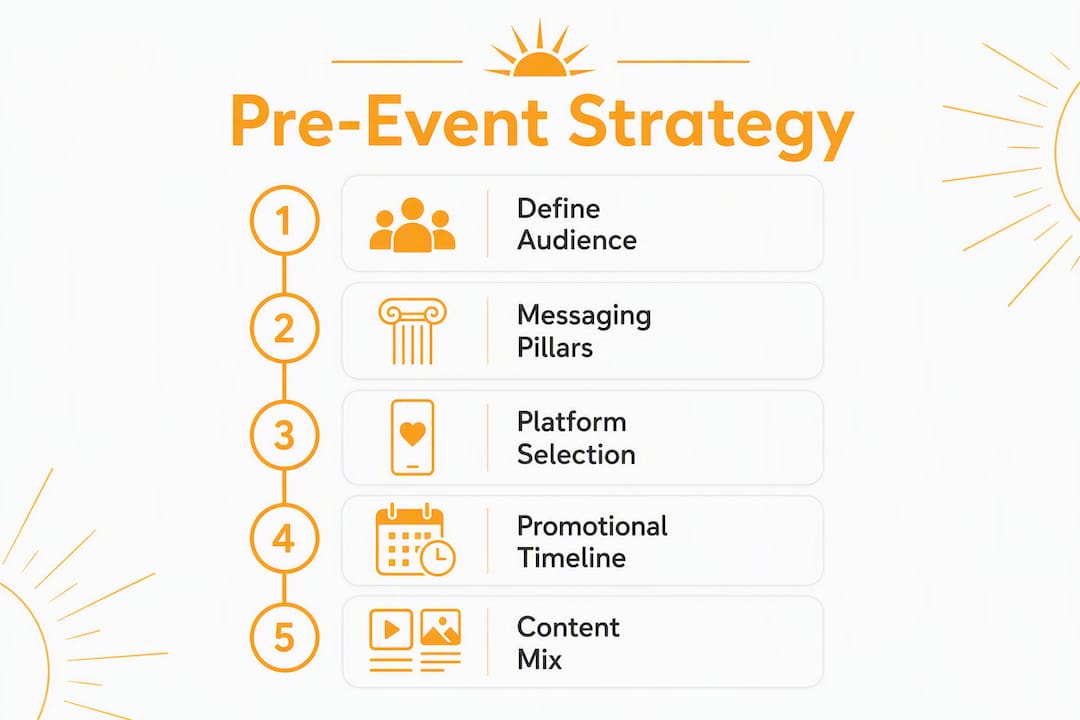
Build your messaging pillars
The 7 Cs framework — Community, Content, Curation, Creation, Connection, Conversation, Conversion — gives you a sequenced approach to messaging. The most common mistake organizers make is skipping straight to Conversion. Audiences who haven’t seen Community or Connection content first will ignore your registration CTA. Build the relationship before you ask for the sale.
Pair the 7 Cs with the 70/20/10 rule: 70% of posts deliver genuine value (speaker insights, industry data, session previews), 20% curate relevant third-party content, and 10% are direct promotional posts with registration links. Keeping promotion at 10% preserves audience trust and makes your CTAs land harder when they do appear.
Promotional timeline and phased tactics
Start at least 90 days out for major conferences and trade shows. Smaller events can compress to 4–8 weeks, but rushing the awareness phase drives up cost-per-registration.
Phase | Timing | Goal | Sample Milestones |
Awareness | 90–60 days out | Reach new audiences | Announce event, launch hashtag, first speaker reveal |
Engagement | 60–30 days out | Build interest and community | Speaker roll-out, agenda previews, early-bird deadline |
Conversion | — | Drive registrations | Retargeting ads, promo codes, final urgency posts |
For paid distribution, allocate roughly 30% of your social budget to awareness (60+ days out), 40% to retargeting (30–60 days), and 30% to final-push conversion campaigns in the last two weeks. Retargeting campaigns convert at 3–5x the rate of cold campaigns, so weight your conversion spend there.
Pro Tip: A/B test your creative and message variants 60–90 days before the event. Identify your top-performing assets early so you’re scaling proven content during the conversion window, not guessing.
Pre-event operational checklist
Before your first post goes live, confirm these are in place:
UTM parameters created and documented for every registration link.
Tracking pixel installed on the registration page.
Event hashtag checked for conflicts and reserved.
Speaker and sponsor social handles collected in a shared document.
Content calendar drafted for weeks 1–6 with post types, platforms, and owners assigned.
How do you run social media coverage during the event?
Live coverage is where your conference social media strategy either pays off or falls apart. The difference between a team that captures great content and one that scrambles is almost always role clarity.
Assign your team roles before day one
Five roles cover most conference sizes:
Lead/strategist — owns the run-of-show, approves posts, and makes real-time decisions.
Roving content producer — captures short-form video, photos, and candid moments across sessions.
Community manager/moderator — monitors the event hashtag, responds to comments, and flags UGC worth reposting.
Paid-ads operator — adjusts live ad spend based on real-time registration data.
Analytics lead — tracks KPIs hourly and flags underperforming content to the lead.
For smaller events, one or two people can cover multiple roles, but the functions still need to be assigned explicitly. Ambiguity during a live event is how key moments get missed.
Content formats to prioritize
Short-form video and live formats significantly outperform static posts for both pre-event momentum and on-site amplification. During the event, prioritize in this order:
Reels and TikTok clips (15–60 seconds): session highlights, speaker soundbites, crowd energy.
Stories: real-time updates, polls, Q&A stickers, countdown timers.
Live streams: keynotes and panels, especially for hybrid or remote attendees.
Quote cards: pull a sharp line from a speaker and post it within 10 minutes of delivery.
Attendee spotlights: short interviews or tagged reposts of attendee content.
Suggested posting cadence
For a mid-size conference (200–500 attendees), aim for 4–6 posts per day across primary platforms: one morning teaser before sessions start, two to three session highlights during the day, one community/UGC post in the afternoon, and one recap or “day in review” post in the evening.

Larger events (1,000+ attendees) can sustain 8–10 posts per day, but only if you have the team to produce quality content at that volume. Posting filler to hit a number does more damage than posting less.
Pro Tip: Capture behind-the-scenes content the day before the event opens — setup, speaker arrivals, venue walk-throughs. Pre-loading this content into your scheduling tool means you have ready-to-post material during the busiest session blocks when you have no time to shoot and edit.
UGC activation and moderation
Encourage attendees to post with the event hashtag by displaying it prominently on signage, screens, and printed materials. A social wall (a live feed of hashtag posts displayed on a screen in the venue) creates a visible incentive to participate. UGC and attendee spotlights drive more authentic reach than branded promotional content, so featuring attendee posts in your Stories or feed amplifies both reach and trust.
Moderation matters. Assign your community manager to monitor the hashtag every 30 minutes during peak hours. Respond to questions, repost quality UGC with credit, and flag any off-brand or problematic content immediately.
What should your run-of-show checklist cover?
Operational failures during live events are almost always preventable. A pre-event technical checklist closes the gaps.
Equipment and connectivity
Item | Owner | Backup Plan | Verification Step |
Smartphones (fully charged) | Roving producer | Power banks on-site | Charged night before |
Gimbal/stabilizer | Roving producer | Handheld grip | Tested at venue walk-through |
Portable LED light | Roving producer | Natural light positions mapped | Tested in venue lighting |
Power banks (2+) | All team members | Charging stations at base | Charged night before |
Mobile hotspot | Lead/analytics | Venue Wi-Fi credentials as backup | Speed-tested on-site |
Capture/storage workflow | Analytics lead | Cloud backup enabled | Tested before day one |
Permissions and legal items
Confirm these before the event opens:
Photo and video release language included in attendee registration terms.
Speaker consent forms signed for any recorded or live-streamed sessions.
Sponsor content rules documented (some sponsors restrict how their branding appears in social posts).
Privacy signage posted at entrances where recording is taking place.
A clear process for attendees who request not to be filmed.
UTM and tracking verification
Every registration link shared during the event must carry a UTM tag mapped to the correct campaign, medium, and source. A single shared tracking document listing every post URL, its UTM parameters, and the team member who posted it lets your analytics lead attribute conversions accurately. A centralized tracking system tying UTMs and creator posts to registration conversions is what separates teams that can prove ROI from those guessing at it.
Pro Tip: If venue Wi-Fi is unreliable, draft your posts in advance and queue them in a scheduling tool. Capture content offline and upload in batches when connectivity returns. Never let a connectivity gap create a posting gap.
How do you keep the momentum going after the event?
The event ends. The content opportunity doesn’t. Schedule post-event content for 2–4 weeks after the event to sustain momentum and capture late conversions from people who couldn’t attend.
Post-event timeline: weeks 1–4
Days 1–3 (Recap and thank you): Post a highlight reel, a thank-you graphic tagging speakers and sponsors, and a “top moments” carousel. Send a follow-up email to registrants with a link to the recap content.
Week 1–2 (Content repurposing): Break sessions into short clips, pull speaker quotes into graphics, and publish a written recap or blog post. A single keynote can generate a highlight reel, five social clips, a written article, and a gated download.
Week 2–3 (Lead nurturing): Share gated assets (session recordings, slide decks) via email and social. Tag attendees who engaged with the event hashtag and invite them to follow your page for future event announcements.
Week 3–4 (Transition to next event): Begin teasing the next event or a related program. Use the post-event audience as a warm seed list for your next paid campaign.
UGC follow-up workflow
Collect all attendee-tagged posts from the event hashtag within 48 hours.
DM contributors to request permission before reposting (even when content is public).
Feature approved UGC in a dedicated “attendee highlights” post or Story series.
Track UGC reach separately from owned content to measure its contribution to total impressions.
Pro Tip: Build a shared content library folder (Google Drive or Dropbox) during the event where all team members upload raw footage and photos. Organizing assets by session and speaker immediately after the event saves hours of searching when you’re repurposing content in week two.
How do you measure whether your event social strategy worked?
Measurement only tells you something useful when it’s tied to funnel stages. Tracking reach without tracking registrations is like counting how many people walked past your booth without knowing how many stopped to talk.
KPI framework by funnel stage
Segmenting metrics by funnel stage prevents overemphasis on vanity metrics and clarifies which channels deserve budget.
KPI | Funnel Stage | Definition | Reporting Frequency |
Reach / Impressions | Top-of-Funnel | Total unique accounts and total views | Weekly pre-event, daily during |
Follower growth | Top-of-Funnel | Net new followers per platform | Weekly |
Engagement rate | Mid-Funnel | (Likes + comments + shares) / reach | Weekly pre-event, daily during |
Watch time / video views | Mid-Funnel | Total minutes watched on video posts | Weekly |
Link clicks | Bottom-Funnel | Clicks on registration or CTA links | Daily pre-event, real-time during |
Registration conversion rate | Bottom-Funnel | Registrations / link clicks | Daily during conversion phase |
Cost per acquisition (CPA) | Bottom-Funnel | Ad spend / registrations from paid | Weekly during paid campaigns |
Reporting cadence
Run a daily check during the live event focused on link clicks, registration conversions, and ad CPA. Post-event, shift to a weekly synthesis for the first two weeks, then a 30-day conversion follow-up to capture late registrations from attendees who shared content after the event.
The most common measurement pitfalls: focusing on follower counts instead of registration conversions, missing UTM tags on posts shared by speakers or sponsors, and having no shared dashboard so each team member is looking at different numbers. Fix all three before the event starts, not after.
For a deeper look at connecting social metrics to business outcomes, the SOL Social Media ROI guide walks through attribution models and reporting templates.
What does a 6–8 week content plan actually look like?
A content plan without a calendar is just a list of intentions. Here’s how to structure the weeks and what to post each day during conference week.
6–8 week phased content plan
Week | Phase | Post Types | Primary Goal |
8–7 weeks out | Awareness | Event announcement, speaker teasers, “save the date” | Reach new audiences |
6–5 weeks out | Engagement | Speaker spotlights, agenda previews, industry insights | Build community interest |
4–3 weeks out | Early-bird push | Registration CTAs, promo code posts, testimonials from past events | Drive early registrations |
2 weeks out | Retargeting | Retargeted ads, urgency posts, FAQ content | Convert warm audiences |
Final week | Conversion | Countdown posts, last-chance CTAs, logistics reminders | Close registrations |
Event week | Live coverage | Session clips, Stories, UGC reposts, live streams | Amplify reach and energy |
Post-event | Repurposing | Highlight reels, quote graphics, gated assets, next-event teasers | Nurture leads, build library |
Two-week sample calendar (conference week)
Pre-event day (Day before):
LinkedIn: “We’re set up and ready. Here’s what to expect tomorrow.” (behind-the-scenes photo)
Instagram Stories: venue walk-through video, speaker arrival clips
Day 1:
Morning: Opening keynote quote card (within 10 minutes of delivery)
Midday: Attendee spotlight Story with hashtag prompt
Afternoon: Session highlight Reel (60 seconds)
Evening: “Day 1 recap” carousel post
Day 2:
Morning: Poll in Stories (“Which session are you most excited for today?”)
Midday: Speaker soundbite clip
Afternoon: UGC repost from top hashtag contributor
Evening: Live Q&A or recap stream
Day 3 (final day):
Morning: “Last day” countdown Story
Midday: Panel highlight clip
Afternoon: Group photo or crowd shot with hashtag
Evening: Thank-you post tagging speakers and sponsors
Post-event Day 1: Highlight reel + thank-you graphic Post-event Day 3: Top quotes carousel Post-event Day 7: Gated session recording announcement
70/20/10 applied to one week
For a week during the engagement phase (six weeks out), a seven-post week on LinkedIn might look like this: five posts sharing speaker insights, industry stats, or session previews (70%), one curated article from a relevant industry publication (20%), and one direct registration CTA with an early-bird deadline (10%).
Pro Tip: Use a social media content creation framework to batch-produce your 70% value content in one sitting. Writing five educational posts at once is faster than writing one per day and keeps your messaging consistent.
Should you handle conference social in-house or hire help?
The right answer depends on four variables: event size, internal bandwidth, live coverage needs, and how seriously you need to measure results.
Decision criteria
Event size under 200 attendees, internal team available: In-house management is viable if at least one person can dedicate 15–20 hours per week during the pre-event phase and be fully present during the event.
Event size 200–500 attendees, limited internal bandwidth: A freelance social media manager or a small agency package covers content production and live coverage without a full retainer commitment.
Event size 500+ attendees, multiple tracks, hybrid component: A full-service agency with live event experience is the practical choice. The volume of content, the complexity of real-time moderation, and the measurement requirements exceed what most in-house teams can handle alongside their other responsibilities.
Any size, no internal measurement capability: If you can’t set up UTM tracking, a reporting dashboard, and post-event attribution analysis, bring in outside help. Measurement gaps are expensive.
Typical cost considerations
Freelance social media support for a single event typically runs on a project basis, covering pre-event content creation, live coverage, and a post-event recap package. Full-service agency engagements can be structured as one-off event packages or as monthly retainers that include event coverage as part of ongoing management.
Pro Tip: When interviewing agencies or freelancers, ask three questions: How do you track registration conversions from social posts? What’s your escalation process if something goes wrong during a live session? Can you show me a post-event measurement report from a similar event? The answers tell you more than any portfolio.
Vendor selection checklist
Experience with events of similar size and format.
Demonstrated content throughput (posts per day during live events).
Clear measurement approach with UTM and dashboard setup included.
Defined escalation plan for crisis situations.
References from event clients, not just brand clients.
When you need a team that handles strategy, live coverage, content repurposing, and measurement reporting without you managing the details, that’s where a small business social media strategy partner like SOL Social Media fits.
How do speakers and sponsors amplify your conference reach?
Speakers and sponsors are distribution channels you’re not fully using if you’re only asking them to “share the event.” Give them ready-to-post content and a clear ask.
For speakers, prepare a speaker kit at least three weeks before the event. Include pre-written LinkedIn and Instagram captions, a branded graphic with their headshot and session title, and the event hashtag. Make it effortless. Speakers who receive a ready-to-post package are far more likely to share than those who receive a generic “please promote your session” email.
For sponsors, negotiate social amplification into the sponsorship agreement before the contract is signed. Define the number of posts, the platforms, and the tagging requirements. A sponsor with 50,000 LinkedIn followers who posts twice about your event is worth more than a banner ad in the venue.
Micro-influencers in your event’s niche, typically those with 5,000–50,000 engaged followers, often deliver stronger engagement rates than larger accounts. If your event targets a specific industry, identify three to five credible voices in that space and offer complimentary passes in exchange for pre-event and on-site content.
How do ticketing CTAs and scarcity tactics drive registrations?
Registration links buried in captions don’t convert. Every social post with a registration CTA needs a clear, specific link (UTM-tagged), a reason to act now, and a friction-free path to the registration page.
Scarcity works when it’s real. “Early-bird pricing ends Friday” converts because the deadline is genuine. Countdown timers in Stories create urgency without requiring copy. Promo codes tied to specific posts or speakers let you track which channel drove the conversion, and they give attendees a reason to share the code with their network.
A practical sequence: post the early-bird announcement with a promo code on LinkedIn and Instagram simultaneously. Three days before the deadline, post a “48 hours left” reminder. On the final day, post a countdown Story. After the deadline passes, announce the price increase and open the next tier. This sequence can run twice, once for early-bird and once for standard pricing, before the final urgency push in the last week.
How do you keep attendees engaged and moderate content in real time?
Engagement during the event isn’t passive. It requires active prompts, visible feedback loops, and a moderator who’s watching the conversation.
Run Instagram Stories polls during sessions (“Which takeaway resonated most?”). Post a question to LinkedIn mid-morning and respond to every comment within two hours. Use X for live session commentary, tagging speakers and using the event hashtag on every post. A social wall displaying the hashtag feed in the venue creates a visible, real-time incentive for attendees to post.
Moderation means more than removing inappropriate content. It means responding to questions before they become complaints, amplifying positive attendee posts, and keeping the hashtag conversation on-topic. Assign one person to this role exclusively during peak hours. A community manager who’s also trying to shoot video will do neither well.
For more social media engagement ideas that work during live events, polls, Q&A stickers, and behind-the-scenes content consistently outperform static promotional posts.
What’s your plan if something goes wrong on social during the event?
Every event social team needs a one-page crisis protocol before the event opens. Not a 20-page document. One page.
The protocol covers four scenarios: a negative post goes viral, a speaker says something controversial that gets clipped out of context, a technical failure disrupts a live stream, and a privacy complaint surfaces about a photo or video. For each scenario, define who makes the call (the lead), what the default response is (acknowledge, don’t delete unless it violates policy), and how quickly you respond (within 30 minutes during event hours).
Pause all scheduled promotional posts immediately if a genuine crisis breaks. Posting a registration CTA while a controversy is trending under your hashtag makes the situation worse. Resume scheduled content only after the lead confirms the situation is resolved.
Establish social media guidelines for your team in writing before the event. These cover what can be posted without approval, what requires sign-off, how to handle attendee complaints in public comments, and what language to avoid. A 15-minute team briefing the morning of day one, reviewing the protocol, prevents most in-event social mistakes.
How does social media connect to your other marketing channels?
Social media works harder when it’s not operating in isolation. Your email list, website, and PR activity should all feed into and draw from your social strategy.
Email and social reinforce each other at every phase. Your email announcement drives people to follow your social accounts for updates. Your social posts drive people to register via links that go to a landing page with a tracking pixel. Post-event, your email follow-up includes social content (the highlight reel, the quote graphics) that registrants can share.
Your event website should display the social hashtag prominently, embed your Instagram or LinkedIn feed, and include social sharing buttons on the registration confirmation page. Every press release should include the hashtag and your primary social handles. When a media outlet covers the event, tag them in your social posts to extend the reach of that coverage.
For a broader view of how these channels connect, the 8 marketing campaign components guide covers cross-channel integration in detail.
Which social listening tools help you track event sentiment?
Social listening during a conference gives you real-time feedback that’s more honest than any post-event survey. Tools like Sprout Social, Brandwatch, and Mention let you monitor your event hashtag, track sentiment shifts, and identify the sessions or moments generating the most organic conversation.
Set up keyword alerts for your event name, hashtag, speaker names, and any branded session titles before the event opens. During the event, check sentiment dashboards every two hours. A sudden spike in negative sentiment around a specific session is a signal worth investigating before it compounds.
Post-event, social listening data feeds directly into your measurement report. Which topics generated the most organic conversation? Which speakers drove the most hashtag activity? These answers shape your content strategy for the next event.
How do you train your social media team for a live event?
Training for a live event is different from training for ongoing social management. The pace is faster, the stakes are higher, and there’s no time to look things up mid-session.
Run a 60-minute team briefing at least one week before the event. Cover the run-of-show, role assignments, the content calendar, the crisis protocol, and the UTM tagging process. Walk through the scheduling tool and confirm everyone can access the shared content library and tracking document.
On the day before the event, run a 30-minute walk-through at the venue. Identify the best locations for video capture, test the Wi-Fi and mobile hotspot, confirm charging stations, and walk each team member through their specific responsibilities for day one.
During the event, hold a five-minute daily standup before sessions begin. Review what performed well the previous day, adjust the day’s content plan if needed, and confirm role assignments. This standup prevents the drift that happens when a live event’s energy pulls team members off their assigned tasks.
Key Takeaways
A conference social media strategy works when it combines a 90-day timeline, a 70/20/10 content mix, centralized UTM tracking, and clearly assigned team roles before the event opens.
Point | Details |
Start 90 days out | Major conferences need a 90-day runway; smaller events can compress to 4–8 weeks. |
Use the 70/20/10 mix | 70% value content, 20% curated, 10% promotional keeps audiences engaged and CTAs effective. |
Track every link | A centralized UTM document maps every post to registration conversions and prevents false attribution. |
Assign roles before day one | Five roles cover most events: lead, roving producer, community manager, paid-ads operator, analytics lead. |
Repurpose for 2–4 weeks post-event | A single keynote can generate a highlight reel, five clips, an article, and a gated download. |
SOL Social Media | SOL Social Media provides strategy, live coverage, content repurposing, and measurement reporting for event organizers who need a full-service team. |
The part most event organizers get wrong about social media
The most common failure in conference social isn’t a bad hashtag or a missed post. It’s treating social media as a broadcast channel instead of a relationship engine. Organizers spend weeks producing polished graphics and then wonder why engagement is flat. The answer is almost always the same: they skipped Community and Connection and went straight to Conversion.
The 7 Cs framework exists precisely because sequence matters. An audience that has never seen you acknowledge their questions, share their content, or respond to their comments will scroll past your registration CTA without hesitation. The organizers who see the strongest registration conversion rates from social are the ones who spent the first four weeks of their campaign building genuine community, not pushing tickets.
The second mistake is measuring the wrong things. Follower counts and impressions feel good to report. Registration conversions and CPA tell you whether the strategy is working. If your social report after an event doesn’t include a line showing how many registrations came from social channels (with UTM attribution), you don’t actually know whether your effort was worth it.
The third mistake is underestimating post-event content. Most teams exhaust themselves during the event and go quiet the week after. That’s exactly when warm audiences are most likely to convert for future events, share content with their networks, and engage with recap material. The post-event repurposing window is where long-term ROI lives, and most organizers leave it on the table.
SOL Social Media’s event coverage services
Running a conference is already a full-time job. Adding a live social media operation on top of it, with real-time content production, community moderation, paid ad management, and post-event repurposing, requires a dedicated team with a clear plan.
SOL Social Media handles the complete social media lifecycle for events: pre-event strategy and content calendar, live coverage with a roving content team, real-time community management, and a post-event repurposing package that turns your sessions into weeks of content. The difference from a generic agency is the measurement layer: every registration link is UTM-tagged, every post is mapped to the conversion funnel, and you get a clear report showing what social activity actually drove results.

Engagements are available as one-off event packages or as part of an ongoing monthly management relationship. Both options include strategy, content production, and reporting. Visit the SOL Social Media community involvement page to see current service offerings, or reach out directly to book a strategy consultation for your next event.
Useful sources and further reading
The sources below back the frameworks and tactics in this article. Each is worth bookmarking for your internal planning documents.
Resource | What It Covers |
Social Media Event Marketing Playbook — The Event Planner Expo | Timeline, budget allocation, retargeting strategy, post-event repurposing |
Social Media Marketing for Events — Snapbar | UGC tactics, short-form video formats, live coverage best practices |
Campaign Strategy: Social Media Events — InfluencerDB | Funnel-aligned KPIs, centralized tracking, attribution models |
The 70/20/10 Social Media Rule — SocialBotify | Content mix framework and promotional balance |
The 7 Cs of Social Media — ClickReturn | Messaging sequence framework from Community to Conversion |
How to Develop a Social Media Strategy for Event Marketing — Glistrr | Creative testing, A/B validation, and ad creative schedules |
SOL Social Media: Measuring ROI | Attribution models and reporting templates for social campaigns |
SOL Social Media: 8 Marketing Campaign Components | Cross-channel integration and the 7 Cs methodology in practice |
Pro Tip: Copy the two-week sample calendar from the content plan section into a Google Sheet and add a “status” column (draft, scheduled, live, posted). Share it with your full event team so everyone sees what’s going live and when. This single document eliminates most day-of coordination confusion.
FAQ
What is the 70/20/10 rule for social media?
The 70/20/10 rule recommends that 70% of posts deliver genuine value to your audience, 20% curate relevant third-party content, and 10% are direct promotional posts. Keeping promotion at 10% preserves audience trust and makes CTAs more effective when they appear.
What are the 7 Cs of a successful social media strategy?
The 7 Cs are Community, Content, Curation, Creation, Connection, Conversation, and Conversion. Skipping the Community and Connection stages before pushing promotional content is the most common reason event social campaigns produce low engagement despite high production value.
What are effective social media strategies for events?
Start promotion 90 days out for major conferences, assign clear team roles before the event opens, use short-form video and live formats for on-site coverage, activate UGC through a visible hashtag and social wall, and repurpose event content for 2–4 weeks after the event closes.
How do you measure social media success for a conference?
Segment KPIs by funnel stage: reach and impressions at the top, engagement rate and watch time in the middle, and link clicks, registration conversion rate, and CPA at the bottom. Use UTM-tagged links on every post and a shared reporting dashboard to attribute registrations to specific social channels and posts.
When should you start promoting a conference on social media?
Major conferences and trade shows need at least 90 days of social promotion to move audiences through awareness, engagement, and conversion phases. Smaller events can start 4–8 weeks out, but compressing the timeline increases cost-per-registration during the conversion phase.
Recommended
Comments